
📌 Introduction
In enterprise applications, one of the most critical requirements is Row-Level Security — ensuring users can only access the data they are authorized to see.
For example:
- HR users should only see HR employees
- Regional managers should only see their region’s data
- Organization users should only access their own organization records
While this can be implemented in Oracle APEX pages using SQL filters, the most secure and scalable approach is to enforce security directly at the Oracle Database level using Virtual Private Database (VPD).
In this blog, we will learn how to implement Row-Level Security in Oracle APEX using VPD step-by-step.
🚀 What Is VPD?
Virtual Private Database (VPD) is an Oracle Database feature that automatically appends a WHERE clause to every SQL statement on a table — transparently, regardless of how the query is written.
Combined with Oracle APEX, it enforces row-level security at the database layer, not the application layer.
✅ No matter what an APEX page, SQL Workshop, Interactive Report, or rogue query does — VPD filters rows before any data is returned.
🔍 How VPD Works
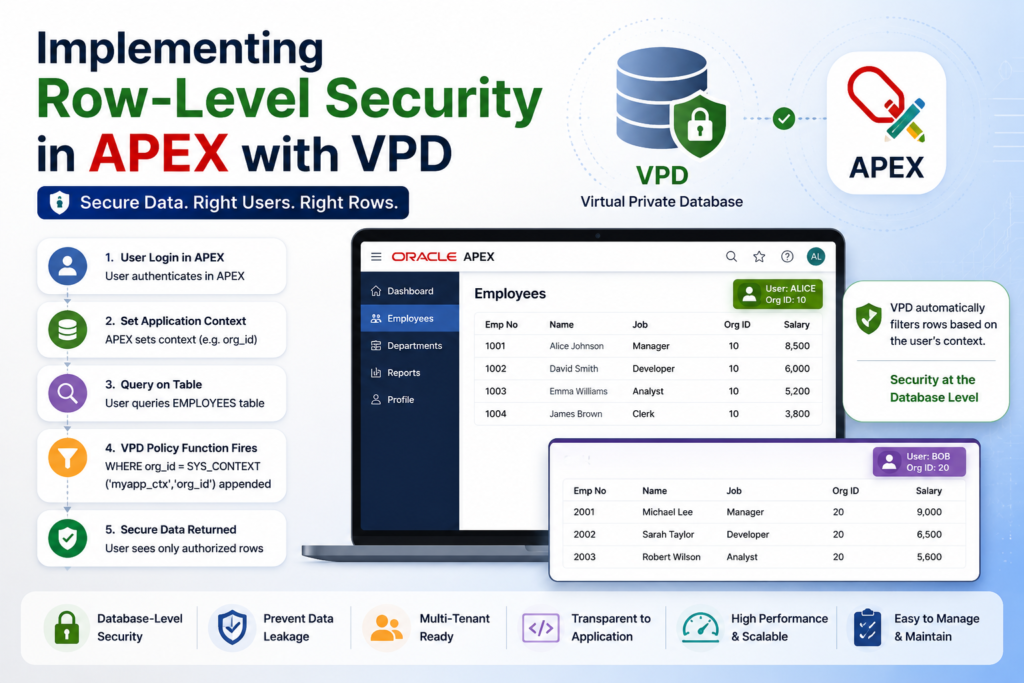
User logs in to APEX
        ↓
APEX sets application context (e.g. current user's org_id)
        ↓
User queries EMPLOYEES table
        ↓
VPD policy function fires
        ↓
Oracle appends:
WHERE org_id = SYS_CONTEXT('myapp_ctx','org_id')
        ↓
User only sees authorized rows
🏗️ Real-Time Example Scenario
Suppose we have:
Organization-Based Employee System
| Username | Org ID |
|---|---|
| ALICE | 10 |
| BOB | 20 |
| ADMIN | All Access |
Requirement:
✅ Users should only see employees from their organization.
📋 Step 1 — Create an Application Context
An Application Context is a named session variable store used by Oracle Database.
The VPD policy function reads values from this context.
CREATE OR REPLACE CONTEXT myapp_ctx
  USING myapp_ctx_pkg
  ACCESSED GLOBALLY;
⚙️ Step 2 — Create the Context Package
This package sets context values when the user logs into Oracle APEX.
CREATE OR REPLACE PACKAGE myapp_ctx_pkg AS
  PROCEDURE set_context(p_username IN VARCHAR2);
END myapp_ctx_pkg;
/
CREATE OR REPLACE PACKAGE BODY myapp_ctx_pkg AS
PROCEDURE set_context(p_username IN VARCHAR2) IS
v_org_id NUMBER;
BEGIN
-- Get org_id for logged-in user
SELECT org_id
INTO v_org_id
FROM app_users
WHERE username = UPPER(p_username);
-- Set Context Values
DBMS_SESSION.SET_CONTEXT(
'myapp_ctx',
'org_id',
v_org_id
);
DBMS_SESSION.SET_CONTEXT(
'myapp_ctx',
'username',
UPPER(p_username)
);
END set_context;
END myapp_ctx_pkg;
/📊 Example APP_USERS Table
CREATE TABLE app_users (
    username VARCHAR2(100),
    org_id   NUMBER
);
INSERT INTO app_users VALUES ('ALICE', 10);
INSERT INTO app_users VALUES ('BOB', 20);
INSERT INTO app_users VALUES ('ADMIN', 0);
COMMIT;🔐 Step 3 — Create the VPD Policy Function
This function returns the WHERE clause Oracle automatically appends to queries.
CREATE OR REPLACE FUNCTION emp_security_policy(
    p_schema IN VARCHAR2,
    p_object IN VARCHAR2
)
RETURN VARCHAR2
IS
BEGIN

    -- ADMIN can see everything
    IF SYS_CONTEXT('myapp_ctx', 'username') = 'ADMIN' THEN
        RETURN NULL;
    END IF;

    -- Other users see only their org rows
    RETURN q'[
        org_id = SYS_CONTEXT('myapp_ctx', 'org_id')
    ]';

END emp_security_policy;
/
🧩 Step 4 — Attach the Policy to the Table
Now attach the VPD policy to the EMPLOYEES table.
BEGIN

  DBMS_RLS.ADD_POLICY(
      object_schema   => 'HR',
      object_name     => 'EMPLOYEES',
      policy_name     => 'EMP_ORG_POLICY',
      function_schema => 'HR',
      policy_function => 'EMP_SECURITY_POLICY',
      statement_types => 'SELECT, INSERT, UPDATE, DELETE'
  );

END;
/
Now Oracle automatically filters every query on:
HR.EMPLOYEES🔄 Step 5 — Set Context During APEX Login
Go to:
Shared Components → Authentication Scheme
Add this in:
Post-Authentication Procedure Name
BEGIN
   myapp_ctx_pkg.set_context(:APP_USER);
END;
This ensures every APEX session has the correct context before pages load.
✅ Step 6 — Verify It Works
Test with different users.
User: ALICE
EXEC myapp_ctx_pkg.set_context('ALICE');

SELECT COUNT(*)
FROM hr.employees;
Output:
45 RowsUser: BOB
EXEC myapp_ctx_pkg.set_context('BOB');

SELECT COUNT(*)
FROM hr.employees;
Output:
23 RowsSame query. Same table. Different results.
✅ VPD successfully applied.
🔒 Handling INSERT and UPDATE Security
Without extra protection, users may insert invalid rows.
Use:
update_check => TRUEThis prevents INSERT or UPDATE outside allowed rows.
✅ Updated Policy with UPDATE CHECK
BEGIN

  DBMS_RLS.ADD_POLICY(
      object_schema    => 'HR',
      object_name      => 'EMPLOYEES',
      policy_name      => 'EMP_ORG_POLICY',
      function_schema  => 'HR',
      policy_function  => 'EMP_SECURITY_POLICY',
      statement_types  => 'SELECT, INSERT, UPDATE, DELETE',
      update_check     => TRUE
  );

END;
/
📌 Why VPD Is Better Than APEX Page Filters
| APEX Filters | VPD |
|---|---|
| Applied in Application Layer | Applied in Database Layer |
| Can be bypassed accidentally | Impossible to bypass |
| Developer dependent | Database enforced |
| Page specific | Global security |
| Harder to maintain | Centralized |
⚡ Benefits of VPD in Oracle APEX
✅ Database-level security
✅ Centralized access control
✅ Works across all applications
✅ Prevents accidental data exposure
✅ Secure Interactive Reports and Grids
✅ No page-level filtering required
✅ Better enterprise compliance
📚 Quick Reference
| Component | Purpose |
|---|---|
| CREATE CONTEXT | Namespace for session variables |
| DBMS_SESSION.SET_CONTEXT | Set context values |
| SYS_CONTEXT() | Read context values |
| DBMS_RLS.ADD_POLICY | Attach VPD policy |
| APEX Post-Authentication | Initialize context |
🚨 Common Pitfalls
❌ Context Not Set
If context is missing:
No rows returnedAlways set context during login.
❌ Hardcoding Usernames
Avoid:
IF USER = 'ALICE'Instead use:
SYS_CONTEXT()❌ Missing Indexes
Since VPD appends predicates automatically, ensure:
org_idis indexed for performance.
❌ Missing UPDATE CHECK
Without:
update_check => TRUEusers can insert unauthorized rows.
🏢 Real-Time Enterprise Use Cases
VPD is commonly used in:
- Multi-tenant SaaS applications
- ERP systems
- HR management systems
- Banking applications
- Healthcare applications
- Government portals
🎯 Final Thoughts
Virtual Private Database (VPD) is one of the most powerful security features available in Oracle Database.
When combined with Oracle APEX:
✅ Security becomes centralized
✅ Row-level isolation becomes automatic
✅ Developers avoid manual filtering mistakes
✅ Applications become enterprise-grade
The best part?
You write the security logic once — Oracle enforces it everywhere automatically.
If you are building enterprise Oracle APEX applications with multiple users, organizations, or departments, implementing VPD is highly recommended.

Hi, I’m Ankur Rai, an Oracle APEX Developer with 6+ years of professional experience in building enterprise applications. I specialize in creating scalable and efficient solutions using Oracle APEX, PL/SQL, and SQL to solve real-world business challenges.
I am a 3X Oracle APEX Professional Certified Developer and also an Oracle ACE Associate Member, actively contributing to the Oracle community by sharing knowledge, insights, and best practices. Through my blogs, I aim to help developers learn, grow, and build better Oracle APEX applications together.