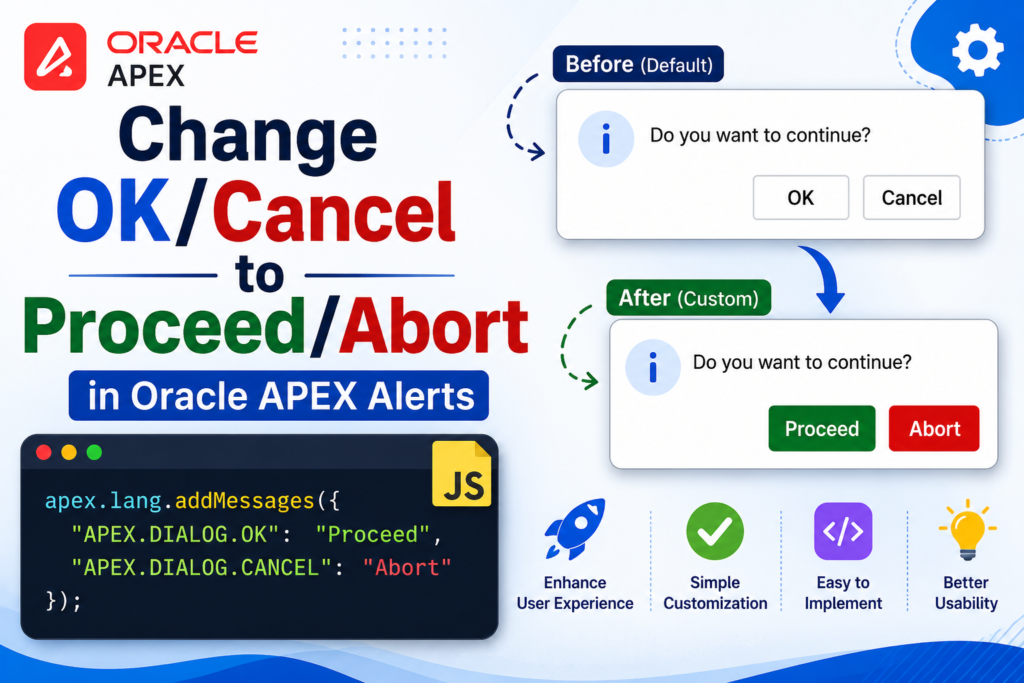

Confirmation dialogs are one of those small UI details that quietly shape how polished an application feels. By default, Oracle APEX shows OK and Cancel on its alert and confirm dialogs. For a lot of use cases, more specific wording communicates the choice better – for example, when a user is about to log out of a session, Proceed and Abort make the two outcomes much clearer than a generic OK/Cancel pair. Here’s how to make that change.
Why Generic Labels Can Feel Off
Imagine a user clicks “Log Out” and gets a dialog asking, “You have unsaved changes. Do you want to continue logging out?” Answering that with “OK” is ambiguous, OK to logging out, or OK to staying? Labels like Proceed (continue with the logout) and Abort (cancel the logout and stay on the page) remove that ambiguity and make the intent of each button obvious at a glance.
APEX Already Gives You a Way to Do This
You don’t need to build a custom dialog component to change this. APEX ships with a client-side localization API, apex.lang, and one of its methods is addMessages, lets you override the text tied to any built-in message key, including the ones that control dialog button labels.
The Code
Here’s the snippet that does the job:
apex.lang.addMessages({
    "APEX.DIALOG.OK": "Proceed",
    "APEX.DIALOG.CANCEL": "Abort"
});
Add this to the page’s Execute when Page Loads JavaScript, and from that point on, every apex.message.confirm dialog on the page will display Proceed/Abort instead of OK/Cancel.
Where to Add It in Page Designer
- Open Page Designer for the page you want to change.
- Select the page root node (click the page number in the left-hand tree).
- In the Property Editor, scroll down to the JavaScript section.
- Paste the snippet into Execute when Page Loads.
Running it at page load guarantees the labels are already overridden before any dialog can appear.
How the Message Key Mechanism Works
APEX components don’t hard-code their text, they look it up using message keys. APEX.DIALOG.OK corresponds to the primary button, and APEX.DIALOG.CANCEL corresponds to the secondary button. Calling addMessages just swaps out the values APEX pulls for those keys at runtime, similar to updating an entry in a lookup table.
Applying Custom Labels to Just One Dialog
Sometimes you don’t want to change every dialog on the page only a specific one, like the logout confirmation. In that case, set the custom labels immediately before showing that dialog, then reset them back to the defaults inside the callback:
// Apply custom labels for the logout confirmation
apex.lang.addMessages({
    "APEX.DIALOG.OK": "Proceed",
    "APEX.DIALOG.CANCEL": "Abort"
});

apex.message.confirm("You have unsaved changes. Continue logging out?", function(okPressed) {
    if (okPressed) {
        // User chose Proceed - continue with logout
        apex.navigation.redirect("wwv_flow_custom_auth_std.logout?p_this_flow=&APP_SESSION=");
    }
    // If Abort was chosen, do nothing and stay on the page

    // Reset labels back to defaults
    apex.lang.addMessages({
        "APEX.DIALOG.OK": "OK",
        "APEX.DIALOG.CANCEL": "Cancel"
    });
});
The callback runs regardless of which button was clicked, so the reset always happens no leftover state to worry about.
A Few Things Worth Knowing
- The override applies only to the current page session it’s page-scoped, not application-wide.
- If a page has several confirm dialogs that need different labels, use the set-then-restore pattern around each one individually.
- This technique affects
apex.message.confirm, but it has no effect on the browser’s nativealert()orconfirm()functions. - Interactive Grid delete confirmations use the same message keys, so a page-level override will change those too worth remembering if you only wanted it for a specific dialog.
Page-Wide vs. Single-Dialog: Which to Use
| Approach | Best For | Scope |
|---|---|---|
| Set in Execute when Page Loads | Every dialog on the page should use the custom labels | Whole page |
| Set immediately before the confirm call, then restore in the callback | Only one dialog needs custom wording | Just that dialog |
Wrapping Up
Swapping OK/Cancel for something more specific, like Proceed/Abort, is a small change, but it makes confirmation prompts communicate intent far more clearly than generic system wording. apex.lang.addMessages gives you full control with barely any code, and pairing it with a restore step in the callback lets you scope the change to a single dialog like a logout confirmation when that’s all you need. It’s a minor detail, but details like this are often what make an app feel genuinely well-built.

Hi, I’m Ankur Rai, an Oracle APEX Developer with 6+ years of professional experience in building enterprise applications. I specialize in creating scalable and efficient solutions using Oracle APEX, PL/SQL, and SQL to solve real-world business challenges.
I am a 3X Oracle APEX Professional Certified Developer and also an Oracle ACE Associate Member, actively contributing to the Oracle community by sharing knowledge, insights, and best practices. Through my blogs, I aim to help developers learn, grow, and build better Oracle APEX applications together.