
🔹 About
JSON (JavaScript Object Notation) has become the standard format for modern web applications and APIs.
In modern enterprise applications, developers frequently work with:
✅ REST APIs
✅ Mobile applications
✅ Third-party integrations
✅ Dynamic front-end applications
✅ AI & cloud services
Oracle Database and Oracle APEX provide powerful native support for JSON operations.
In this blog, we’ll learn:
✔ What is JSON
✔ JSON support in Oracle Database
✔ JSON functions in SQL
✔ Working with JSON in Oracle APEX
✔ Real-time API integration example
🛠️ Tools and Technologies
- Oracle Database
- Oracle APEX
- SQL
- PL/SQL
- REST APIs
- JSON
🚀 What is JSON?
JSON stands for:
JavaScript Object NotationIt is a lightweight data exchange format used between applications and APIs.
📌 Example JSON
{
   "empno": 101,
   "ename": "Ankur",
   "job": "Developer",
   "salary": 5000
}
🎯 Why JSON is Important?
JSON is widely used because:
✅ Lightweight
✅ Easy to read
✅ API friendly
✅ Language independent
✅ Fast data exchange
🚀 JSON Support in Oracle Database
Oracle Database provides native JSON support using:
✅ JSON data type
✅ JSON_OBJECT
✅ JSON_ARRAY
✅ JSON_TABLE
✅ JSON_VALUE
✅ JSON_QUERY
📌 Creating Table with JSON Column
CREATE TABLE employee_json
(
    emp_id      NUMBER,
    emp_data    CLOB CHECK (emp_data IS JSON)
);
📌 Insert JSON Data
INSERT INTO employee_json
VALUES (
    1,
    '{
       "ename":"Ankur",
       "job":"Developer",
       "salary":5000
     }'
);
📌 Fetch Complete JSON
SELECT emp_data
FROM employee_json;
📌 Extract JSON Value
Use:
JSON_VALUEExample:
SELECT
    JSON_VALUE(emp_data, '$.ename') AS employee_name,
    JSON_VALUE(emp_data, '$.job')   AS employee_job
FROM employee_json;
📌 Extract JSON Object
Use:
JSON_QUERYExample:
SELECT JSON_QUERY(emp_data, '$')
FROM employee_json;
📌 Convert Table Data to JSON
Oracle can generate JSON directly from SQL.
🚀 Example Using JSON_OBJECT
SELECT JSON_OBJECT(
    'empno' VALUE empno,
    'ename' VALUE ename,
    'job'   VALUE job
) AS employee_json
FROM emp;
📌 Generate JSON Array
SELECT JSON_ARRAYAGG(
    JSON_OBJECT(
        'empno' VALUE empno,
        'ename' VALUE ename
    )
) AS employees
FROM emp;
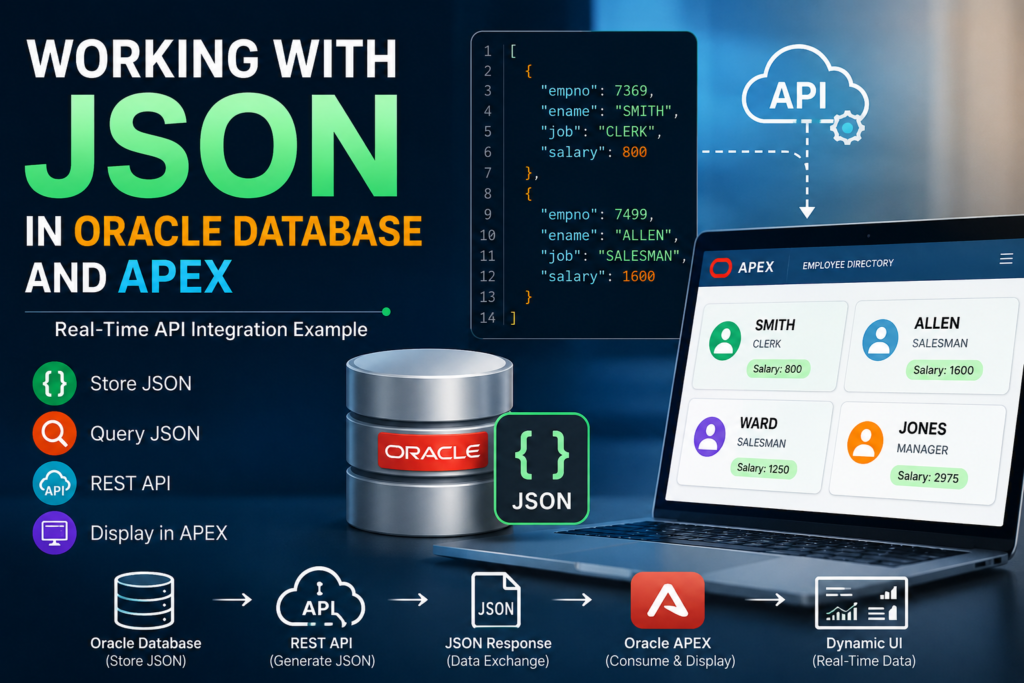
🚀 Real-Time Example: Employee Directory API in Oracle APEX
Now let’s build a practical real-time example.
🎯 Scenario
Suppose we want to:
✅ Generate employee data as JSON
✅ Expose it via REST API
✅ Consume the JSON in Oracle APEX
✅ Display dynamic employee cards
📌 Step 1: Create REST API Query
Go to:
SQL Workshop → RESTful ServicesCreate Module:
employee_api📌 SQL Query
SELECT JSON_ARRAYAGG(
    JSON_OBJECT(
        'empno' VALUE empno,
        'ename' VALUE ename,
        'job' VALUE job,
        'salary' VALUE sal
    )
) AS employee_data
FROM emp;
📌 Sample API Response
[
  {
    "empno":7369,
    "ename":"SMITH",
    "job":"CLERK",
    "salary":800
  },
  {
    "empno":7499,
    "ename":"ALLEN",
    "job":"SALESMAN",
    "salary":1600
  }
]
🚀 Step 2: Consume JSON API in Oracle APEX
Create a region:
Create Page → Cards📌 Data Source Type
Set:
REST Data SourceUse your API endpoint.
📌 Map JSON Columns
| JSON Field | Card Attribute |
|---|---|
| ename | Title |
| job | Subtitle |
| salary | Body |
🚀 Step 3: Add Dynamic Styling
Go to:
Cards → Appearance → HTML Expression📌 Example
<div class="emp-card">

<h3>#ENAME#</h3>

<p>#JOB#</p>

{if SALARY/}

<span class="t-Badge t-Badge--success">
Salary: #SALARY#
</span>

{endif/}

</div>
🚀 Step 4: Add Custom CSS
Go to:
Page → CSS → Inline📌 CSS
.emp-card {
    padding: 15px;
    border-radius: 12px;
    background: #f8f9fa;
    box-shadow: 0 2px 10px rgba(0,0,0,0.1);
}
🚀 Working with JSON_TABLE
JSON_TABLE converts JSON into relational rows.
📌 Example
SELECT *
FROM JSON_TABLE(
    '[
      {"name":"Ankur","salary":5000},
      {"name":"Ravi","salary":7000}
    ]',
    '$[*]'
    COLUMNS (
        employee_name VARCHAR2(50) PATH '$.name',
        salary NUMBER PATH '$.salary'
    )
);
📌 Output
| EMPLOYEE_NAME | SALARY |
|---|---|
| Ankur | 5000 |
| Ravi | 7000 |
🚀 Working with APEX_JSON Package
Oracle APEX provides:
APEX_JSONpackage for JSON processing.
📌 Example
DECLARE
    l_json CLOB;
BEGIN

    APEX_JSON.initialize_clob_output;

    APEX_JSON.open_object;

    APEX_JSON.write('ename', 'Ankur');
    APEX_JSON.write('job', 'Developer');

    APEX_JSON.close_object;

    l_json := APEX_JSON.get_clob_output;

    DBMS_OUTPUT.put_line(l_json);

END;
📌 Output
{
   "ename":"Ankur",
   "job":"Developer"
}
🚀 Real-World Use Cases
JSON is heavily used in:
✔ REST APIs
✔ Mobile applications
✔ AI integrations
✔ Cloud applications
✔ External system integrations
✔ Dynamic dashboards
🚀 Example Architecture
Oracle Database
       ↓
Generate JSON
       ↓
REST API
       ↓
Oracle APEX
       ↓
Dynamic UI Rendering
⚠️ Important Considerations
🔹 Validate JSON
Always validate JSON before storing.
🔹 Use JSON Indexing
For large JSON datasets:
✅ Use JSON Search Index
to improve performance.
🔹 Avoid Large Nested JSON
Very complex JSON structures may impact performance.
🚀 Advantages of JSON in Oracle
✅ Native support
✅ High performance
✅ API friendly
✅ Flexible structure
✅ Easy integration
🎯 Why Oracle APEX Developers Love JSON
JSON makes it easy to integrate Oracle APEX with:
✔ External APIs
✔ JavaScript frameworks
✔ Mobile apps
✔ Cloud services
without complicated transformations.
🎉 Conclusion
JSON has become an essential part of modern application development.
With Oracle Database and Oracle APEX, developers can easily:
✅ Store JSON
✅ Generate JSON
✅ Parse JSON
✅ Consume REST APIs
✅ Build dynamic applications
Whether you are integrating external services or building modern enterprise apps, mastering JSON in Oracle and APEX is a must-have skill.
Happy Coding! 🚀

Hi, I’m Ankur Rai, an Oracle APEX Developer with 6+ years of professional experience in building enterprise applications. I specialize in creating scalable and efficient solutions using Oracle APEX, PL/SQL, and SQL to solve real-world business challenges.
I am a 3X Oracle APEX Professional Certified Developer and also an Oracle ACE Associate Member, actively contributing to the Oracle community by sharing knowledge, insights, and best practices. Through my blogs, I aim to help developers learn, grow, and build better Oracle APEX applications together.