
🔹 About
No application is perfect.
Users may enter invalid data, database operations may fail, APIs may return errors, or unexpected exceptions may occur during execution.
Proper error handling is one of the most important parts of building enterprise-grade applications in Oracle APEX.
Good error handling helps developers:
✅ Identify issues quickly
✅ Improve user experience
✅ Prevent application crashes
✅ Maintain application stability
✅ Debug production issues efficiently
In this blog, we’ll learn:
✔ Types of errors in Oracle APEX
✔ Built-in APEX error handling
✔ Custom error handling techniques
✔ PL/SQL exception handling
✔ Real-time practical example
✔ Best practices for enterprise applications
🛠️ Tools and Technologies
- Oracle APEX
- Oracle Database
- SQL
- PL/SQL
- JavaScript
🚀 What is Error Handling?
Error handling is the process of detecting, managing, and responding to application errors gracefully.
Instead of showing:
ORA-00001: unique constraint violated
we should show user-friendly messages like:
Employee ID already exists.
🎯 Why Error Handling is Important?
Without proper error handling:
❌ Users see technical database errors
❌ Application becomes difficult to debug
❌ Poor user experience
❌ Security risks
❌ Harder maintenance
With proper handling:
✅ Better UX
✅ Easier debugging
✅ Cleaner logs
✅ Better security
✅ More stable applications
📌 Common Types of Errors in Oracle APEX
| Error Type | Example |
|---|---|
| Validation Errors | Required field missing |
| Database Errors | Constraint violations |
| PL/SQL Errors | NO_DATA_FOUND |
| JavaScript Errors | Undefined variable |
| REST/API Errors | API timeout |
| Authorization Errors | Access denied |
🚀 Built-in Error Handling in Oracle APEX
Oracle APEX automatically handles many errors such as:
✅ Required fields
✅ Invalid number/date formats
✅ Constraint violations
✅ Session state errors
📌 Example: Required Field Validation
Suppose EMP_NAME is mandatory.
Go to:
Item → ValidationSet:
Type → Value Required📌 Result
Instead of database error:
ORA-01400 cannot insert NULL
APEX shows:
Employee Name must have some value.
🚀 PL/SQL Exception Handling
PL/SQL provides exception handling using:
EXCEPTIONblock.
📌 Basic Syntax
BEGIN

   -- Business Logic

EXCEPTION

   WHEN NO_DATA_FOUND THEN
      DBMS_OUTPUT.PUT_LINE('No data found');

   WHEN OTHERS THEN
      DBMS_OUTPUT.PUT_LINE(SQLERRM);

END;
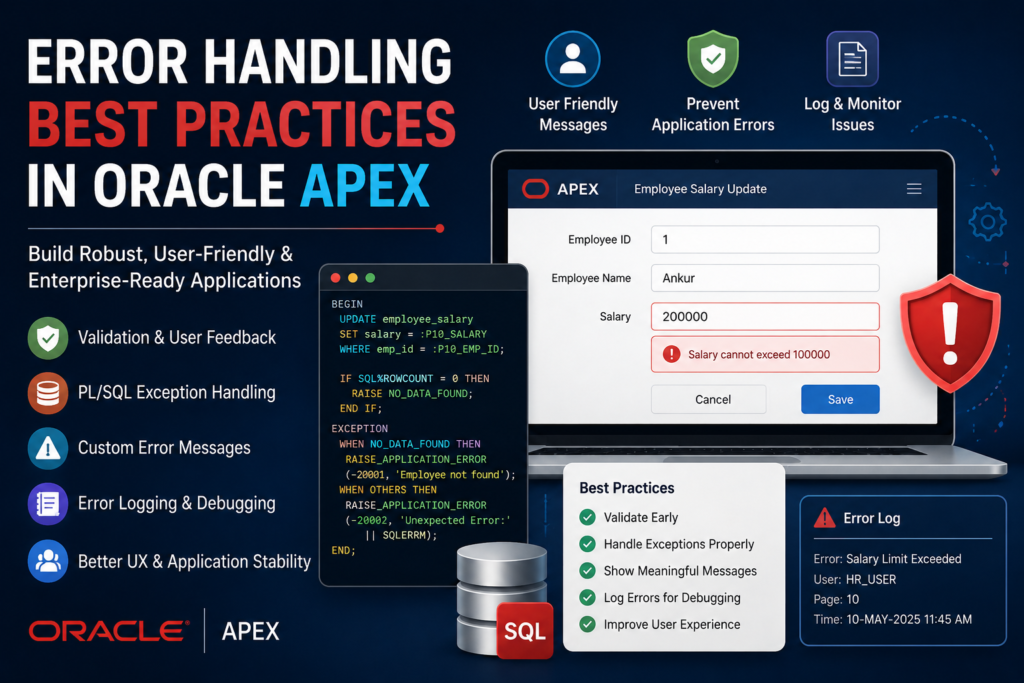
🚀 Real-Time Example: Employee Salary Update
🎯 Scenario
Suppose HR users update employee salary.
Possible issues:
❌ Employee does not exist
❌ Salary exceeds limit
❌ Invalid data entered
We’ll handle these errors properly.
📌 Step 1: Create Table
CREATE TABLE employee_salary
(
    emp_id      NUMBER PRIMARY KEY,
    emp_name    VARCHAR2(100),
    salary      NUMBER
);
📌 Insert Sample Data
INSERT INTO employee_salary
VALUES (1, 'Ankur', 5000);

COMMIT;
🚀 Step 2: Create Oracle APEX Form
Go to:
Create Page → Form → Form on TableSelect:
EMPLOYEE_SALARY🚀 Step 3: Add Validation
📌 Salary Validation
Go to:
Page Items → PXX_SALARY → Validation📌 Validation Type
PL/SQL Function Returning Error Text📌 Validation Code
IF :P10_SALARY > 100000 THEN
   RETURN 'Salary cannot exceed 100000';
END IF;

RETURN NULL;
✅ Result
If user enters:
200000User sees:
Salary cannot exceed 100000
instead of database failure.
🚀 Step 4: Handle Database Exceptions
📌 Process Code
Go to:
Page Processing → Process RowAdd custom PL/SQL:
BEGIN

   UPDATE employee_salary
   SET salary = :P10_SALARY
   WHERE emp_id = :P10_EMP_ID;

   IF SQL%ROWCOUNT = 0 THEN
      RAISE NO_DATA_FOUND;
   END IF;

EXCEPTION

   WHEN NO_DATA_FOUND THEN

      raise_application_error(
         -20001,
         'Employee not found'
      );

   WHEN OTHERS THEN

      raise_application_error(
         -20002,
         'Unexpected Error: ' || SQLERRM
      );

END;
🚀 Step 5: Create Custom Error Handling Function
Enterprise applications usually use centralized error handling.
📌 Create Function
CREATE OR REPLACE FUNCTION custom_error_handling (
    p_error IN apex_error.t_error
)
RETURN apex_error.t_error_result
IS

    l_result apex_error.t_error_result;

BEGIN

    l_result := apex_error.init_error_result (
                    p_error => p_error );

    IF p_error.is_internal_error THEN

        l_result.message :=
            'Internal application error occurred.';

    ELSE

        l_result.message :=
            p_error.message;

    END IF;

    RETURN l_result;

END;
🚀 Step 6: Register Error Handling Function
Go to:
Shared Components → Application Definition AttributesThen:
Error Handling FunctionAdd:
custom_error_handling🚀 Handling JavaScript Errors
Client-side validation is also important.
📌 Example
if ($v('P10_SALARY') === '') {

   apex.message.alert(
      'Salary cannot be empty'
   );

}
🚀 Display Friendly Notifications
Avoid displaying raw Oracle errors.
❌ Bad Example
ORA-06502 numeric or value error
✅ Good Example
Invalid salary entered. Please check the value.
🚀 Logging Errors for Debugging
Store errors into audit/log table.
📌 Create Log Table
CREATE TABLE error_logs
(
    log_id          NUMBER GENERATED BY DEFAULT AS IDENTITY,
    error_message   VARCHAR2(4000),
    error_date      DATE
);
📌 Insert Errors
INSERT INTO error_logs
(
    error_message,
    error_date
)
VALUES
(
    SQLERRM,
    SYSDATE
);
🚀 Handling REST API Errors
When working with APIs:
✔ Handle timeout
✔ Handle invalid JSON
✔ Handle authentication errors
📌 Example
IF apex_web_service.g_status_code != 200 THEN

   raise_application_error(
      -20003,
      'API Request Failed'
   );

END IF;
🚀 Best Practices for Error Handling
✅ 1. Show User-Friendly Messages
Avoid technical ORA errors.
✅ 2. Log Errors Internally
Maintain audit logs for debugging.
✅ 3. Use Validations Before DML
Prevent bad data entry early.
✅ 4. Use Centralized Error Handling
Maintain one common function.
✅ 5. Avoid Exposing Database Structure
Never expose:
❌ Table names
❌ SQL queries
❌ Internal package names
to end users.
✅ 6. Handle Exceptions Explicitly
Instead of:
WHEN OTHERS THEN NULL;Always log or handle properly.
🚀 Real-World Enterprise Use Cases
Error handling is critical in:
✔ Banking applications
✔ HR systems
✔ ERP applications
✔ Healthcare systems
✔ Approval workflows
✔ API integrations
📊 Recommended Error Handling Flow
User Action
     ↓
Validation
     ↓
PL/SQL Process
     ↓
Exception Handling
     ↓
Custom Error Message
     ↓
Logging
🎯 Why Oracle APEX Developers Need Strong Error Handling
Good error handling improves:
✅ Application quality
✅ User satisfaction
✅ Security
✅ Maintainability
✅ Production support
It is one of the key skills for enterprise Oracle APEX developers.
🎉 Conclusion
Error handling is not just about preventing crashes — it’s about building reliable and user-friendly enterprise applications.
Using Oracle APEX and Oracle Database, developers can implement:
✅ Validations
✅ PL/SQL exception handling
✅ Centralized error management
✅ API error handling
✅ Friendly notifications
to create professional and stable applications.
If you want your Oracle APEX applications to feel enterprise-ready, robust error handling is absolutely essential.
Happy Coding! 🚀

Hi, I’m Ankur Rai, an Oracle APEX Developer with 6+ years of professional experience in building enterprise applications. I specialize in creating scalable and efficient solutions using Oracle APEX, PL/SQL, and SQL to solve real-world business challenges.
I am a 3X Oracle APEX Professional Certified Developer and also an Oracle ACE Associate Member, actively contributing to the Oracle community by sharing knowledge, insights, and best practices. Through my blogs, I aim to help developers learn, grow, and build better Oracle APEX applications together.