
🔹 About
Oracle APEX Template Directives are one of the most powerful features for creating dynamic, reusable, and conditional UI components directly inside templates.
They allow developers to:
✅ Add conditional rendering
✅ Loop through data
✅ Display dynamic content
✅ Simplify template customization
✅ Reduce JavaScript complexity
In this blog, we’ll explore Oracle APEX Template Directives with practical examples and step-by-step implementation.
🛠️ Tools and Technologies
- Oracle APEX
- SQL
- HTML
- Template Directives
🚀 What are Template Directives?
Template Directives are special instructions used inside Oracle APEX templates to dynamically render content.
They work similarly to conditional statements and loops in programming languages.
🎯 Why Use Template Directives?
Without template directives:
❌ Large amount of duplicate HTML
❌ Complex conditional rendering
❌ More JavaScript code
❌ Harder template maintenance
With template directives:
✅ Cleaner templates
✅ Better readability
✅ Dynamic rendering
✅ Easier customization
📌 Common Template Directives
| Directive | Purpose |
|---|---|
| {if/} | Conditional rendering |
| {case/} | Switch-case logic |
| {loop/} | Iterate over data |
| {with/} | Define local scope |
| {apply/} | Apply subtemplate |
🚀 Where Can We Use Template Directives?
Template Directives can be used in:
✅ Region Templates
✅ Report Templates
✅ List Templates
✅ Cards
✅ Email Templates
✅ Content Rows
📌 Step-by-Step: How to Create Template Directives in Oracle APEX
✅ Step 1: Create a Card Region
Go to:
Create Page → Region → Card RegionUse EMP table query:
SELECT empno, ename, job, sal, deptno FROM emp✅ Step 2: Body Formating
Go to:
Card Region→ AttributesSet:
Body → Advance Formating → Enableor choose any custom report template.
✅ Step 3: Enable Template Directives
Go to:
Body → HTML ExpressionNow add Template Directive code.
🚀 Example 1: Conditional Display Using IF
Suppose we want to display employee salary conditionally.
📌 HTML Expression
<div class="template-card-container">
    <h3 class="u-textUpper u-bold" style="margin: 0 0 12px 0; font-size: 1.2rem; color: #1a2f3f;">
        &ENAME.
    </h3>

    <div class="card-badge-container">
        {if SAL/}
            <span class="t-Badge t-Badge--success t-Badge--pill">
                <span class="t-Badge-label">Salary: &SAL.</span>
            </span>
        {else/}
            <span class="t-Badge t-Badge--danger t-Badge--pill">
                <span class="t-Badge-label">No Salary</span>
            </span>
        {endif/}
    </div>
</div>
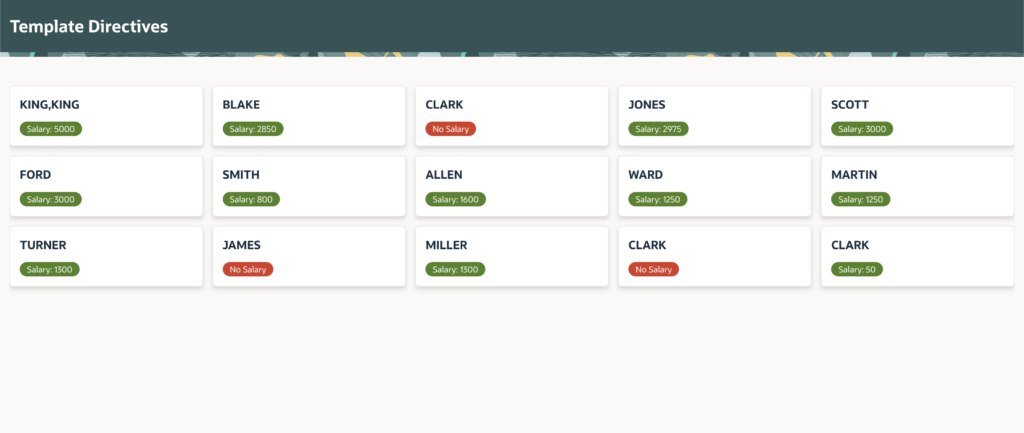
✅ Result
If SAL contains value:
✔ Green badge displays
Else:
✔ Red badge displays
🚀 Example 2: CASE Directive
CASE directives work like switch-case logic.
📌 HTML Expression
{case JOB/}

{when MANAGER/}
   <span class="fa fa-user-tie"></span>
   Manager

{when ANALYST/}
   <span class="fa fa-chart-line"></span>
   Analyst

{when CLERK/}
   <span class="fa fa-user"></span>
   Clerk

{otherwise/}
   Employee

{endcase/}
✅ Result
Different icons display based on JOB value.
🚀 Example 3: Conditional CSS
📌 HTML Expression
<div class="
{if DEPTNO/}
dept-active
{else/}
dept-inactive
{endif/}">
    #ENAME#
</div>
🚀 Example 4: Highlight High Salary Employees
📌 SQL Query
SELECT
    empno,
    ename,
    sal,
    CASE
        WHEN sal > 3000 THEN 'HIGH'
        ELSE 'NORMAL'
    END salary_status
FROM emp
📌 HTML Expression
<div class="
{case SALARY_STATUS/}

{when HIGH/}
high-salary

{otherwise/}
normal-salary

{endcase/}">

    #ENAME#

</div>
🚀 Example 5: LOOP Directive
LOOP directives are useful in advanced templates.
📌 Example
{loop EMPLOYEES/}

<div>
   #ENAME#
</div>

{endloop/}
🚀 Example 6: WITH Directive
The WITH directive creates reusable local variables.
📌 Example
{with EMP_NAME:=ENAME/}

<h2>&EMP_NAME.</h2>

{endwith/}
🚀 Example 7: APPLY Directive
Used to apply reusable subtemplates.
📌 Example
{apply EMP_TEMPLATE/}🎯 Real-World Use Cases
Template Directives are extremely useful for:
✔ Employee dashboards
✔ Status-based cards
✔ Notification panels
✔ Dynamic badges
✔ Role-based UI
✔ Custom reports
🎨 Example CSS
Add this CSS in:
Page → CSS → Inline.high-salary {
background: #d4edda;
padding: 10px;
border-radius: 10px;
}
.normal-salary {
background: #f8d7da;
padding: 10px;
border-radius: 10px;
}⚠️ Important Considerations
🔹 Use Correct Syntax
Template directives are case-sensitive.
Incorrect syntax may break rendering.
🔹 Avoid Heavy Business Logic
Use directives mainly for UI rendering.
Keep business logic in:
✅ SQL
✅ PL/SQL
🔹 Test Nested Directives Carefully
Complex nested directives can become difficult to debug.
🚀 Advanced Use Cases
You can use Template Directives for:
✔ Dynamic Cards
✔ Report Formatting
✔ Email Templates
✔ Dashboard Widgets
✔ Notification Systems
✔ Dynamic Icons
📊 Workflow
SQL Query
     ↓
Template Directive Processing
     ↓
Dynamic HTML Rendering
     ↓
Final UI Output
🔥 Why Oracle APEX Developers Love Template Directives
Template Directives help developers create dynamic user interfaces without writing excessive JavaScript.
Benefits include:
✅ Reusable templates
✅ Cleaner HTML
✅ Better maintainability
✅ Flexible rendering
🎉 Conclusion
Oracle APEX Template Directives are a powerful feature for building intelligent and dynamic UI components.
Using directives like:
✅ IF
✅ CASE
✅ LOOP
✅ WITH
✅ APPLY
developers can create highly customizable templates with minimal effort.
If you want cleaner templates and smarter rendering in Oracle APEX, Template Directives are definitely worth learning.
Happy Coding!

Hi, I’m Ankur Rai, an Oracle APEX Developer with 6+ years of professional experience in building enterprise applications. I specialize in creating scalable and efficient solutions using Oracle APEX, PL/SQL, and SQL to solve real-world business challenges.
I am a 3X Oracle APEX Professional Certified Developer and also an Oracle ACE Associate Member, actively contributing to the Oracle community by sharing knowledge, insights, and best practices. Through my blogs, I aim to help developers learn, grow, and build better Oracle APEX applications together.