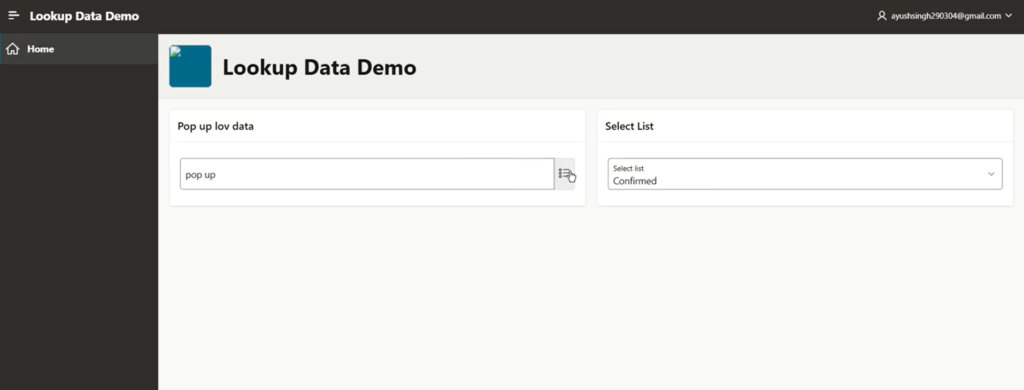

Same table. Same row. One APEX component rendered it without complaint. The other looked at
the exact same value and insisted it didn’t exist.
I checked the SQL – fine. I checked the JavaScript – fine. I checked the Popup LOV’s settings,
attribute by attribute – fine. So I started debugging properly.
Same Query, Two Components – One Refused to Match
I went onto the page and pulled the query straight from the page item. Both components – the
Popup LOV and the Select List – were running the exact same query:
SELECT value1 d, value1 r FROM test_lookup_dtl ORDER BY lookup_code;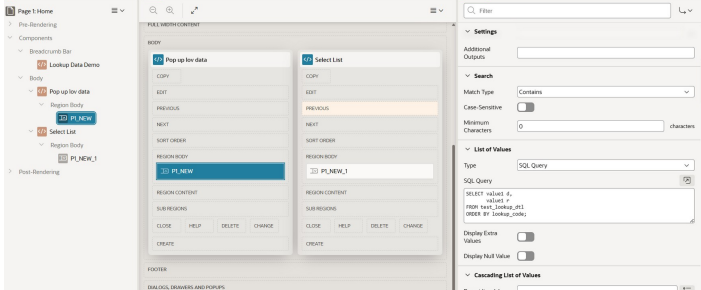
When I ran that query directly in SQL Developer, it worked fine. No errors, no missing rows. So I
moved down my usual checklist:
– Session state – cleared it, re-tested. Still broken.
– Browser cache – cleared it too. Still broken.
Nothing was there. At that point I guessed it might be a whitespace issue, so I tried wrapping the
query in TRIM() – mostly as a guess, not because I’d confirmed anything yet:
SELECT TRIM(value1) d, TRIM(value1) r FROM test_lookup_dtl ORDER BY
lookup_code;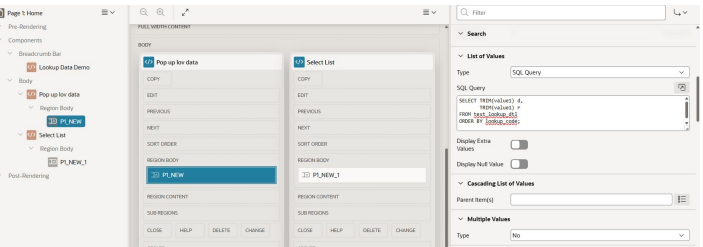
That didn’t immediately confirm anything either — I still didn’t know why it was needed. So after
going back and forth for a while, I stopped guessing and went looking for a way to actually see what
was inside the value.
DUMP() Showed What Nothing Else Could
Once I suspected the data – instead of the code – I needed a way to see a value the way Oracle
actually stores it, not the way a query tool chooses to display it. That’s exactly what DUMP() is for.
DUMP() returns the internal storage representation of a value: its datatype code, its length in
bytes, and the raw byte values that make it up. A SELECT shows you rendered text. DUMP() shows
you the bytes behind that text – which is precisely the layer where invisible characters live, and
exactly the layer none of my other checks (the query, the JavaScript, session state, cache) could
ever have shown me.
So I scanned the whole table with it:
SELECT lookup_code,
 value1,
 DUMP(value1)
FROM test_lookup_dtl
WHERE INSTR(value1, CHR(13)) > 0
 OR INSTR(value1, CHR(10)) > 0
ORDER BY lookup_code;
That query came back with rows. Real rows, with a real problem: every flagged value was carrying
CHR(13) and CHR(10) – a carriage return and line feed – sitting silently at the end of the string. A
clean value shows up as 9 bytes for 9 letters. These were coming back at 11 bytes. Invisible on
screen. Identical in every grid and report. But a string comparison checks every byte, and
“Confirmed” is not the same string as “Confirmed” plus two control characters you can’t see.
That’s what TRIM() had been quietly fixing all along – I just didn’t know it until DUMP() showed me
what TRIM() was actually trimming.
Cleaning the Eleven Bytes Out for Good
With the affected rows identified, I ran this to clean them permanently:
UPDATE test_lookup_dtl
SET value1 = TRIM(REPLACE(REPLACE(value1, CHR(13), ''), CHR(10), ''));
After that, both components displayed the data correctly – no TRIM() needed in the query
anymore, because the data itself was clean.
How Bad Data Gets Into a Table
Control characters like these almost always arrive through data entry or import – a value copypasted from Excel or Word, a Windows-style CSV load, or a migration that never sanitized whitespace. None of it shows up as wrong in a query tool, because the text renders identically
either way.
So Why Did the Select List Show It and the Popup LOV Didn’t?
This is the part that actually explains the whole bug:
– Select List loads and displays all LOV values directly, so it can still show values even if they
contain hidden spaces or CR/LF characters.
– Popup LOV tries to find an exact match between the item value and the LOV’s return value. If
the database value contains hidden characters – CHR(13), CHR(10), trailing spaces – that
comparison fails, so the Popup LOV can’t find the value and appears blank.
One value. Two jobs. Displaying text forgives invisible bytes. Matching text against a
source query does not. That difference is the entire bug.
What This Bug Actually Taught Me
The bug was never in the SQL, the JavaScript, or the LOV configuration. All three were correct from
the start. It was sitting in the data, invisible, until DUMP() showed exactly what was hiding in it.
Next time something looks right everywhere you can read it but still fails at runtime – run DUMP()
before you re-check the logic one more time. Sometimes the bug was never in the code. It was
hiding in the data.

Oracle APEX Developer sharing real-world demos and practical solutions using APEX, REST APIs, and integrations. Recognized as an Oracle ACE Associate.