
Artificial Intelligence is transforming how users interact with applications. With Generative AI + RAG (Retrieval-Augmented Generation), you can build smart chatbots that not only generate responses but also fetch accurate data from your database.
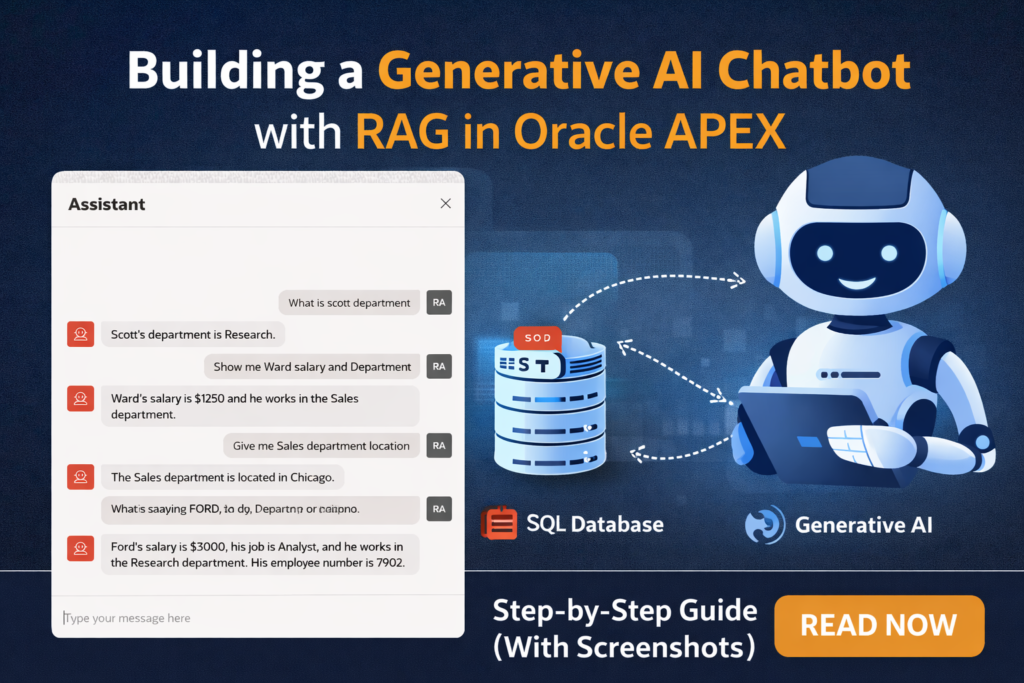
In this blog, I’ll walk you through how to build a ChatGPT-like AI Assistant inside Oracle APEX using Cohere + RAG Sources.
🔍 What We Are Building
A chatbot inside Oracle APEX that can answer questions like:
- “What is Scott’s department?”
- “Show me Ward’s salary and department”
- “Give me Sales department location”
👉 All answers are dynamically fetched from database tables using RAG.
🧠 What is RAG (Retrieval-Augmented Generation)?
RAG enhances AI responses by combining:
- Retrieval → Fetch relevant data from database
- Generation → Use AI (LLM) to generate a human-like response
This ensures:
✔ Accurate answers
✔ Context-aware responses
✔ Reduced hallucination
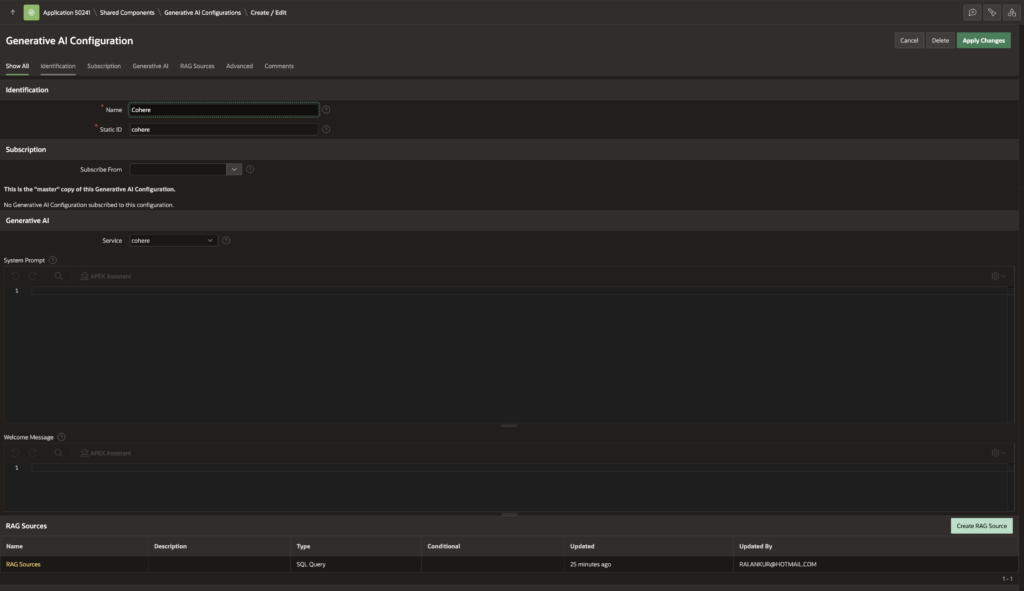
⚙️ Step 1: Create Generative AI Configuration
Navigate to:
Shared Components → Generative AI Configurations → Create
Configuration Details:
- Name: Cohere
- Static ID: cohere
- Service: Cohere
Key Sections:
✔ System Prompt
(Define how AI should behave – optional but recommended)
✔ Welcome Message
(Initial message shown in chatbot)
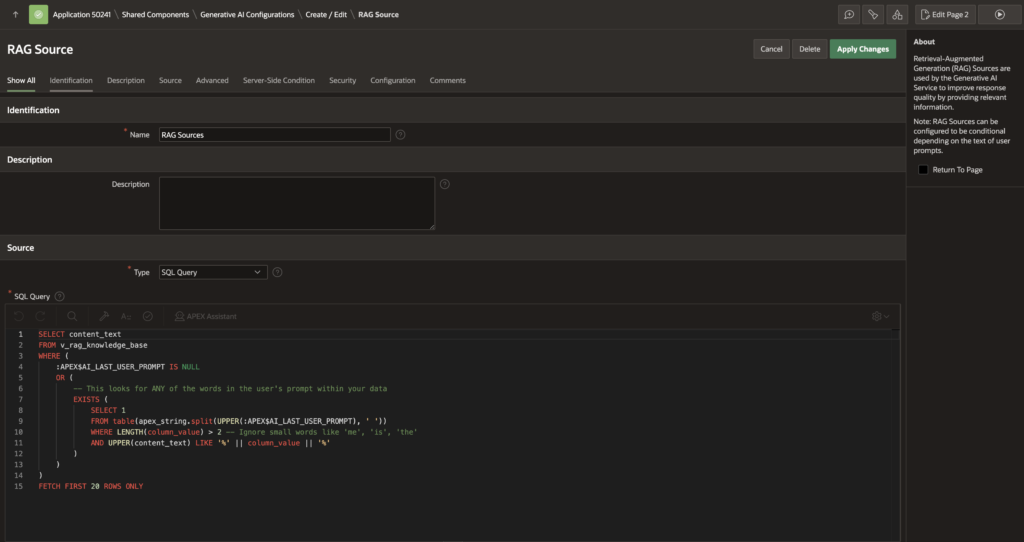
📚 Step 2: Create RAG Source
Navigate to:
Shared Components → RAG Sources → Create
Configuration:
- Type: SQL Query
- Name: RAG Sources
Sample SQL Query:
SELECT content_text
FROM v_rag_knowledge_base
WHERE (
    :APEX$AI_LAST_USER_PROMPT IS NULL
    OR EXISTS (
        SELECT 1
        FROM table(apex_string.split(UPPER(:APEX$AI_LAST_USER_PROMPT), ' '))
        WHERE LENGTH(column_value) > 2
        AND UPPER(content_text) LIKE '%' || column_value || '%'
    )
)
FETCH FIRST 20 ROWS ONLY;
💡 What this does:
- Breaks user prompt into keywords
- Matches with stored knowledge
- Returns relevant data for AI context
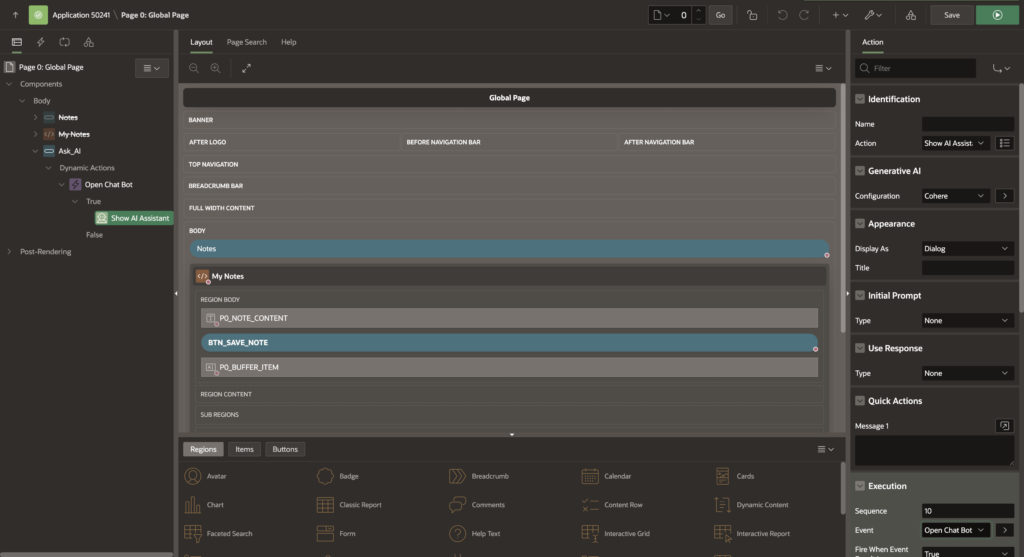
🤖 Step 3: Add AI Chat Assistant (UI)
Go to your Page (Global Page recommended)
Create a Dynamic Action:
- Event: Button Click (e.g., “Ask AI”)
- Action: Show AI Assistant
Configuration:
- Display As: Dialog
- Generative AI Config: Cohere
- RAG Source: Your created source
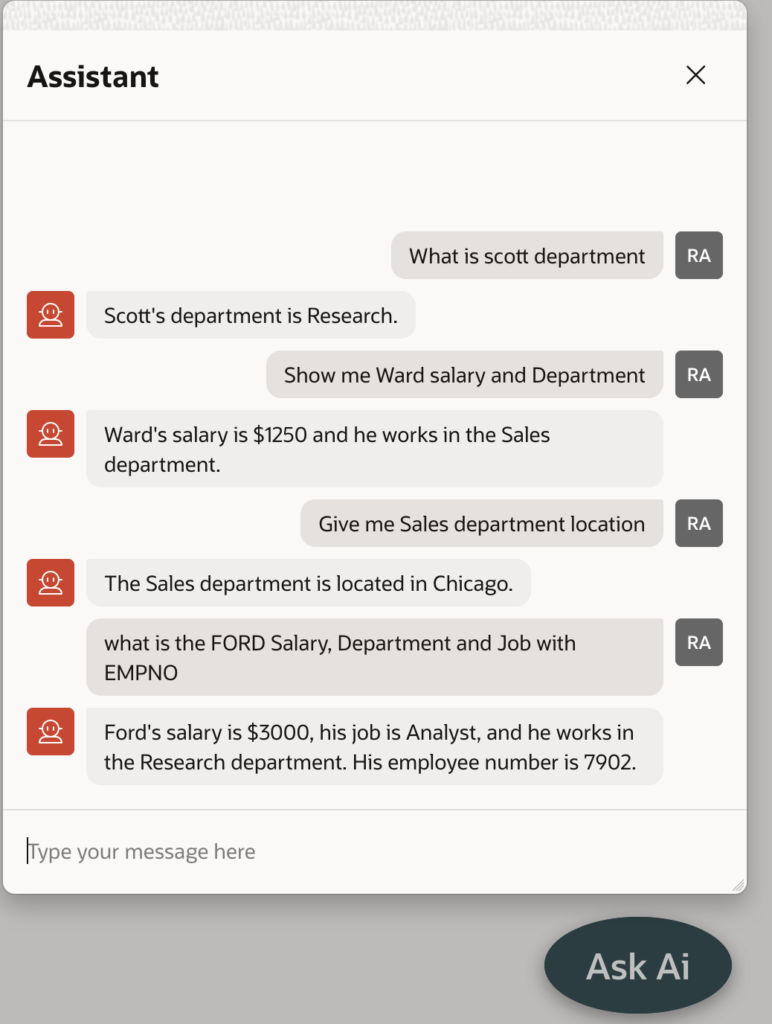
💬 Step 4: Enable Chat UI
Your chatbot UI will automatically:
✔ Show user queries
✔ Display AI responses
✔ Maintain conversation flow
Example from implementation:
- Scott’s department is Research
- Ward’s salary is $1250 and he works in Sales
- Sales department is located in Chicago
🔗 Step 5: Connect with Your Tables
Ensure your RAG source view (v_rag_knowledge_base) contains:
- Employee data
- Department data
- Any business knowledge
👉 You can create a view combining multiple tables:
  CREATE OR REPLACE FORCE EDITIONABLE VIEW "V_RAG_KNOWLEDGE_BASE" ("SOURCE_TABLE", "PRIMARY_KEY", "CONTENT_TEXT") AS
  SELECT 'DEPT' as source_table,
       deptno as primary_key,
       'Department Number: ' || deptno || ' Name: ' || dname || ' Location: ' || loc as content_text
FROM dept
UNION ALL
-- 2. Employee Data (CRITICAL: Added Salary here)
SELECT 'EMP',
       e.empno,
       'Employee: ' || e.ename || ' (ID: ' || e.empno || ') Job: ' || e.job ||
       ' Salary: ' || e.sal || ' works in Dept: ' || d.dname as content_text
FROM emp e
LEFT JOIN dept d ON e.deptno = d.deptno
UNION ALL
-- 3. Projects Data
SELECT 'PROJECTS',
       project_id,
       'Project ID: ' || project_id || ' Name: ' || project_name || '. Description: ' || project_description
FROM projects;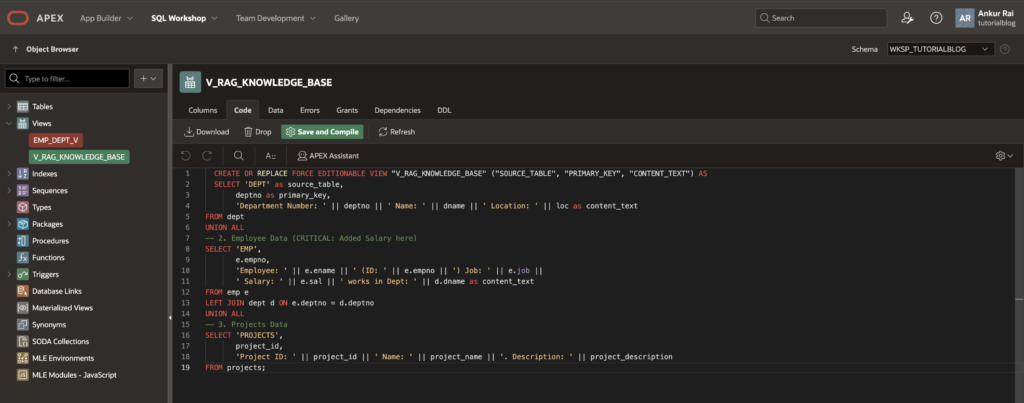
🚀 Key Benefits
✔ Natural language querying of database
✔ No need for complex reports
✔ AI-powered user experience
✔ Works across multiple tables
✔ Easy to extend with more data
🔥 Pro Tips
- Use clean, descriptive content_text for better AI responses
- Avoid too much raw data—focus on meaningful sentences
- Add filters in RAG query for performance
- Customize System Prompt for better control
🎯 Final Thoughts
With Oracle APEX + Generative AI + RAG, you can transform traditional applications into intelligent, conversational systems.
No more complex UI navigation—just ask questions and get answers instantly.
💡 What’s Next?
- Add role-based AI responses
- Integrate with APIs
- Enable document-based RAG
- Use vector search for advanced matching
🚀 Conclusion
Building AI-powered apps is no longer complex.
With Oracle APEX, you can quickly create a smart chatbot that understands your data and speaks your business language.
👉 Start building today and bring AI into your applications!

Hi, I’m Ankur Rai, an Oracle APEX Developer with 6+ years of professional experience in building enterprise applications. I specialize in creating scalable and efficient solutions using Oracle APEX, PL/SQL, and SQL to solve real-world business challenges.
I am a 3X Oracle APEX Professional Certified Developer and also an Oracle ACE Associate Member, actively contributing to the Oracle community by sharing knowledge, insights, and best practices. Through my blogs, I aim to help developers learn, grow, and build better Oracle APEX applications together.