
Working with multiple rows of data efficiently is a common requirement in PL/SQL. This is where Collections come into play — one of the most powerful features in Oracle.
In this blog, we’ll explore what collections are, their types, and real-time examples to help you master them.
🔹 What is a Collection?
A Collection is a homogeneous, single-dimensional data structure that stores multiple elements of the same datatype.
👉 In simple terms:
A Collection is an array in Oracle Database.
🔥 Types of Collections
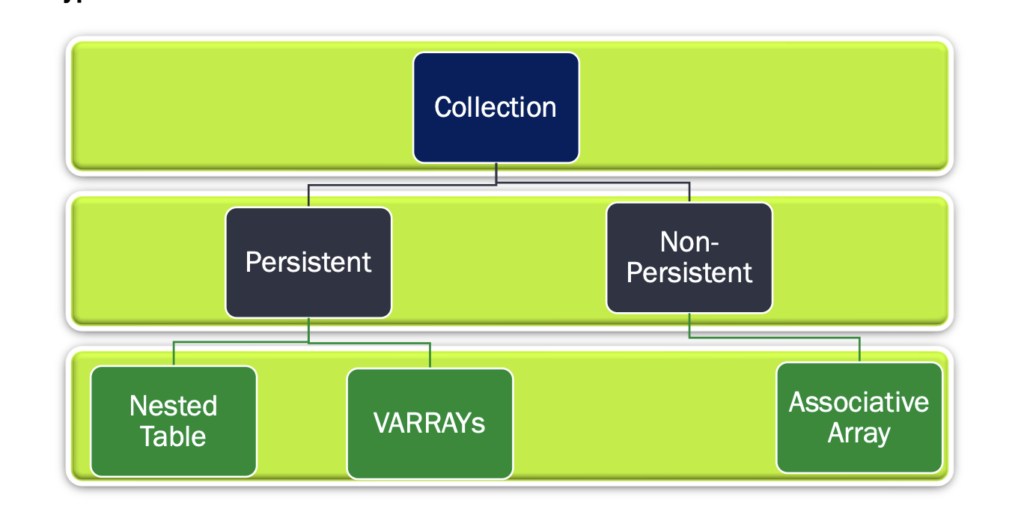
Oracle supports three types of collections:
- Nested Tables
- VARRAYs (Variable Size Arrays)
- Associative Arrays
1️⃣ Nested Tables
📌 Definition
- Persistent collection (can be stored in database)
- Unbounded (no size limit)
- Stored as a separate table internally
👉 Think of it as a table inside a table
🔹 Syntax
TYPE nested_table_name IS TABLE OF element_type [NOT NULL];🔹 Example 1: Associative Style Looping
DECLARE
 TYPE employee IS TABLE OF NUMBER
 INDEX BY VARCHAR2(64);

 srl_employee employee;
 i VARCHAR2(64);

BEGIN
 srl_employee('DDN') := 4;
 srl_employee('HUBLY') := 6;
 srl_employee('BANGALORE') := 10;

 i := srl_employee.FIRST;

 WHILE i IS NOT NULL LOOP
   DBMS_OUTPUT.PUT_LINE('Employees in ' || i || ' is ' || srl_employee(i));
   i := srl_employee.NEXT(i);
 END LOOP;
END;
🔹 Example 2: Simple Nested Table
DECLARE
 TYPE list_of_numbers IS TABLE OF NUMBER;
 var_nt list_of_numbers := list_of_numbers(9,18,27,36);

BEGIN
 DBMS_OUTPUT.PUT_LINE('Index 1: ' || var_nt(1));
 DBMS_OUTPUT.PUT_LINE('Index 2: ' || var_nt(2));
END;
🔹 Example 3: Nested Table in Database
CREATE TYPE emp_hobies IS TABLE OF VARCHAR2(100);

CREATE TABLE employees (
    emp_id NUMBER,
    emp_name VARCHAR2(20),
    emp_hobie emp_hobies
) NESTED TABLE emp_hobie STORE AS nested_tab_space;
Insert Data
INSERT INTO employees VALUES (1, 'Roopa', emp_hobies('Listening Songs','Traveling'));Query Nested Table
SELECT * FROM TABLE (
  SELECT emp_hobie FROM employees WHERE emp_id = 1
);
2️⃣ VARRAY (Variable Size Array)
📌 Definition
- Persistent collection
- Stored inline with table
- Fixed size (bounded)
🔹 Syntax
CREATE TYPE type_name AS VARRAY(size_limit) OF element_type;🔹 Example 1: PL/SQL Block
DECLARE
 TYPE emp_number IS VARRAY(6) OF NUMBER;
 vry_obj emp_number := emp_number();

BEGIN
 FOR i IN 1..6 LOOP
   vry_obj.EXTEND;
   vry_obj(i) := 10*i;
   DBMS_OUTPUT.PUT_LINE(vry_obj(i));
 END LOOP;
END;
🔹 Example 2: Stored in Table
CREATE TYPE emp_num IS VARRAY(15) OF NUMBER;

CREATE TABLE emp (
    emp_number emp_num,
    emp_name VARCHAR2(200)
);

INSERT INTO emp VALUES(emp_num(1,2,3), 'Ankur');
Query VARRAY
SELECT emp.emp_name, vry.COLUMN_VALUE
FROM emp, TABLE(emp.emp_number) vry;
❓ Important Questions
👉 Can we change size of VARRAY?
❌ No, size is fixed after creation
👉 Can we store VARRAY in DB?
✅ Yes
👉 Is VARRAY bounded?
✅ Yes
3️⃣ Associative Array
📌 Definition
- Non-persistent (memory only)
- Cannot be stored in database
- Exists only during session
🔹 Syntax
TYPE array_name IS TABLE OF datatype
INDEX BY datatype;
🔹 Example
DECLARE
TYPE emp IS TABLE OF NUMBER INDEX BY VARCHAR2(20);
srl_emp emp;
emp_loop VARCHAR2(20);
BEGIN
srl_emp('Roopa') := 1;
srl_emp('Ankur') := 2;
emp_loop := srl_emp.FIRST;
WHILE emp_loop IS NOT NULL LOOP
DBMS_OUTPUT.PUT_LINE(emp_loop || ' -> ' || srl_emp(emp_loop));
emp_loop := srl_emp.NEXT(emp_loop);
END LOOP;
END;
🚀 BULK COLLECT
📌 What is it?
Used to fetch multiple rows at once into a collection → improves performance.
🔹 Syntax
FETCH cursor_name BULK COLLECT INTO collection;🔹 Example
DECLARE
 CURSOR exp_cur IS SELECT emp_name FROM employees;

 TYPE emp_list IS TABLE OF VARCHAR2(20);
 fname emp_list;

BEGIN
 OPEN exp_cur;
 LOOP
   FETCH exp_cur BULK COLLECT INTO fname;
   EXIT WHEN fname.COUNT = 0;

   FOR i IN fname.FIRST..fname.LAST LOOP
     DBMS_OUTPUT.PUT_LINE(fname(i));
   END LOOP;
 END LOOP;
 CLOSE exp_cur;
END;
⚡ FORALL
📌 What is it?
Used for bulk DML operations (INSERT, UPDATE, DELETE) → very fast.
🔹 Syntax
FORALL i IN collection.FIRST..collection.LAST
   INSERT INTO table VALUES collection(i);
📊 Collection Methods
Collections come with built-in methods:
- .COUNT → number of elements
- .FIRST → first index
- .LAST → last index
- .NEXT(index) → next element
- .PRIOR(index) → previous element
- .EXTEND → add elements
- .DELETE → remove elements
🧠 Assignment
Try these:
✅ Find distinct hobbies
✅ Sort hobbies by popularity (descending)
🎯 Final Thoughts
PL/SQL Collections are extremely powerful for:
✔ Handling bulk data
✔ Improving performance
✔ Writing cleaner code
✔ Reducing context switching
If you’re working with large datasets or loops in PL/SQL, mastering collections is a must 🚀

Hi, I’m Ankur Rai, an Oracle APEX Developer with 6+ years of professional experience in building enterprise applications. I specialize in creating scalable and efficient solutions using Oracle APEX, PL/SQL, and SQL to solve real-world business challenges.
I am a 3X Oracle APEX Professional Certified Developer and also an Oracle ACE Associate Member, actively contributing to the Oracle community by sharing knowledge, insights, and best practices. Through my blogs, I aim to help developers learn, grow, and build better Oracle APEX applications together.