

A deep dive into Oracle’s biggest architectural shift — human-readable .apx source files, AI-assisted generation, Git-friendly version control, and CI/CD-native deployment workflows.
Oracle APEX 26.1 ships with what may be its most significant architectural change in years. APEXLang — a new open application specification language — fundamentally changes how APEX applications are exported, edited, version-controlled, and deployed. If you've ever struggled with messy SQL exports or wished you could let an AI agent build your app, this is the feature you've been waiting for.
What is APEXLang?
APEXLang is an open application specification language introduced by Oracle specifically for Oracle APEX application development. Its primary purpose is AI-optimized coding — with AI agents, you can now generatively create APEX applications using this language directly from an IDE like VS Code.
But APEXLang isn’t only about AI. At its core, it enables three things previously difficult or impossible with traditional SQL exports: human-readable application files, granular version control, and seamless application portability between environments.
📄 .apx Source Files
Human-readable, versionable, AI-optimized application metadata in a structured format.
🔀Version Controlled
Git-friendly diffs and clean merges. Stable static IDs ensure predictable change tracking.
🤖AI-Ready Format
Structured for AI-assisted generation, refactoring, and bulk editing across hundreds of components.
🚀CI/CD Native
Validate, import, and automate with SQLcl pipelines. apex-validate runs before every deploy.
The .apx File Structure
When you export an application in APEXLang format, you receive a ZIP file containing a structured set of .apx files — not a single monolithic SQL dump. Each concern of your application lives in its own file.
📄 application.apx — app-level metadata & settings

📁 /pages
📄 p00000-global-page.apx
📄 p00001-home.apx
📄 p00002-employees.apx

📁 /shared_components
📄 lovs.apx
📄 breadcrumbs.apx
📄 lists.apx

📁 /security
📄 authentications.apx
📄 authorizations.apx

📁 /themes
📄 theme.apx

📁 /deployments
{ } default.json — target environment config
This separation is intentional and powerful. With traditional SQL exports, a single file contains everything — making diffs noisy and merges painful. With APEXLang, a change to your home page only touches p00001-home.apx. Your CI pipeline can tell exactly what changed, reviewers can focus on relevant files, and merge conflicts become rare.
Key characteristics of .apx files
✓ YAML-like syntax, without indentation complexity. The format resembles YAML and JSON in spirit but avoids their strictest pitfalls. Change the indentation and nothing breaks — change a value incorrectly and the VS Code extension immediately flags the error.
✓ Embedded SQL using markdown-style code fences. SQL queries live inside “`sql … “` blocks, making it immediately clear what’s a query and what’s metadata. No string escaping, no encoding surprises.
✓ Each page equals one file. Clean diffs, granular version control, and no accidental cross-page changes.
✓ Static IDs enforce uniqueness. Every component has a stable, human-readable static ID. Duplicate one and the IDE throws an error. These IDs are what make AI edits predictable — no random integer IDs that shift between environments.
✓ Reference notation with @. When a component references another (e.g., a navigation bar defined in shared components), it uses an @reference notation rather than repeating the definition — keeping files lean and links explicit.
Four Export Types
In Oracle APEX 26.1, the export screen now shows APEXLang as a format option alongside SQL. Once you select APEXLang, you have four export types to choose from:
⭐ Standard Export
Recommended for source control. Includes full application spec plus developer metadata.
⚙️ Runtime Export
Application spec only. No developer metadata. Build status set to Run Application Only.
📦 Full Export
Everything — workflows, task activity, saved reports (public and private), and all metadata.
🎛️ Custom Export
Choose exactly which components to include. Same fine-grained control as the legacy exporter.
One important note: applications using legacy tabs cannot be exported in APEXLang format. If you encounter this, migrating legacy tabs to the modern navigation model is a prerequisite.
VS Code Becomes Your APEX IDE
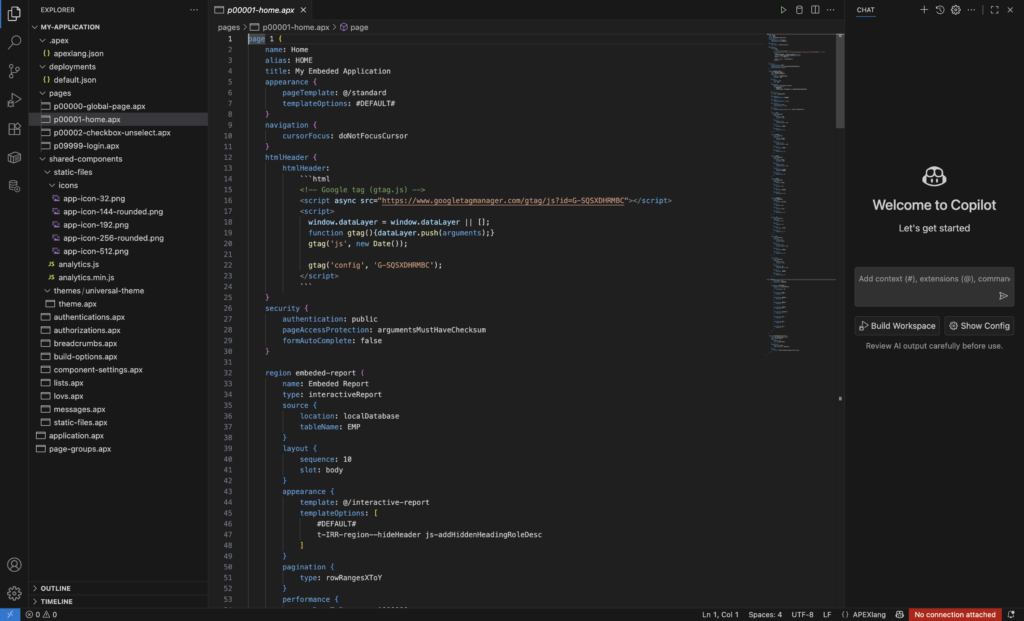
APEXLang is a first-class citizen in the SQL Developer extension for VS Code. The extension — updated to support APEXLang — provides full syntax validation, IntelliSense autocompletion, and direct export/import from within the editor.
When you open an exported APEXLang ZIP in VS Code, you can hover over any property to see what it does, press Ctrl+Space to see all valid values for that field, and get real-time errors if you write an invalid specification. The extension even allows you to right-click an application inside the Oracle Database connection tree and export it directly to a local folder — no browser navigation needed.
page 1 {
  name: Home
  alias: HOME
  title: My Embedded Application

  appearance {
    pageTemplate: @/standard
    templateOptions: #DEFAULT#
  }

  security {
    authentication: public
    pageAccessProtection: argumentsMustHaveChecksum
  }

  region embeded-report {
    name: Embed Report
    type: interactiveReport
    source {
      location: localDatabase
      tableName: EMP
    }
  }
}
Spec-Driven Development: From Intent to App
Alongside APEXLang, Oracle APEX 26.1 introduces Spec-Driven Development — a structured workflow that takes a business requirements document and a database schema description and produces a running application, mediated by AI at each step.
The spec-driven approach separates AI variability from deterministic execution — AI interprets your intent into a blueprint, then the blueprint reproducibly generates the same application every time.
The workflow has three stages:
1. Write specs.md — A markdown document capturing all business intent: user roles, required features, pages, data access patterns. Think of it as a precise product requirements document for the AI.
2. Generate schema_metadata.md — Oracle APEX’s new “Describe Tables” utility (under SQL Workshop → Utilities) generates a structured markdown description of your tables, columns, constraints, and indexes. Provide this alongside your spec to help the AI understand your data model.
3. Blueprint → Application — Oracle’s blueprint prompts (available via GitHub) use both documents to produce a blueprint.md — a structured, deterministic app plan. Import this blueprint into APEX (Application Builder → Import → Application Blueprint) and APEX creates the running application.
Deterministic Generation: Why It Matters for Enterprise
The distinction between AI-assisted and deterministic steps is one of APEXLang’s most important design decisions — and one that makes it viable for enterprise governance.
| AI-Assisted Phase | Deterministic Phase |
|---|---|
| Intent → Blueprint Slight variability. AI interprets human language, so two runs may produce slightly different blueprints. Oracle blueprint prompts minimize this drift. | Blueprint → Application Same input always produces identical output. Import the same blueprint into 10 instances and get 10 identical apps. No AI variability. |
| Inputs specs.md, schema_metadata.md, Oracle blueprint prompts | Benefit Enterprise governance, reproducibility, and auditability built in by design. |
APEXLang vs App Builder: Choose the Right Tool
APEXLang doesn’t replace App Builder — it complements it. Each tool has scenarios where it excels.
| Use App Builder when… | Use APEXLang when… |
|---|---|
| Quick UI changes Drag-and-drop in browser with instant preview | Bulk changes Update 100+ forms or components consistently |
| Small edits Rename a form item, tweak a report column | AI-assisted generation Spec-to-app with deterministic, reproducible output |
| Rapid manual development No file system or tooling required | Source control Git diffs, pull requests, merge workflows |
| Visual exploration Prototyping new ideas with instant feedback | CI/CD automation apex-validate + SQLcl deploy pipelines |
CI/CD Workflows with APEXLang
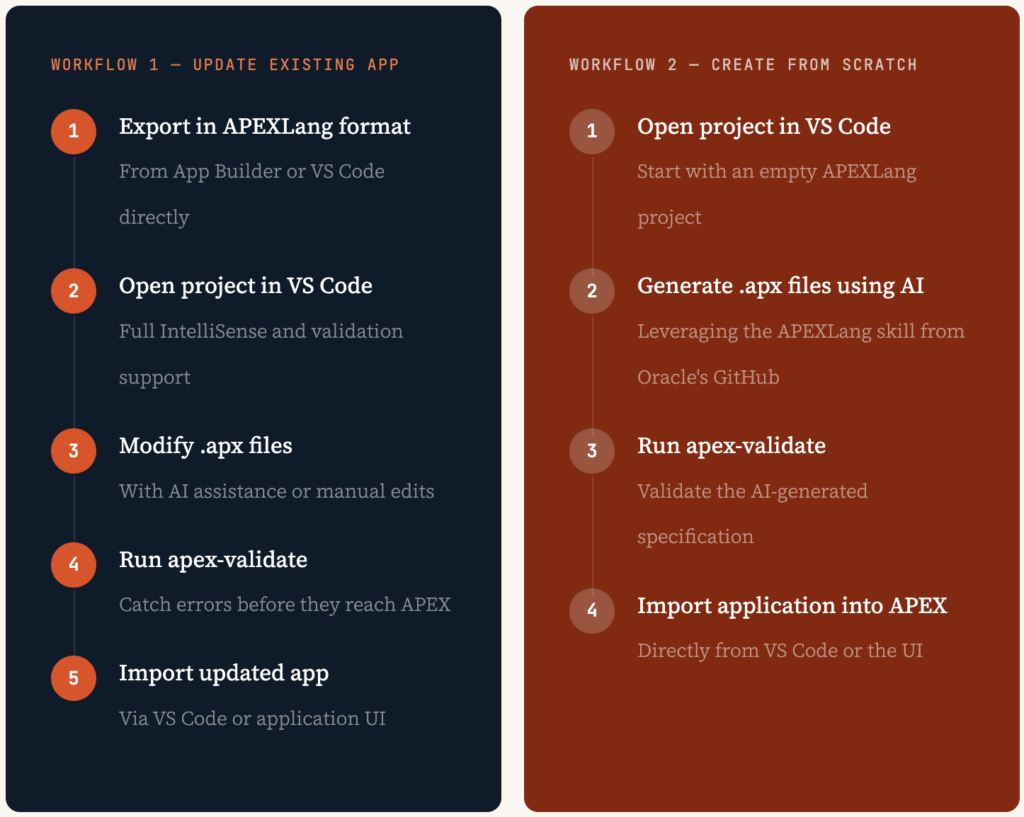
APEXLang was designed with deployment automation in mind. Using SQLcl, you can validate, export, and import applications programmatically — making APEX a first-class participant in any CI/CD pipeline.
There are two primary development workflows:
The APEXLang Skill: Teaching AI to Write .apx
One of the most practical components of this release is the APEXLang skill — a skill.md file published in Oracle’s official GitHub repository. This file provides an AI model with the rules, syntax, and structural conventions needed to generate valid .apx files.
By including this skill as context in your AI agent or coding assistant, the model learns the APEXLang specification well enough to write new pages, modify existing ones, and perform bulk updates across an entire application — all from natural language prompts.
This is vibe coding applied to enterprise application development: describe what you want, let the AI produce the specification, validate it with apex-validate, and push to APEX — all without leaving your IDE.
Key Takeaways
.apx Source Files
Human-readable, AI-friendly application definitions you can check into Git.
Spec → Blueprint → App
A structured, spec-driven path from business intent to a running application.
Deterministic by Design
The same blueprint always produces the same app — enterprise governance built in.
CI/CD First
apex-validate + SQLcl enable automated governance and deployment pipelines.
VS Code is the IDE
Full APEXLang support with IntelliSense, skeletons, and direct APEX export/import.
APEXLang represents a genuine architectural shift — not just a new export format, but a rethinking of how Oracle APEX applications are authored, maintained, and deployed. It opens a pathway where AI agents become productive members of your development team, capable of generating and modifying APEX applications from natural language specifications, with enterprise-grade predictability and governance built in from the start.
The combination of APEXLang, Spec-Driven Development, and the CI/CD tooling introduced in APEX 26.1 means that building complex applications at speed is no longer exclusively the domain of deep APEX experts. It’s the most significant shift the platform has seen in years — and it’s worth getting familiar with now.

Hi, I’m Ankur Rai, an Oracle APEX Developer with 6+ years of professional experience in building enterprise applications. I specialize in creating scalable and efficient solutions using Oracle APEX, PL/SQL, and SQL to solve real-world business challenges.
I am a 3X Oracle APEX Professional Certified Developer and also an Oracle ACE Associate Member, actively contributing to the Oracle community by sharing knowledge, insights, and best practices. Through my blogs, I aim to help developers learn, grow, and build better Oracle APEX applications together.


Really good read, thanks for posting this.