1. Introduction
In Oracle APEX applications, delivering a seamless and consistent user experience across multiple applications is often a key requirement—especially when those applications live within the same workspace.
In this blog post, I’ll share a practical approach to embedding a page from one Oracle APEX application into another, without users even realizing they’re switching applications. The navigation menu remains the same, there’s no second login prompt, and the experience feels completely unified.
After some research, I decided to use the URL Region available in Oracle APEX. Surprisingly, even after more than 10 years of working with APEX, this was my first real use case for it! While this approach may not be perfect for every scenario, it worked flawlessly for my client’s requirements.
If you know alternative or better approaches, I’d love to hear your thoughts in the comments 😉
2. Tools and Technologies
The following tools and features are used to implement this solution:
- Oracle APEX
- URL Region (iFrame)
- Session Sharing
- JavaScript
- CSS
3. Business Requirement
In enterprise environments, applications are often split into multiple APEX apps for modularity, security, or team ownership.
The Challenge:
- Display a page from Application 2 inside Application 1
- Keep the navigation menu of Application 1
- Avoid multiple login prompts
- Ensure full width & height display
- Remove duplicate headers and navigation bars
The Solution:
- Use URL Region to embed the page
- Enable Session Sharing between applications
- Adjust iFrame dimensions with CSS
- Hide extra headers using JavaScript
✔ Seamless user experience
✔ No re-authentication
✔ Consistent navigation
✔ Clean UI
4. Implementation Steps
1️⃣ Prerequisites
Make sure you have:
- Access to an Oracle APEX Instance ✅
- Application 1 (Main Application) ✅
- Application 2 (Application containing the page to embed) ✅
2️⃣ Create a URL Region in Application 1
- Log in to your APEX Workspace
- Navigate to Application 1
- Create a new blank page
- Add a URL Region to the Full Width Content slot
- In the Attributes section, enter the URL of Application B:
f?p=123341:home:&SESSION.
📌 Replace the application alias and page number as required.
3️⃣ First Run – What Goes Wrong?
After running the page, you’ll notice three problems:
❌ A new login screen appears
❌ The URL region does not occupy full width and height
❌ oracleapex.com refused to connect.
Let’s fix them one by one.
4️⃣ First Problem: Authentication (Session Sharing)
To avoid the second login prompt, Oracle APEX provides Session Sharing.
Steps:
- Go to Application 2
- Navigate to Shared Components
- Open Authentication Schemes
- Edit the active Authentication Scheme
- Scroll to Session Sharing
- Set:
- Type: Custom
- Cookie Name: SESSION
Now refresh Application 1. If you get the error in Iframe repeat the same step 4 for Application 1.
✅ Login issue resolved!
5️⃣ Second Problem: iFrame Width & Height
To make the URL region fill the entire space, update the iFrame Attributes in the URL Region:
id="iframe" height="100%" width="100%" frameborder="0"
After refreshing, the width looks fine—but the height still doesn’t fill the page 🤔
6️⃣ Fixing Full Height Using CSS
The issue occurs because parent containers don’t have full height.
Add the following CSS using Inline CSS Code Editor:
.i-h640>.t-Region-bodyWrap>.t-Region-body {
    block-size: 1000px !important;
}
Refresh the page again.
✅ iFrame now fills both width and height perfectly!
7️⃣ Third Problem: oracleapex.com refused to connect.
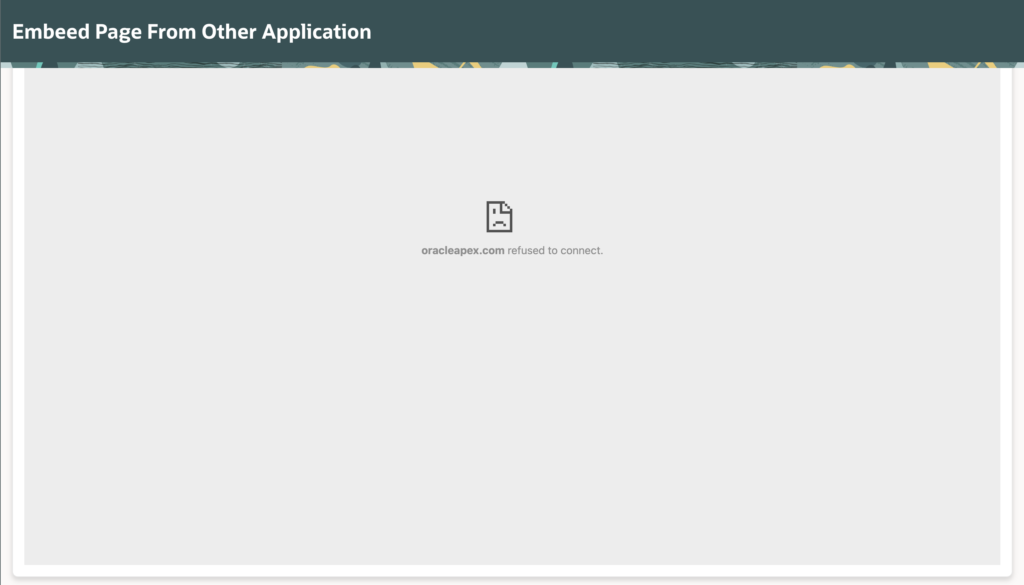
To fix this, follow bellow step.
Open Application 2 (the one you are trying to display inside the frame).
Go to Shared Components.
Under the “Security” section, click Security Attributes.
Scroll down to the Browser Security section.
Find the setting Embed in Frames.
Change it to Allow from same origin.
- Note: If “Allow from same origin” still fails, try setting it to Allow to test, but be aware this reduces security.
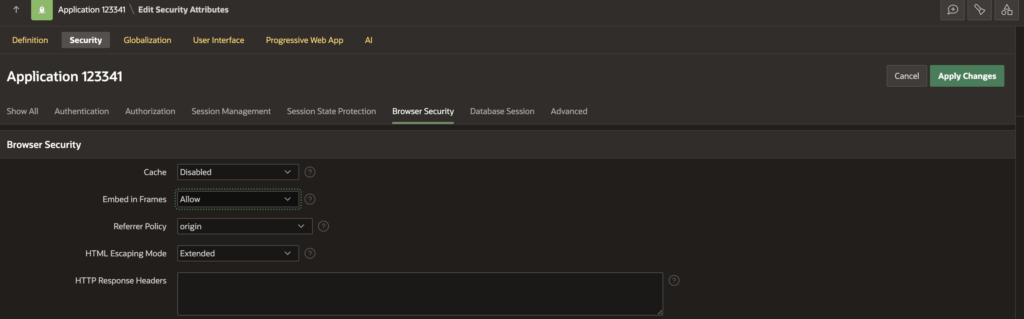
Click Apply Changes.
8️⃣ Assign an ID to the iFrame
In the URL Region’s iFrame Attributes, add:
id="iframe"9️⃣ Hide Header Using JavaScript
If you want to hide header for Iframe Application then Add the following code to Execute when Page Loads:
const iframe = document.getElementById("iframe");

iframe.addEventListener("load", () => {
    const iframeDoc = iframe.contentDocument || iframe.contentWindow.document;
    const style = iframeDoc.createElement("style");
    style.textContent = ".t-Header { display: none !important; }";
    iframeDoc.head.appendChild(style);
});
This script waits for the iframe to load and then hides the APEX header only inside the embedded page.
🔟 Save and Run the Page
🎉 And there you go!
- Single navigation menu
- No additional login
- Full width & height embedded page
- Clean, seamless experience
5. Final Output
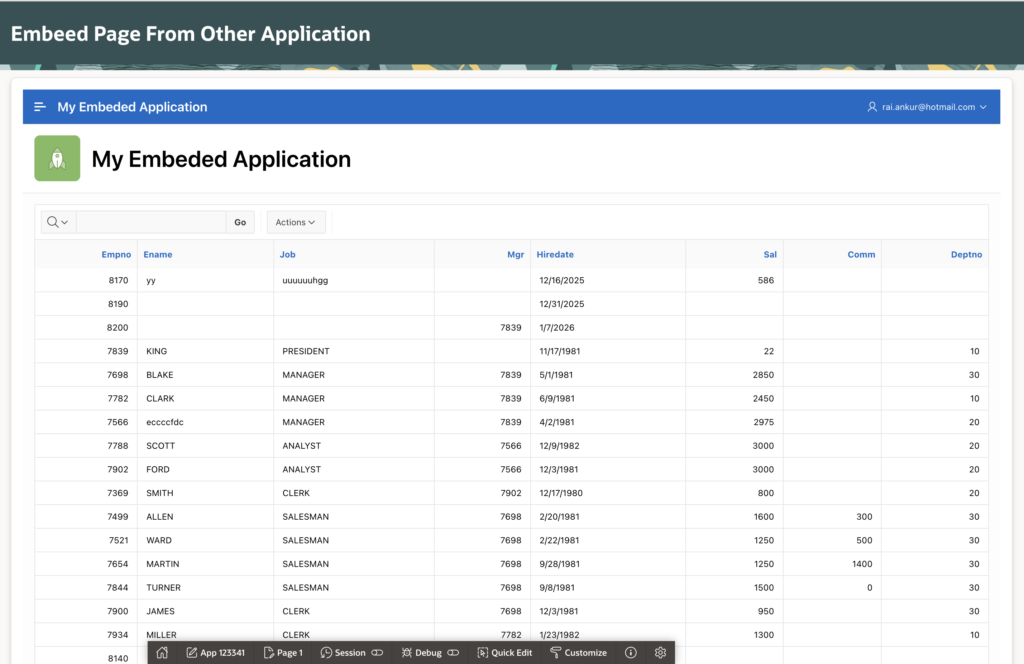
✔ Embedded page from another APEX application
✔ Unified navigation experience
✔ No re-authentication
✔ Full-screen responsive layout
✔ Clean UI without duplicate headers
🏁 Conclusion
Embedding a page from another Oracle APEX application using the URL Region is a simple yet effective way to create a seamless multi-application experience within the same workspace.
By combining:
- Session Sharing
- iFrame configuration
- CSS adjustments
- JavaScript enhancements
…you can deliver a smooth and professional UI without complex integrations. While this solution may not fit every use case, it works exceptionally well when plug-ins or deep refactoring aren’t an option.
🔗 Final Thoughts
If you found this blog useful:
👍 Like
🔄 Share with your APEX friends
💬 Comment your ideas or improvements
📌 Bookmark for future reference
Happy APEXing! 🚀

Hi, I’m Ankur Rai, an Oracle APEX Developer with 6+ years of professional experience in building enterprise applications. I specialize in creating scalable and efficient solutions using Oracle APEX, PL/SQL, and SQL to solve real-world business challenges.
I am a 3X Oracle APEX Professional Certified Developer and also an Oracle ACE Associate Member, actively contributing to the Oracle community by sharing knowledge, insights, and best practices. Through my blogs, I aim to help developers learn, grow, and build better Oracle APEX applications together.