
A practical implementation using localStorage heartbeats, Web Workers, and a background scheduler to enforce single-tab sessions — without breaking your users’ experience.
The problem with multiple tabs
Enterprise APEX applications often need to restrict users to a single active browser tab. Whether it’s for license compliance, preventing conflicting edits, or simply avoiding stale data problems, uncontrolled multi-tab access can cause real headaches in production systems.
The challenge is that the web is stateless by design. There’s no native browser API that says “this user already has my app open.” So we need to build our own coordination layer — one that works in real time, survives page navigation, and cleans up after itself gracefully.
This post walks through a complete solution: a localStorage-based heartbeat system on the frontend, a persistent Web Worker for background APEX server calls, and a DBMS_SCHEDULER job that continuously prunes stale sessions.
Architecture overview
The solution has four interlocking parts that work together:
Page-level JS
Tab registration, localStorage heartbeat, and duplicate detection on every page load
Web Worker
Runs in the background; sends periodic AJAX heartbeats to the APEX server even when the tab isn’t focused
APEX process
Server-side PL/SQL that upserts session records in USER_SESSION on each heartbeat
DB Scheduler
DBMS_SCHEDULER job running every 3 seconds, deleting stale sessions older than 15 seconds
Key insight: The frontend heartbeat is fast and local (no round-trip), giving instant feedback. The backend heartbeat ensures sessions are tracked even when localStorage events aren’t fired cross-tab (e.g. incognito vs regular windows).
Step 1 — The USER_SESSION table
Before any code runs, you need a table to track active sessions. Here’s a minimal structure that supports everything in this guide:
CREATE TABLE USER_SESSION (
  SESSION_ID     VARCHAR2(50)   PRIMARY KEY,
  USERNAME       VARCHAR2(100),
  LOGIN_TIME     TIMESTAMP,
  LAST_ACTIVITY  TIMESTAMP,
  PRE_AUTHENTICATIO_SESSION_STATUS VARCHAR2(1),
  USER_AGENT     VARCHAR2(500),
  IP_ADDRESS     VARCHAR2(50),
  APEX_SESSION   VARCHAR2(100),
  CONCURRENT_ID  NUMBER
);
The PRE_AUTHENTICATIO_SESSION_STATUS flag of ‘Y’ marks an active session. The LAST_ACTIVITY timestamp is the heartbeat column — rows that stop updating are automatically pruned by the scheduler.
Step 2 — Login page process
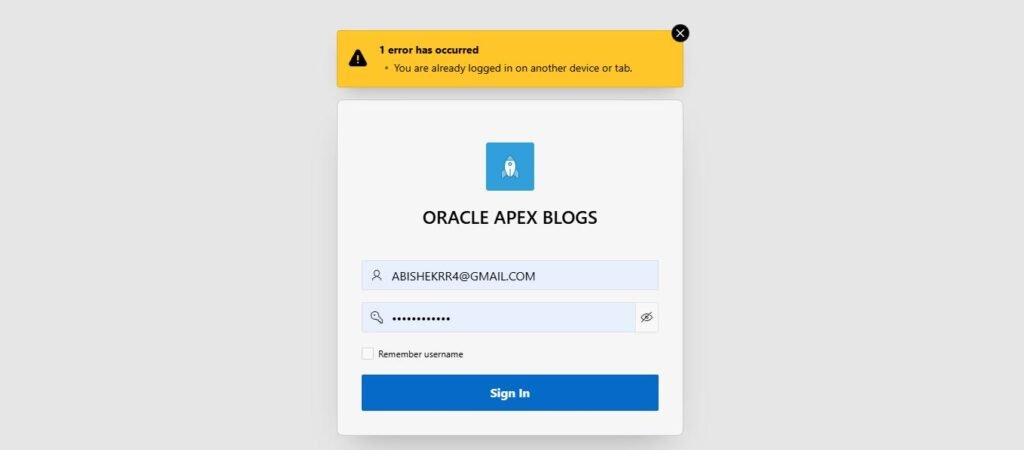
On the login page, before allowing access, check whether the user already has an active session. If they do, block the login with a friendly error. Otherwise, insert a new session record.
DECLARE
  v_count NUMBER;
BEGIN
  SELECT COUNT(*) INTO v_count
    FROM  USER_SESSION
   WHERE UPPER(username) = UPPER(:P9999_USERNAME);

  IF v_count > 0 THEN
    APEX_ERROR.ADD_ERROR(
      p_message => 'You are already logged in on another device or tab.',
      p_display_location => APEX_ERROR.c_inline_in_notification
    );
  ELSE
    INSERT INTO USER_SESSION (
      SESSION_ID, USERNAME, LOGIN_TIME,
      PRE_AUTHENTICATIO_SESSION_STATUS,
      USER_AGENT, IP_ADDRESS, APEX_SESSION,
      CONCURRENT_ID
    ) VALUES (
      SYS_GUID(), :P9999_USERNAME, SYSTIMESTAMP, 'Y',
      OWA_UTIL.GET_CGI_ENV('HTTP_USER_AGENT'),
      OWA_UTIL.GET_CGI_ENV('REMOTE_ADDR'),
      V('APP_SESSION'),
      USER_SESSION_SEQ.NEXTVAL
    );
    COMMIT;
  END IF;
END;
Note: Because sessions are pruned by the scheduler, a user whose browser crashed (without a clean logout) will be able to log back in after ~15 seconds of inactivity. This is by design — it prevents permanent lockouts.
Step 3 — Global page JavaScript (main.js)
Add this to the Page Load event on your Global Page (page 0). It runs on every APEX page transition and performs three jobs: registers the current tab, watches for new tabs, and starts the Web Worker.
Tab identity and localStorage heartbeat
Each tab generates a random tabId stored in sessionStorage (not localStorage, so it’s tab-local). The heartbeat record in localStorage is a JSON object keyed by tabId, with the username and a timestamp:
// ------------------------------------------------------------
// main.js  — APEX Page-level Heartbeat Manager
// ------------------------------------------------------------

const username = "&APP_USER.".trim().toLowerCase();
const heartbeatInterval = 3000;   // 3 seconds
const heartbeatTimeout = 7000;    // 7 seconds
const storageKey = "heart_beat_save";
const tabId = Math.random().toString(36).substr(2, 9);
sessionStorage.setItem("tab_id", tabId);
$s('P0_GET_TAB_ID',tabId);

function getHeartbeats(){
  try { return JSON.parse(localStorage.getItem(storageKey)) || {}; }
  catch { localStorage.removeItem(storageKey); return {}; }
}
function setHeartbeats(hb){ localStorage.setItem(storageKey, JSON.stringify(hb)); }
function cleanHeartbeats(hb){
  const now = Date.now();
  for(const id in hb){
    const rec = hb[id];
    if(rec && now - rec.time > heartbeatTimeout) delete hb[id];
  }
  setHeartbeats(hb);
  return hb;
}
function isAnotherTabActive(hb){
  const now = Date.now();
  return Object.keys(hb).some(id => id !== tabId && hb[id]?.username === username && now - hb[id].time <= heartbeatTimeout);
}
function showSingleTabModal(){
  const modal = document.getElementById("singleTabModal");
  if(modal) modal.style.display = "flex";
  console.warn("❌ Duplicate tab detected for user:", username);
}

(function(){
  let hb = cleanHeartbeats(getHeartbeats());
  if(isAnotherTabActive(hb)){ showSingleTabModal(); return; }

  hb[tabId] = { username, time: Date.now() };
  setHeartbeats(hb);

  // keep localStorage fresh
  setInterval(()=>{
    const h = getHeartbeats();
    h[tabId] = { username, time: Date.now() };
    cleanHeartbeats(h);
    setHeartbeats(h);
  }, heartbeatInterval);

  window.addEventListener("storage", e => {
    if(e.key === storageKey){
      const h = cleanHeartbeats(getHeartbeats());
      if(isAnotherTabActive(h)) showSingleTabModal();
    }
  });

  window.addEventListener("unload", ()=>{
    const h=getHeartbeats();
    delete h[tabId];
    setHeartbeats(h);
  });

  // --- start worker ---
  if(window.Worker){
    const workerUrl = "#APP_FILES#Web_Worker.js";
    window.worker = new Worker(workerUrl);

    const appId = $v('pFlowId');
    const pageId = $v('pFlowStepId');
    const sessionId = $v('pInstance');

    window.worker.postMessage({
      action: "init",
      username,
      appId,
      pageId,
      sessionId,
      interval: heartbeatInterval
    });

    window.worker.onmessage = (e) => {
      const d = e.data;

      if(d.status === "init") {
        console.log("📨 Worker init:", d.message);

      } else if(d.status === "ok"){
       // alert("✅ HEARTBEAT UPDATED FOR " + username + " at " + new Date(d.time).toLocaleTimeString());
        console.log("💓 Worker beat @", new Date(d.time).toLocaleTimeString());

      } else if(d.status === "deleted"){
        //alert("🧹 Session deleted. Stopping heartbeat.");
        stopHeartbeat();

      } else if(d.status === "stopped"){
        console.log("🛑 Worker stopped successfully.");

      } else if(d.status === "error"){
       // alert("❌ HEARTBEAT ERROR: " + d.message);
        console.error("Worker error:", d);
      }
    };

    console.log("✅ Worker started for", username);
  } else {
    console.warn("⚠️ Web Workers not supported in this browser.");
  }

})();

// ---------------- Stop Function ----------------
let heartbeatStopped = false;
function stopHeartbeat() {
  if(window.worker && !heartbeatStopped) {
    window.worker.postMessage({ action: "stop" });
    window.worker.terminate();
    heartbeatStopped = true;
    console.log("🛑 Heartbeat stopped and worker terminated.");
  }
}

// stop when tab closes
window.addEventListener("beforeunload", function() {
  stopHeartbeat();
});
Starting the Web Worker
After registering in localStorage, the script starts a Web Worker uploaded as a static application file. The worker receives the APEX session context and starts sending server-side heartbeats independently of the main thread:
if (window.Worker) {
  const workerUrl = "#APP_FILES#Web_Worker.js";
  window.worker = new Worker(workerUrl);

  window.worker.postMessage({
    action:    "init",
    username,
    appId:     $v('pFlowId'),
    pageId:    $v('pFlowStepId'),
    sessionId: $v('pInstance'),
    interval:  heartbeatInterval
  });
}
Step 4 — The Web Worker (Web_Worker.js)
Upload this file as a static application file at #APP_FILES#Web_Worker.js. The worker lives outside the main thread, so it keeps sending heartbeats even when the user is idle or the tab is in the background — which is exactly what you need for reliable session tracking.
It calls the HEARTBEAT_PROCESS Application Process via a POST to /ords/wwv_flow.ajax, passing the username as x01 and the action (UPDATE or DELETE) as x02:
let heartbeatTimer = null;

self.postMessage({ status: "init", message: "Worker file loaded and started!" });

self.onmessage = function (e) {
  const data = e.data;

  if (data.action === "init") {
    const { username, appId, pageId, sessionId, interval } = data;
    self.postMessage({ status: "init", message: `Worker initialized for ${username}` });

    const sendHeartbeat = function () {
      if (!username) return;

      const apexUrl = `${location.origin}/ords/wwv_flow.ajax`;

      const params = new URLSearchParams();
      params.append("p_flow_id", appId);
      params.append("p_flow_step_id", pageId);
      params.append("p_instance", sessionId);
      params.append("p_request", "APPLICATION_PROCESS=HEARTBEAT_PROCESS");
      params.append("x01", username);
      params.append("x02", "UPDATE");

      fetch(apexUrl, {
        method: "POST",
        headers: { "Content-Type": "application/x-www-form-urlencoded" },
        body: params.toString()
      })
      .then(r => r.text())
      .then(text => {
        let response;
        try { response = JSON.parse(text); } catch { response = { status: "success" }; }

        if(response.status === "deleted"){
          self.postMessage({ status: "deleted", time: Date.now() });
          clearInterval(heartbeatTimer);
        } else {
          self.postMessage({ status: "ok", time: Date.now(), data: response });
        }
      })
      .catch(err => {
        self.postMessage({ status: "error", message: err.message });
      });
    };

    sendHeartbeat();
    heartbeatTimer = setInterval(sendHeartbeat, interval);
  }

  if (data.action === "stop") {
    clearInterval(heartbeatTimer);
    self.postMessage({ status: "stopped", message: "Worker stopped" });
  }
};
If the server returns { “status”: “deleted” }, the worker posts that back to the main thread, which calls stopHeartbeat() — cleanly terminating the worker.
Step 5 — The HEARTBEAT_PROCESS application process
Create this as an AJAX Callback Application Process named HEARTBEAT_PROCESS. It handles two actions:
- UPDATE — sets LAST_ACTIVITY = SYSTIMESTAMP for the user. If no row exists yet, it inserts one.
- DELETE — removes session rows inactive for more than 30 seconds (a fallback; the scheduler handles routine cleanup).
DECLARE
  v_user   VARCHAR2(100) := LOWER(apex_application.g_x01);
  v_action VARCHAR2(10)  := NVL(apex_application.g_x02, 'UPDATE');
BEGIN
  IF v_action = 'UPDATE' THEN
    UPDATE USER_SESSION
       SET LAST_ACTIVITY = SYSTIMESTAMP
     WHERE LOWER(USERNAME) = v_user
       AND PRE_AUTHENTICATIO_SESSION_STATUS = 'Y';

    IF SQL%ROWCOUNT = 0 THEN
      -- Insert on first heartbeat if login process missed it
      INSERT INTO USER_SESSION (...)
      VALUES (SYS_GUID(), v_user, SYSTIMESTAMP, SYSTIMESTAMP, 'Y', ...);
    END IF;

  ELSIF v_action = 'DELETE' THEN
    DELETE FROM USER_SESSION
     WHERE LAST_ACTIVITY < (SYSTIMESTAMP - INTERVAL '30' SECOND)
       AND PRE_AUTHENTICATIO_SESSION_STATUS = 'Y';
  END IF;

  COMMIT;
  HTP.P('{ "status": "success" }');
EXCEPTION
  WHEN OTHERS THEN
    HTP.P('{ "status": "error", "message": "' || SQLERRM || '" }');
END;
Step 6 — The duplicate tab modal
On the Global Page, create a static HTML region and paste in the modal markup. It starts hidden (display:none) and is shown by showSingleTabModal() when a duplicate is detected. The modal covers the entire page with a blurred overlay and a clear, friendly message:
<div id="singleTabModal"
     style="display:none; position:fixed; backdrop-filter:blur(8px);
            top:0; left:0; width:100%; height:100%;
            background-color:white; z-index:9999;
            align-items:center; justify-content:center;">
  <div class="tab-warning">
    <h2>This website is already open in another tab</h2>
    <p class="tab-message">Please use the existing tab to continue.</p>
  </div>
</div>
The modal uses position:fixed intentionally here — it’s native browser HTML, not inside the APEX visualizer widget, so this constraint doesn’t apply to your APEX implementation.
Step 7 — The cleanup scheduler
The final piece is a DBMS_SCHEDULER job that runs every 3 seconds and deletes any session row with a LAST_ACTIVITY older than 15 seconds. This ensures that if a user closes their browser without a clean logout, the session slot frees itself automatically — typically within 15–18 seconds.
BEGIN
  DBMS_SCHEDULER.CREATE_JOB(
    job_name        => 'SESSION_CLEANUP_JOB',
    job_type        => 'PLSQL_BLOCK',
    job_action      => q'[
      BEGIN
        DELETE FROM USER_SESSION
        WHERE LAST_ACTIVITY < (SYSTIMESTAMP - INTERVAL '15' SECOND);
        COMMIT;
      END;
    ]',
    start_date      => SYSTIMESTAMP,
    repeat_interval => 'FREQ=SECONDLY;INTERVAL=3',
    enabled         => TRUE,
    auto_drop       => FALSE,
    comments        => 'Deletes inactive user sessions older than 15 seconds'
  );
END;
Performance note: A scheduler running every 3 seconds on a busy system will generate measurable I/O. Add an index on LAST_ACTIVITY and consider whether 15-second expiry vs 3-second interval is the right trade-off for your workload. You can safely increase the interval to 10–15 seconds with a corresponding increase in the expiry window.
Implementation checklist
- Create theUSER_SESSIONtable and sequence (USER_SESSION_SEQ)
- Add the PL/SQL login check to your login page as a Before Header process
- Create theHEARTBEAT_PROCESSApplication Process (type: AJAX Callback)
- UploadWeb_Worker.jsas a static application file
- Add the main JavaScript block to the Global Page → Page Load → Execute when Page Loads
- Add the modal HTML to a static HTML region on the Global Page
- Run theDBMS_SCHEDULER.CREATE_JOBblock once in SQL Workshop
- Test by opening two tabs with the same user — the second should show the modal within 3 seconds
How it all fits together
When a user opens the app, the login process inserts a session record. The Global Page JS registers the tab in localStorage and starts the Web Worker. Every 3 seconds, the worker POSTs to HEARTBEAT_PROCESS, refreshing LAST_ACTIVITY.
If the same user opens a second tab, the page-load script reads localStorage and immediately sees a heartbeat from the first tab (with a timestamp less than 7 seconds old). The modal blocks the duplicate tab before any APEX content is rendered.
When the user closes their browser — or the network drops — heartbeats stop. After 15 seconds, the scheduler removes the row. The next login attempt succeeds cleanly.
The dual-layer approach (localStorage for instant cross-tab detection + server heartbeat for persistent tracking) makes this solution robust across different browser configurations, incognito windows, and network interruptions.

Hi, I’m Abishek R, an Oracle APEX Developer with 3 years of professional experience in designing and building enterprise applications. I am passionate about solving real-world business challenges using Oracle APEX, PL/SQL, and SQL. Through this blog, I share practical insights, useful tips, and best practices drawn from my hands-on experience to help developers learn, build better applications, and grow together within the Oracle APEX community.