
🔹 About
Understanding how users interact with your Oracle APEX application is essential for improving usability, tracking engagement, and making data-driven decisions.
In this blog, we’ll learn how to integrate Google Analytics (GA4) with Oracle APEX to track:
✅ Page visits
✅ User behavior
✅ Navigation flow
✅ Session analytics
✅ Custom events
By the end of this guide, you’ll have a fully integrated analytics solution for your Oracle APEX application.
🛠️ Tools and Technologies
- Oracle APEX
- Google Analytics 4 (GA4)
- JavaScript
- Google Tag Manager (Optional)
🚀 Why Use Google Analytics in Oracle APEX?
Google Analytics helps monitor application usage and user behavior.
🎯 Benefits
✅ Track application traffic
✅ Understand user behavior
✅ Identify popular pages
✅ Monitor session duration
✅ Track custom actions/events
✅ Improve application UX
📌 What is Google Analytics 4 (GA4)?
GA4 is the latest version of Google Analytics that provides:
✔ Event-based tracking
✔ Cross-platform analytics
✔ Enhanced reporting
✔ Real-time monitoring
Unlike older Universal Analytics, GA4 focuses on events instead of sessions.
🚀 Step 1: Create Google Analytics Account
Go to:
https://analytics.google.comCreate:
- Analytics Account
- Property
- Data Stream
After setup, Google provides a:
Measurement IDExample:
G-XXXXXXXXXX📌 Step 2: Get GA4 Tracking Script
Google Analytics provides a script similar to:
<!-- Google tag (gtag.js) -->
<script async src="https://www.googletagmanager.com/gtag/js?id=G-XXXXXXXXXX"></script>

<script>
  window.dataLayer = window.dataLayer || [];

  function gtag(){
      dataLayer.push(arguments);
  }

  gtag('js', new Date());

  gtag('config', 'G-XXXXXXXXXX');
</script>
📌 Step 3: Add Script in Oracle APEX
Go to:
Shared Components → User Interface AttributesUnder:
Desktop → JavaScript → Function and Global Variable DeclarationPaste the GA4 tracking code.
🚀 Alternative Method: Page Level Integration
You can also add the script directly at page level.
Go to:
Page Designer → Page → Execute when Page Loads
Example:
<script async src="https://www.googletagmanager.com/gtag/js?id=G-XXXXXXXXXX"></script>

<script>
  window.dataLayer = window.dataLayer || [];

  function gtag(){
      dataLayer.push(arguments);
  }

  gtag('js', new Date());

  gtag('config', 'G-XXXXXXXXXX');
</script>
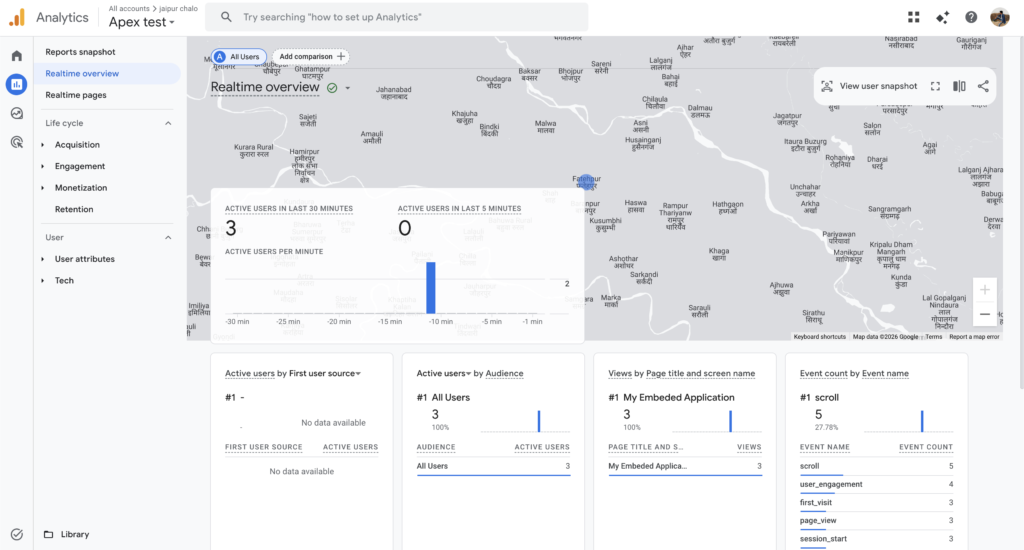
📌 Step 4: Verify Google Analytics Integration
Open your application.
Then in GA4:
Reports → RealtimeYou should see:
✅ Active users
✅ Current page visits
✅ Events triggered
🚀 Step 5: Track Custom Events
One of the most powerful GA4 features is custom event tracking.
📌 Example: Track Button Click
$('#save_btn').click(function(){ gtag('event', 'save_button_click', { event_category: 'Button', event_label: 'Save Employee', value: 1 }); });📌 Example: Track Interactive Grid Save
gtag('event', 'ig_save', { event_category: 'Interactive Grid', event_label: 'Employee Grid Save' });📌 Example: Track Login Activity
gtag('event', 'user_login', { event_category: 'Authentication', event_label: 'APEX Login' });🚀 Step 6: Track Page Navigation
apex.navigation.redirect = function(url){ gtag('event', 'page_navigation', { destination_url: url }); };📊 Useful Metrics You Can Track
| Metric | Description |
|---|---|
| Page Views | Most visited pages |
| Active Users | Current online users |
| Session Duration | User engagement |
| Events | User interactions |
| Bounce Rate | Exit behavior |
| Device Type | Desktop vs Mobile |
🎯 Real-World Use Cases
Google Analytics in APEX is useful for:
✔ Enterprise dashboards
✔ Employee portals
✔ Customer self-service apps
✔ Internal business applications
✔ Public-facing applications
🔥 Using Google Tag Manager (Optional)
Instead of adding scripts directly in APEX, you can use:
Google Tag Manager (GTM)Benefits:
✅ Centralized management
✅ No redeployment needed
✅ Easier event tracking
✅ Better scalability
📌 Example GTM Script
<!-- Google Tag Manager -->
<script>
(function(w,d,s,l,i){w[l]=w[l]||[];
w[l].push({'gtm.start':

new Date().getTime(),event:'gtm.js'});

var f=d.getElementsByTagName(s)[0],
j=d.createElement(s),dl=l!='dataLayer'?'&l='+l:'';

j.async=true;

j.src='https://www.googletagmanager.com/gtm.js?id='+i+dl;

f.parentNode.insertBefore(j,f);

})(window,document,'script','dataLayer','GTM-XXXX');
</script>
⚠️ Important Considerations
🔹 GDPR / Privacy Compliance
Always inform users if tracking is enabled.
You may need:
✅ Cookie consent popup
✅ Privacy policy updates
🔹 Avoid Sensitive Data Tracking
Do NOT send:
❌ Passwords
❌ Personal information
❌ Financial data
to Google Analytics.
🔹 Performance
Load scripts asynchronously to avoid slowing down APEX pages.
🚀 Advanced Enhancements
You can extend analytics with:
✔ Custom dashboards in APEX
✔ User journey tracking
✔ Heatmaps
✔ Conversion funnels
✔ Error monitoring
✔ Session replay tools
📊 Example Architecture
Oracle APEX App ↓ Google Analytics Script ↓ User Interactions ↓ GA4 Event Tracking ↓ Analytics Dashboard🎉 Conclusion
Integrating Google Analytics with Oracle APEX provides powerful insights into how users interact with your application.
By combining:
✅ Oracle APEX
✅ Google Analytics 4
✅ Event Tracking
✅ JavaScript
you can create smarter, data-driven applications with better user experiences.
Whether it’s monitoring employee portals, customer applications, or enterprise dashboards, analytics helps you make informed decisions and continuously improve your applications.
Happy Coding!

Hi, I’m Ankur Rai, an Oracle APEX Developer with 6+ years of professional experience in building enterprise applications. I specialize in creating scalable and efficient solutions using Oracle APEX, PL/SQL, and SQL to solve real-world business challenges.
I am a 3X Oracle APEX Professional Certified Developer and also an Oracle ACE Associate Member, actively contributing to the Oracle community by sharing knowledge, insights, and best practices. Through my blogs, I aim to help developers learn, grow, and build better Oracle APEX applications together.