
🔹 About
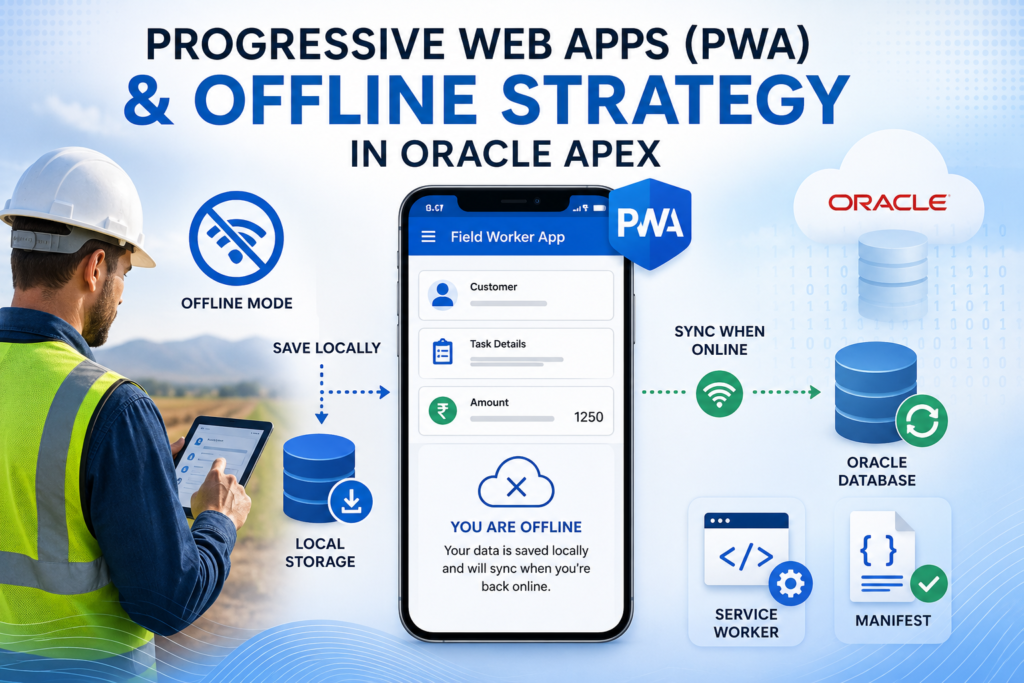
Oracle APEX makes it incredibly easy to convert applications into Progressive Web Apps (PWA). But the real challenge begins when users expect the application to continue working even without internet connectivity.
In this blog, we’ll explore how to build a true offline-capable Oracle APEX application using:
✔ Progressive Web Apps (PWA)
✔ Service Workers
✔ Browser Local Storage
✔ Offline Data Synchronization
✔ Custom Offline Page Design
This approach is especially useful for:
- Field workers
- Sales teams
- Survey applications
- Warehouse management systems
- Remote inspection apps
🛠️ Tools and Technologies
- Oracle APEX
- JavaScript
- Browser Local Storage
- Service Workers
- Oracle Database
- PWA Manifest
🚀 What is a Progressive Web App (PWA)?
A Progressive Web App is a web application that behaves like a native mobile app.
With PWA, users can:
✅ Install the app on mobile/desktop
✅ Access the app fullscreen
✅ Use caching for faster performance
✅ Work offline (partially/full)
Oracle APEX provides built-in support for enabling PWA functionality.
🔥 The Real Challenge: Offline Capability
Enabling PWA is easy.
The difficult part is:
👉 What happens when internet connectivity drops?
Normally:
❌ Form submissions fail
❌ Data gets lost
❌ Users cannot continue work
For field workers, this becomes a major business problem.
🎯 Goal of This Strategy
We want users to:
✔ Continue entering data offline
✔ Save data locally in browser storage
✔ Automatically sync to Oracle DB when internet returns
📌 Step 1: Enable PWA in Oracle APEX
Go to:
Shared Components → Progressive Web AppEnable:
- ✔ Installable
- ✔ Offline Support
- ✔ Service Worker
📌 Step 2: Configure PWA Manifest
The Manifest file controls how the application behaves as an installed app.
Example:
{
  "name": "Field Worker App",
  "short_name": "FieldApp",
  "start_url": "/ords/r/app",
  "display": "standalone",
  "background_color": "#ffffff",
  "theme_color": "#1976D2",
  "icons": [
    {
      "src": "icon-192.png",
      "sizes": "192x192",
      "type": "image/png"
    }
  ]
}
📌 Step 3: Configure Service Worker
The Service Worker acts like a proxy between browser and server.
It enables:
✅ Offline caching
✅ Faster loading
✅ Background sync
Example:
self.addEventListener('install', event => {
    event.waitUntil(
        caches.open('apex-cache').then(cache => {
            return cache.addAll([
                '/',
                '/offline.html'
            ]);
        })
    );
});
📌 Step 4: Detect Online / Offline Status
Use JavaScript to detect internet connectivity.
window.addEventListener('offline', function() {
   console.log('Internet Disconnected');
});

window.addEventListener('online', function() {
   console.log('Internet Restored');
});
📌 Step 5: Save Data in Browser Local Storage
When internet is unavailable, save data locally instead of losing it.
Example: Save Offline Data
function saveOfflineData(empname, salary) {

   let offlineData =
      JSON.parse(localStorage.getItem("emp_data")) || [];

   offlineData.push({
      empname: empname,
      salary: salary,
      sync_status: 'PENDING'
   });

   localStorage.setItem(
      "emp_data",
      JSON.stringify(offlineData)
   );

   console.log("Saved Offline");
}
📌 Step 6: Synchronize Data When Internet Returns
Once connectivity returns:
✔ Read local storage
✔ Push data to Oracle DB
✔ Clear synced records
Example Sync Logic
async function syncOfflineData() {

   let offlineData =
      JSON.parse(localStorage.getItem("emp_data")) || [];

   for (let row of offlineData) {

      await apex.server.process(
         "SAVE_EMP_DATA",
         {
            x01: row.empname,
            x02: row.salary
         }
      );

   }

   localStorage.removeItem("emp_data");

   console.log("Sync Completed");
}
📌 Step 7: Trigger Automatic Sync
window.addEventListener('online', function() {
   syncOfflineData();
});
📌 Step 8: Create AJAX Callback Process
BEGIN

   INSERT INTO emp_offline_data
   (
      emp_name,
      salary
   )
   VALUES
   (
      apex_application.g_x01,
      apex_application.g_x02
   );

END;
🎨 The Offline Page Explained
Oracle APEX also allows you to customize the Offline Page shown when users lose connectivity.
Before modifying the Offline Page, review the Oracle APEX documentation related to:
Progressive Web App (PWA) Messages Requiring TranslationYou will find several message names starting with:
APEX.PWA.*These messages control:
- Offline page title
- Offline page body
- PWA error messages
- Unsupported device messages
📌 Important Offline Messages
🔹 Offline Page Title
APEX.PWA.OFFLINE.TITLE🔹 Offline Page Body
APEX.PWA.OFFLINE.BODYThis is the most important message because it controls the actual HTML displayed on the Offline Page.
💡 Why Use SVG?
It is recommended to use SVG graphics instead of PNG/JPG images because:
✅ Lightweight
✅ Browser renders directly
✅ No server dependency
✅ Works perfectly offline
Unlike PNG/JPG files, SVG does not require an additional server request.
🚀 Steps to Customize Offline Page
Step 1
Go to:
Shared ComponentsStep 2
Under:
Globalization → Text MessagesStep 3
Click:
Create Text MessageStep 4
Enter Message Name:
APEX.PWA.OFFLINE.BODYStep 5
Select the appropriate language.
Repeat for all supported languages.
Step 6
Enter your custom HTML / SVG / Text.
Example:
<div style="text-align:center;padding:40px;">

  <svg width="120" height="120" viewBox="0 0 24 24">
      <path fill="#1976D2"
            d="M12 2L1 21h22L12 2z"/>
  </svg>

  <h2>You Are Offline</h2>

  <p>
     Internet connection is currently unavailable.
     Your data will sync automatically once connection returns.
  </p>

</div>
🔥 Architecture Flow
User Enters Data
        ↓
Internet Available?
        ↓
   YES → Save to Oracle DB
        ↓
   NO  → Save to Local Storage
        ↓
Internet Restored
        ↓
Sync Local Data to Oracle DB
🎯 Advantages of Offline Strategy
✅ No data loss
✅ Better field usability
✅ Faster response time
✅ Improved user experience
✅ Works in low-network areas
⚠️ Challenges in Offline APEX Apps
🔹 Conflict Resolution
What if the same record changes online and offline?
🔹 Data Security
Avoid storing sensitive data in local storage.
🔹 Browser Storage Limits
Local Storage has size limitations.
🔹 Sync Failures
Need retry logic for failed synchronization.
🚀 Advanced Enhancements
You can further improve the solution with:
✔ IndexedDB instead of Local Storage
✔ Background Sync API
✔ Offline Queue Management
✔ Sync Status Dashboard
✔ Push Notifications
📊 Real-World Use Cases
This strategy is ideal for:
- Logistics apps
- Delivery tracking
- Field inspections
- Survey collection systems
- Healthcare mobility solutions
🎉 Conclusion
Oracle APEX makes Progressive Web Apps easy, but building a true offline-first application requires additional planning and strategy.
By combining:
✅ PWA
✅ Service Workers
✅ Browser Local Storage
✅ Offline Synchronization
✅ Custom Offline Pages
you can create enterprise-grade applications that continue working even when the internet disappears.
This becomes a game changer for field workers and remote operations.

Hi, I’m Ankur Rai, an Oracle APEX Developer with 6+ years of professional experience in building enterprise applications. I specialize in creating scalable and efficient solutions using Oracle APEX, PL/SQL, and SQL to solve real-world business challenges.
I am a 3X Oracle APEX Professional Certified Developer and also an Oracle ACE Associate Member, actively contributing to the Oracle community by sharing knowledge, insights, and best practices. Through my blogs, I aim to help developers learn, grow, and build better Oracle APEX applications together.