
Kanban boards are one of the most powerful ways to manage tasks visually.
In this blog, I’ll walk you step-by-step through building a fully dynamic Project Task Kanban Board in Oracle APEX using the Material Kanban Board Plugin, including:
- ✅ Database Table Design
- ✅ SQL Query Structure (Columns, Groups, Items)
- ✅ Dynamic Links
- ✅ Avatars & Attachments
- ✅ Status-Based Styling
- ✅ Real UI Implementation
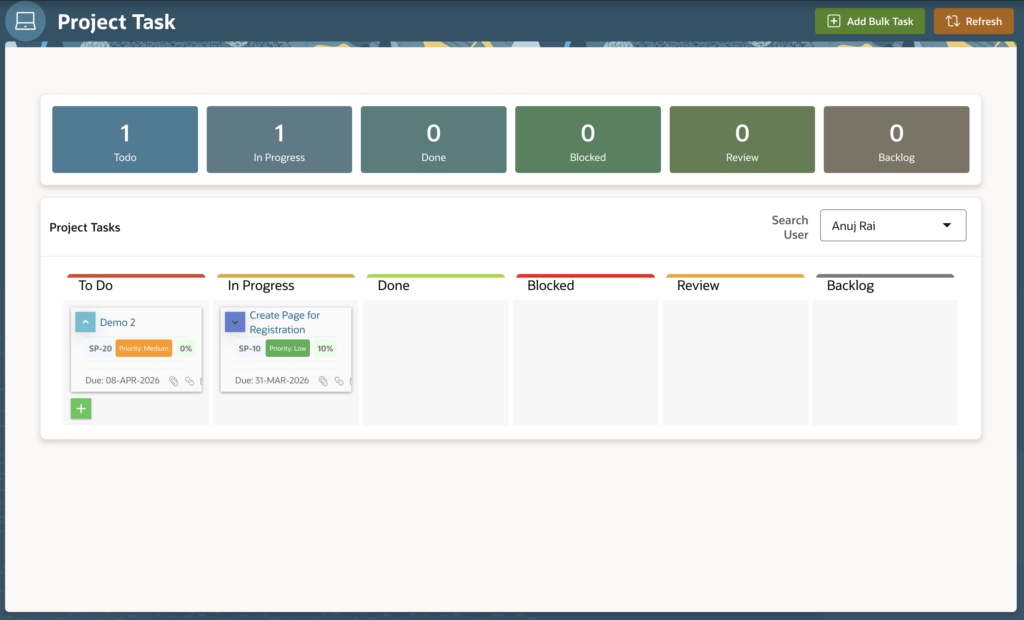
🎯 Final Output
Your Kanban board will look like this:
- Columns: Backlog, To Do, In Progress, Done, Blocked, Review
- Groups: Project-based grouping
- Cards: Task name, story points, priority, progress %, assignees, due date
- Drag & Drop enabled
🗄️ Step 1: Database Tables
Below is a simplified structure used for this implementation.
📌 PROJECTS Table
| Column Name | Data Type | Description |
|---|---|---|
| PROJECT_ID | NUMBER | Primary Key |
| PROJECT_NAME | VARCHAR2 | Project Name |
| PROJECT_MANAGER_ID | NUMBER | Manager Reference |
| STATUS | VARCHAR2 | Project Status |
📌 TASKS Table
| Column Name | Data Type | Description |
|---|---|---|
| TASK_ID | NUMBER | Primary Key |
| TASK_NAME | VARCHAR2 | Task Title |
| PROJECT_ID | NUMBER | Foreign Key |
| STATUS | VARCHAR2 | To Do / Done / etc |
| PRIORITY | VARCHAR2 | Low / Medium / High / Urgent |
| STORY_POINTS | NUMBER | Effort Estimation |
| PROGRESS_PERCENT | NUMBER | Completion % |
| DUE_DATE | DATE | Deadline |
| ASSIGNED_TO | VARCHAR2 | Comma-separated employee IDs |
| DISPLAY_SEQUENCE | NUMBER | Order in Column |
📌 EMPLOYEES Table
| Column Name | Data Type |
|---|---|
| EMP_NO | NUMBER |
| EMP_NAME | VARCHAR2 |
| EMP_IMAGE | BLOB |
🔌 Step 2: Install Material Kanban Board Plugin
- Download plugin from APEX Plugin Repository
- Go to:
Shared Components → Plugins → ImportOr Directly Download and install from here.
- Install the plugin
- Create new region → Select Material Kanban Board
🧠 Step 3: Understanding the Kanban Query Structure
Material Kanban plugin requires 3 logical sections:
| Section | Purpose |
|---|---|
| C | Columns |
| G | Groups |
| I | Items (Cards) |
🏗 Step 4: Define Columns (C)
These define board columns like To Do, Done, etc.
WITH C AS (
    SELECT 1 COLUMN_ID, 'To Do' COLUMN_TITLE FROM DUAL
    UNION ALL
    SELECT 2, 'In Progress' FROM DUAL
    UNION ALL
    SELECT 3, 'Done' FROM DUAL
)
In your implementation, you defined:
- Backlog
- To Do
- In Progress
- Done
- Blocked
- Review
Each column also includes:
- Font Awesome icon
- Header color
- Border styling
👥 Step 5: Define Groups (G)
Groups represent Projects.
SELECT
    P.PROJECT_ID AS GROUP_ID,
    P.PROJECT_NAME AS GROUP_TITLE
FROM PROJECTS P
WHERE P.PROJECT_ID = :P32_PROJECT_ID
Advanced Features You Added:
✔ Project manager avatar using:
APEX_UTIL.GET_BLOB_FILE_SRC
✔ Dynamic link to project page:
APEX_UTIL.PREPARE_URL✔ Status-based header styling
✔ Animated icon for “In Progress”
📝 Step 6: Define Items (I) – The Task Cards
Items represent individual tasks.
Mapping example:
CASE T.STATUS
    WHEN 'To Do' THEN 1
    WHEN 'In Progress' THEN 2
    WHEN 'Done' THEN 3
END AS COLUMN_ID
This maps task status to column.
🎨 Advanced Card Customization
Your implementation includes:
🔥 Priority Badge Styling
CASE T.PRIORITY
    WHEN 'High' THEN 'background-color:#D32F2F;'
    WHEN 'Medium' THEN 'background-color:#FF9800;'
END
👤 Assignee Avatars
You split comma-separated IDs using:
REGEXP_SUBSTRThen joined with EMPLOYEES table.
If:
- 1 assignee → Show avatar + name
- Multiple → Show group icon + count
Very clean UX design 👌
📎 Footer Icons with Modal Links
Each card has:
- Attachments icon
- Related links icon
- Schedule icon
- Assignees icon
All generated using:
APEX_UTIL.PREPARE_URL🎯 Final Query Structure
Your final SELECT joins:
FROM C
FULL OUTER JOIN G ON 1=1
LEFT JOIN I ON I.GROUP_ID = G.GROUP_ID
AND I.COLUMN_ID = C.COLUMN_ID
Ordered by:
C.COLUMN_ID,
G.GROUP_ID,
I.ID
This ensures proper Kanban rendering.
🖼 Step 7: Region Settings in APEX
After pasting query:
Set mapping in plugin attributes:
| Plugin Field | Column Mapping |
|---|---|
| Column ID | COLUMN_ID |
| Column Title | COLUMN_TITLE |
| Group ID | GROUP_ID |
| Group Title | GROUP_TITLE |
| Item ID | ID |
| Item Title | TITLE |
| Item Footer | FOOTER |
| Item Link | LINK |
| Item Icon | ICON |
| Card Color | CARD_COLOR |
💡 Why Material Kanban Plugin?
Compared to Classic Reports:
| Classic Report | Material Kanban |
|---|---|
| Static Layout | Drag & Drop |
| No column grouping | Multi-column board |
| Limited UI | Fully customizable |
| No visual workflow | Agile workflow ready |
🏁 Conclusion
With:
- Clean SQL structure
- Proper Column/Group/Item mapping
- APEX_UTIL functions
- Styling logic
You can build a fully enterprise-level Kanban Board inside Oracle APEX without external JS frameworks.

Hi, I’m Ankur Rai, an Oracle APEX Developer with 6+ years of professional experience in building enterprise applications. I specialize in creating scalable and efficient solutions using Oracle APEX, PL/SQL, and SQL to solve real-world business challenges.
I am a 3X Oracle APEX Professional Certified Developer and also an Oracle ACE Associate Member, actively contributing to the Oracle community by sharing knowledge, insights, and best practices. Through my blogs, I aim to help developers learn, grow, and build better Oracle APEX applications together.