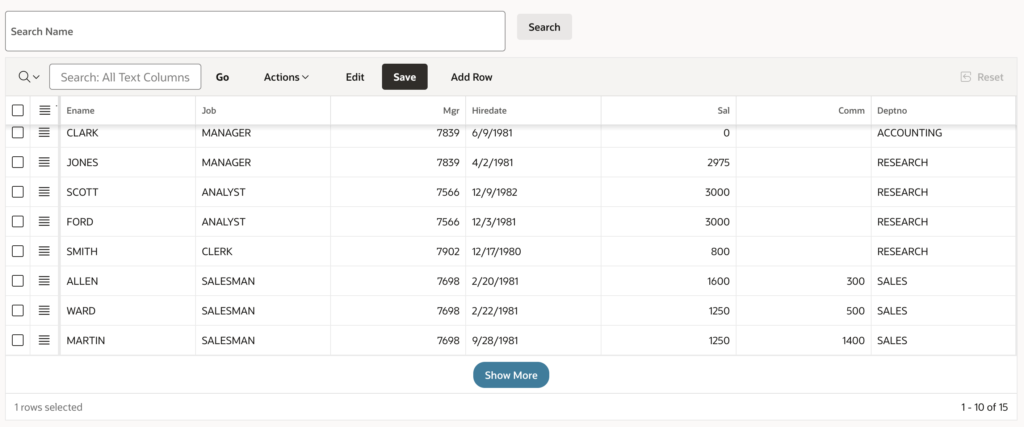

Interactive Grid is one of the most powerful components in Oracle APEX, widely used for displaying and managing large datasets.
By default, Interactive Grid uses pagination, which can sometimes impact user experience—especially when users prefer scrolling instead of switching pages.
In this blog, we’ll learn how to replace traditional pagination with a “Show More” (Load More) button, allowing users to load data dynamically.
🎯 What You Will Achieve
After implementing this solution:
✅ Users can load more records with a single click
✅ No need to navigate between pages
✅ Improved user experience for large datasets
✅ Cleaner and modern UI
🧰 Tools & Technologies
- Oracle APEX
- JavaScript
- Interactive Grid
💼 Business Requirement
In many enterprise applications:
- Users work with large datasets
- Pagination becomes tedious
- Users prefer continuous scrolling or incremental loading
For example:
👉 Employee listing screen
👉 Order management dashboard
👉 Inventory data grid
Instead of clicking “Next Page”, users should be able to:
➡ Click “Show More”
➡ Load additional records instantly
⚙️ Step-by-Step Implementation
Step 1️⃣ Create Interactive Grid
Create an Interactive Grid based on your table (e.g., EMP).
Step 2️⃣ Add Static ID
Go to:
Region → Advanced → Static IDSet a Static ID (optional but recommended):
emp_igStep 3️⃣ Add Initialization JavaScript Code
Navigate to:
Attributes → Advanced → JavaScript Initialization CodeAdd the following code:
function( options ) {
    options.defaultGridViewOptions = {
        pagination: {
            loadMore: true
        },
        rowsPerPage: 5
    };
    return options;
}
🧠 Code Explanation
🔹 loadMore: true
- Enables “Show More” button
- Replaces traditional pagination
- Loads additional records dynamically
🔹 rowsPerPage: 5
- Defines how many rows to load initially
- Each click on Show More loads the next set of rows
👉 You can increase this value based on performance needs.
🖥️ How It Works
Initial Load
- Only 5 records are displayed
When User Clicks “Show More”
- Next 5 records are loaded
- Data keeps appending to the grid
🎨 UI Behavior
Traditional Pagination ❌
⬇
Modern Load More Button ✅
This creates a smooth and app-like experience.
💡 Use Cases
This feature is very useful in:
- 📊 Reporting dashboards
- 🛒 Product listings
- 📦 Inventory systems
- 👨💼 Employee directories
- 📑 Audit logs
⚡ Pro Tips
✔ Use smaller rowsPerPage for better performance
✔ Combine with Lazy Loading for large datasets
✔ Avoid loading too many records at once
✔ Test performance for large tables
🚀 Advanced Enhancement Ideas
You can further enhance this feature:
👉 Add infinite scrolling (auto-load on scroll)
👉 Combine with search filters
👉 Add loading spinner
👉 Highlight newly loaded rows
🏁 Conclusion
Using a simple JavaScript configuration, you can transform your Interactive Grid into a modern, user-friendly component with a “Show More” button.
This small enhancement:
✔ Improves usability
✔ Reduces navigation friction
✔ Makes your app feel more responsive

Hi, I’m Ankur Rai, an Oracle APEX Developer with 6+ years of professional experience in building enterprise applications. I specialize in creating scalable and efficient solutions using Oracle APEX, PL/SQL, and SQL to solve real-world business challenges.
I am a 3X Oracle APEX Professional Certified Developer and also an Oracle ACE Associate Member, actively contributing to the Oracle community by sharing knowledge, insights, and best practices. Through my blogs, I aim to help developers learn, grow, and build better Oracle APEX applications together.