In real-world Oracle APEX applications, there are scenarios where users need to download multiple reports at once—for example, a detailed transactional report along with a master reference report.
Oracle APEX does not provide a built-in feature to download multiple files in a single click. However, by combining Application Processes, PL/SQL, and JavaScript, we can implement a clean and effective solution.
This blog demonstrates how to:
- Create two Application Processes
- Generate Excel files dynamically using PL/SQL
- Trigger multiple downloads from a single button click
Solution Overview
We will create:
- Application Process A – DOWNLOAD_EMP_RPT A complex Excel report with:
- EMP and DEPT join
- Dynamic column handling using DBMS_SQL
- Salary and commission totals
- Application Process B – DOWNLOAD_DEPT_RPT A simple department master Excel report
- JavaScript function to trigger both downloads sequentially
Step 1: Create Application Process – DOWNLOAD_EMP_RPT
Navigate to:
Shared Components → Application Processes → Create
Process Details
- Name: DOWNLOAD_EMP_RPT
- Point: Ajax Callback
Purpose
This process generates a dynamic Employee Salary Excel report with a totals row.
PL/SQL Code
DECLARE
    l_cursor_id   INTEGER;
    l_col_cnt     INTEGER;
    l_desc_tab    DBMS_SQL.DESC_TAB;
    l_col_val     VARCHAR2(4000);
    l_status      INTEGER;

    l_sql VARCHAR2(32767) := q'[
        SELECT
            e.EMPNO AS "Emp ID",
            e.ENAME AS "Employee Name",
            d.DNAME AS "Department",
            TO_CHAR(e.HIREDATE, 'DD-MON-YYYY') AS "Hired Date",
            e.SAL   AS "Salary",
            NVL(e.COMM, 0) AS "Commission"
        FROM EMP e
        JOIN DEPT d ON e.DEPTNO = d.DEPTNO
        ORDER BY d.DNAME, e.ENAME
    ]';

    l_total_sal   NUMBER := 0;
    l_total_comm  NUMBER := 0;
BEGIN
    owa_util.mime_header('application/vnd.ms-excel', FALSE);
    htp.p('Content-Disposition: attachment; filename="Employee_Report_' || TO_CHAR(SYSDATE, 'YYYYMMDD') || '.xls"');
    owa_util.http_header_close;

    htp.p('<html><body><table border="1">');
    htp.p('<tr><td colspan="6" style="font-weight:bold;text-align:center;">EMPLOYEE SALARY REPORT</td></tr>');

    l_cursor_id := DBMS_SQL.open_cursor;
    DBMS_SQL.parse(l_cursor_id, l_sql, DBMS_SQL.NATIVE);
    DBMS_SQL.describe_columns(l_cursor_id, l_col_cnt, l_desc_tab);

    FOR i IN 1 .. l_col_cnt LOOP
        DBMS_SQL.define_column(l_cursor_id, i, l_col_val, 4000);
    END LOOP;

    l_status := DBMS_SQL.execute(l_cursor_id);

    htp.p('<tr>');
    FOR i IN 1 .. l_col_cnt LOOP
        htp.p('<th>' || l_desc_tab(i).col_name || '</th>');
    END LOOP;
    htp.p('</tr>');

    WHILE DBMS_SQL.fetch_rows(l_cursor_id) > 0 LOOP
        htp.p('<tr>');
        FOR i IN 1 .. l_col_cnt LOOP
            DBMS_SQL.COLUMN_VALUE(l_cursor_id, i, l_col_val);

            IF UPPER(l_desc_tab(i).col_name) = 'SALARY' THEN
                l_total_sal := l_total_sal + NVL(TO_NUMBER(l_col_val),0);
            ELSIF UPPER(l_desc_tab(i).col_name) = 'COMMISSION' THEN
                l_total_comm := l_total_comm + NVL(TO_NUMBER(l_col_val),0);
            END IF;

            htp.p('<td>' || NVL(l_col_val,'-') || '</td>');
        END LOOP;
        htp.p('</tr>');
    END LOOP;

    htp.p('<tr style="font-weight:bold;">');
    htp.p('<td colspan="4">Grand Totals</td>');
    htp.p('<td>' || l_total_sal || '</td>');
    htp.p('<td>' || l_total_comm || '</td>');
    htp.p('</tr>');

    htp.p('</table></body></html>');
    DBMS_SQL.close_cursor(l_cursor_id);
    apex_application.stop_apex_engine;
END;
Step 2: Create Application Process – DOWNLOAD_DEPT_RPT
Process Details
- Name: DOWNLOAD_DEPT_RPT
- Point: Ajax Callback
Purpose
This process generates a simple Department master Excel file.
PL/SQL Code
DECLARE
BEGIN
    owa_util.mime_header('application/vnd.ms-excel', FALSE);
    htp.p('Content-Disposition: attachment; filename="Department_List.xls"');
    owa_util.http_header_close;

    htp.p('<html><body><table border="1">');
    htp.p('<tr><th>ID</th><th>Name</th><th>Location</th></tr>');

    FOR x IN (SELECT DEPTNO, DNAME, LOC FROM DEPT ORDER BY DEPTNO) LOOP
        htp.p('<tr>');
        htp.p('<td>' || x.DEPTNO || '</td>');
        htp.p('<td>' || x.DNAME || '</td>');
        htp.p('<td>' || x.LOC || '</td>');
        htp.p('</tr>');
    END LOOP;

    htp.p('</table></body></html>');
    apex_application.stop_apex_engine;
END;
Step 3: JavaScript Configuration
A. Function and Global Variable Declaration
Add the following code to Page → Function and Global Variable Declaration:
function downloadDemoFiles() {
    var urlEmp  = 'f?p=&APP_ID.:0:&SESSION.:APPLICATION_PROCESS=DOWNLOAD_EMP_RPT';
    var urlDept = 'f?p=&APP_ID.:0:&SESSION.:APPLICATION_PROCESS=DOWNLOAD_DEPT_RPT';

    window.open(urlEmp, '_self');

    setTimeout(function () {
        window.open(urlDept, '_self');
    }, 1000);
}
B. Create Button
- Button Name: BTN_DOWNLOAD
- Action: Defined by Dynamic Action
C. Dynamic Action
- Event: Click
- Action: Execute JavaScript Code
downloadDemoFiles();Important Browser Note ⚠️
Modern browsers may show a warning:
“This site is attempting to download multiple files”
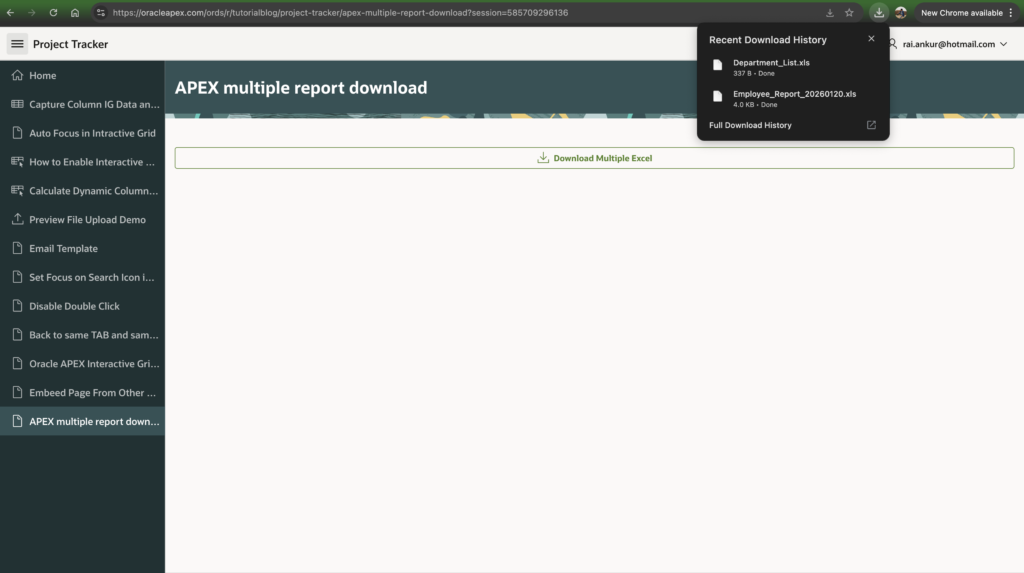
You must click Allow for the second file to download successfully. This is expected browser behavior and not an APEX issue.
Output
Conclusion
Using Application Processes + JavaScript, you can easily enable multiple Excel downloads from a single button in Oracle APEX.
This approach is:
- ✅ Secure (session-based)
- ✅ Flexible (dynamic SQL supported)
- ✅ Enterprise-ready
Perfect for finance reports, HR exports, and admin dashboards.
Happy APEXing! 🚀

Hi, I’m Ankur Rai, an Oracle APEX Developer with 6+ years of professional experience in building enterprise applications. I specialize in creating scalable and efficient solutions using Oracle APEX, PL/SQL, and SQL to solve real-world business challenges.
I am a 3X Oracle APEX Professional Certified Developer and also an Oracle ACE Associate Member, actively contributing to the Oracle community by sharing knowledge, insights, and best practices. Through my blogs, I aim to help developers learn, grow, and build better Oracle APEX applications together.