1. Introduction
This article explains How to Create a Floating Action Button (FAB) in Oracle APEX. The solution is implemented using a combination of Oracle APEX and CSS.
2. Tools and Technologies
To achieve the desired functionality, the following technologies are used:
- Oracle APEX
- CSS
3. Business Requirement
Users frequently perform key actions such as Create, Add, Upload, or Submit within Oracle APEX applications. Currently, these actions are placed within page buttons or regions that may require scrolling, especially on long forms or reports, leading to reduced usability and increased user effort.
This document outlines the steps required to Create a Floating Action Button (FAB) in Oracle APEX.
4. Implementation Steps
Step 1: Go to the Page Designer
Go to the Page designer where you want to Create a Floating Action Button (FAB). Create new Button. And add “floating-bt” as class in Appearance.
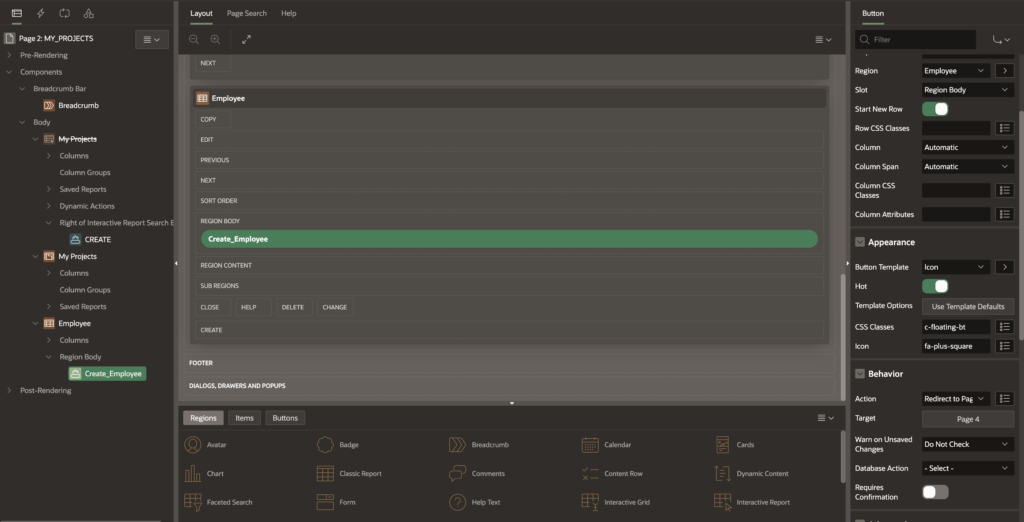
Step 2: Now go to the page inline CSS
On same page, go to page inline css and paste below code.
.floating-bt {
  position: fixed;
  bottom: 80px;
  right: 10px;
  z-index: 100;
  height: 65px;
  width: 65px;
  border-radius: 50%;
  display: flex;
  align-items: center;
  justify-content: center;
  box-shadow: 0 4px 12px rgba(0,0,0,0.2);
  font-size: 2rem;
}
Step 4: Save and Run the page
5. Output
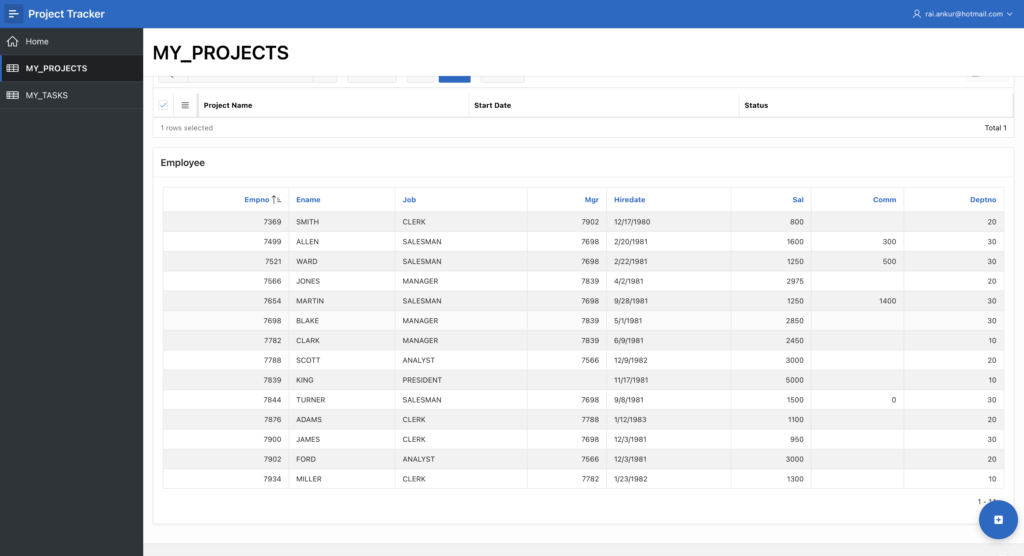
Following the above steps, you can Create a Floating Action Button (FAB) in Oracle APEX. This ensures a smoother and more user-friendly experience.
Thanks for reading! We hope this guide helped you to Create a Floating Action Button (FAB) in Oracle APEX.

Hi, I’m Ankur Rai, an Oracle APEX Developer with 6+ years of professional experience in building enterprise applications. I specialize in creating scalable and efficient solutions using Oracle APEX, PL/SQL, and SQL to solve real-world business challenges.
I am a 3X Oracle APEX Professional Certified Developer and also an Oracle ACE Associate Member, actively contributing to the Oracle community by sharing knowledge, insights, and best practices. Through my blogs, I aim to help developers learn, grow, and build better Oracle APEX applications together.