
Introduction
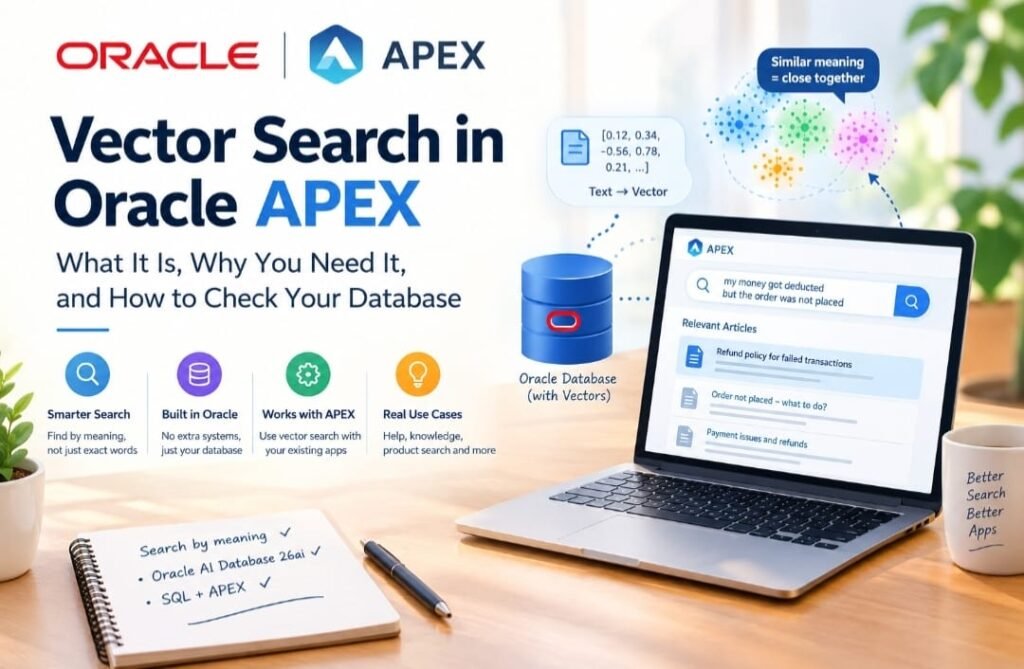
Most Oracle APEX apps search the old way: you type a word, and the database finds rows that contain that exact word. That works well for IDs, names, dates and statuses. It fails when people search by meaning instead of exact words.
This series shows how to fix that using vector search in Oracle AI Database 26ai and Oracle APEX. We start with simple SQL and finish with a working AI search app.
The Problem: Search That Misses the Point
Imagine a support website built in APEX. It has a help article called “Refund policy for failed transactions”. A customer types:
my money got deducted but the order was not placed
A normal search looks for the customer’s words inside the articles:
SELECT title
FROM   kb_articles
WHERE  UPPER(content) LIKE '%DEDUCTED%'
OR     UPPER(content) LIKE '%ORDER%';
But the customer never wrote “refund”, “failed” or “transaction”. The perfect article may exist, yet the search only finds it if the words happen to match. People describe the same problem in many different ways, so a word-matching search will always miss some of them.
What Is Vector Search?
Vector search finds things by meaning, not by exact words. Think of a map. Cities that are close together on a map are neighbors. Vector search puts sentences on a “map of meaning”. Sentences that mean the same thing sit close together, even if they use different words.
It works in three steps:
- Convert: an AI model turns every text into a list of numbers. This list is called a vector. It is like the text’s address on the map of meaning.
- Store: we save these numbers in the database, in a column next to the normal data.
- Compare: when a user asks a question, we turn the question into numbers too, and the database finds the stored texts that are closest.
In our example, the customer’s sentence and the refund article should land close together on the map, so the article can be shown. Oracle does the “how close?” calculation with one SQL function called VECTOR_DISTANCE.
Word Search vs Vector Search
| Word search | Vector search | |
| Looks for | The exact words you typed | The meaning of what you typed |
| Good for | IDs, codes, names, exact phrases | Questions, descriptions, “find something similar” |
| Weak at | Different wording for the same idea | Exact codes and rare identifiers |
| Needs | Just SQL | An AI model to make the numbers |
Vector search does not replace word search. Many real apps use both.
Where This Helps in APEX Apps
- Help and FAQ search: users type problems in their own words.
- Company knowledge: find the right policy or guide by asking a question.
- Product search: “something warm for winter trekking” finds the right items.
- Document assistants (RAG): find the right passages, then let an AI write an answer using only those passages.
Why Do It Inside Oracle and APEX?
- One database: the numbers live next to your normal tables. No extra system to run, copy data into, or secure.
- Normal SQL: you can mix vector search with usual filters like department, status or who is allowed to see the record.
- Built into APEX: APEX 26.2 has features to connect to AI models, which we cover later in this series.
Before We Start: Does Your Database Support Vectors?
Not every database can store vectors, and older or hosted ones sometimes cannot. This article is a five-minute check you can run in SQL Workshop before building anything.
Two simple ideas first:
- Vector: a list of numbers, for example [0.9, 0.1, 0.0].
- Dimension: how many numbers are in the list. That list has 3, so it has 3 dimensions. A map location has 2 numbers (left-right, up-down). Real AI models use hundreds or thousands of numbers to describe meaning.
In this test I type the numbers myself, so no AI model is involved yet. Real AI-made numbers come in Article 3.
Step by Step
In APEX, open SQL Workshop > SQL Commands. Paste one statement at a time, select it (it turns blue in the editor), and click Run. APEX runs only the selected text, so run each statement once and do not repeat it.
I ran everything below on Oracle AI Database 26ai (version 23.26.2.0.0). Your numbers should match closely.
Step 1: Which database version do I have?
Vector support came with the 23ai generation of Oracle Database, and 26ai is the new name for that line, so the version should start with 23 or higher.
SELECT product, version, version_full
FROM   product_component_version;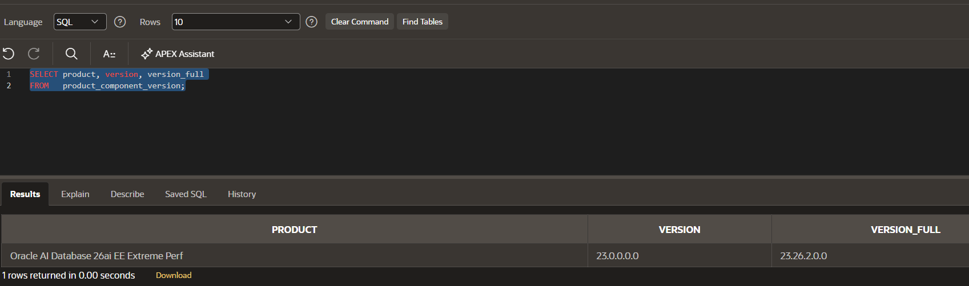
Image 1: Checking the Oracle Database version in SQL Workshop.
Explanation of Image 1
- Top (blue text): the query we ran. It asks the database for its product name and version.
- PRODUCT: “Oracle AI Database 26ai EE Extreme Perf”. The name 26ai confirms this is the new AI-ready database. “EE Extreme Perf” is the edition of the service.
- VERSION: 23.0.0.0.0. It still starts with 23 because 26ai is built on the 23ai line. That is normal, not a mistake.
- VERSION_FULL: 23.26.2.0.0. The “26” inside confirms the 26ai release.
- Bottom line: “1 rows returned” means the query worked and found one product.
- Good sign for you: a name with 26ai (or 23ai) and a version starting with 23 or higher.
Step 2: Can the database understand a vector?
This is the quickest test. It creates nothing: the database reads three numbers as a vector and counts them.
SELECT VECTOR_DIMENSION_COUNT(TO_VECTOR('[1, 2, 3]')) AS dimension_count
FROM   dual;
TO_VECTOR turns the text [1, 2, 3] into a vector. VECTOR_DIMENSION_COUNT counts how many numbers it has. dual is a built-in Oracle table with one row, used for quick tests.
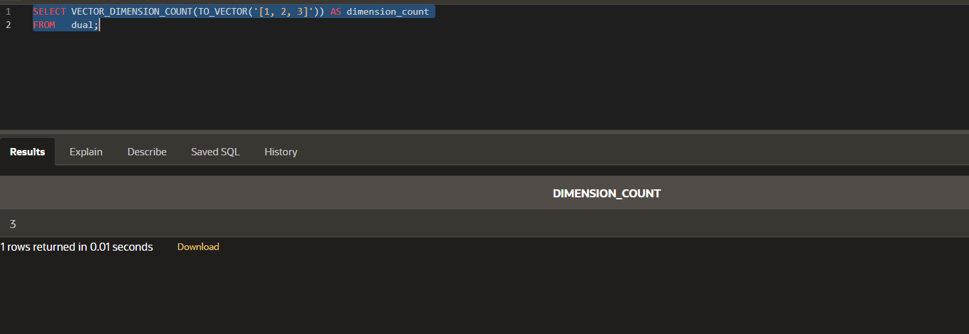
Image 2: The database counts three dimensions, so vector support works.
Explanation of Image 2
- Top (blue text): the test query.
- DIMENSION_COUNT: the answer is 3, because we gave it three numbers: 1, 2 and 3.
- No red error message means the database knows what a vector is. This is the key proof that vector support is on.
- If you see an error instead: your database probably does not support vectors yet. Stop here and re-check Step 1.
Step 3: Can I create a vector column?
Step 2 shows the database understands vectors, but an app has to store them in a table. This small table checks that your schema can create a vector column.
CREATE TABLE demo_vec_basic (

    id         NUMBER GENERATED ALWAYS AS IDENTITY PRIMARY KEY,

    label      VARCHAR2(50) NOT NULL,

    embedding  VECTOR(3, FLOAT32)

);- id: a number the database fills in by itself (1, 2, 3 …). It is only a row number.
- label: the name of the item, such as cat or car.
- embedding VECTOR(3, FLOAT32): the vector column. It says “every row must hold exactly 3 numbers”, saved as decimal numbers. FLOAT32 is a standard size for decimal numbers that AI models commonly use.
What you should see: a “Table created” success message. This table is only for the test. We delete it at the end.
Step 4: Add some sample data
Four items with invented numbers. Think of the first number as “how animal-like” and the third as “how vehicle-like”.
INSERT INTO demo_vec_basic (label, embedding) VALUES ('cat',    TO_VECTOR('[0.90, 0.10, 0.00]'));

INSERT INTO demo_vec_basic (label, embedding) VALUES ('kitten', TO_VECTOR('[0.85, 0.15, 0.05]'));

INSERT INTO demo_vec_basic (label, embedding) VALUES ('car',    TO_VECTOR('[0.05, 0.10, 0.95]'));

INSERT INTO demo_vec_basic (label, embedding) VALUES ('truck',  TO_VECTOR('[0.10, 0.05, 0.90]'));

COMMIT;
Run each line separately and only once. COMMIT saves the rows permanently.
Step 4b: Check that exactly 4 rows were saved
If an insert runs twice you get duplicate rows and confusing results later, so check the count first.
SELECT COUNT(*) AS total_rows FROM demo_vec_basic;It must show 4. If it shows more, drop the table (see the clean-up step) and start again from Step 3.
Step 5: Look at what was saved
SELECT id, label, FROM_VECTOR(embedding) AS embedding_text

FROM   demo_vec_basic

ORDER  BY id;

FROM_VECTOR turns the stored numbers back into readable text. ORDER BY id lists the rows in ID order.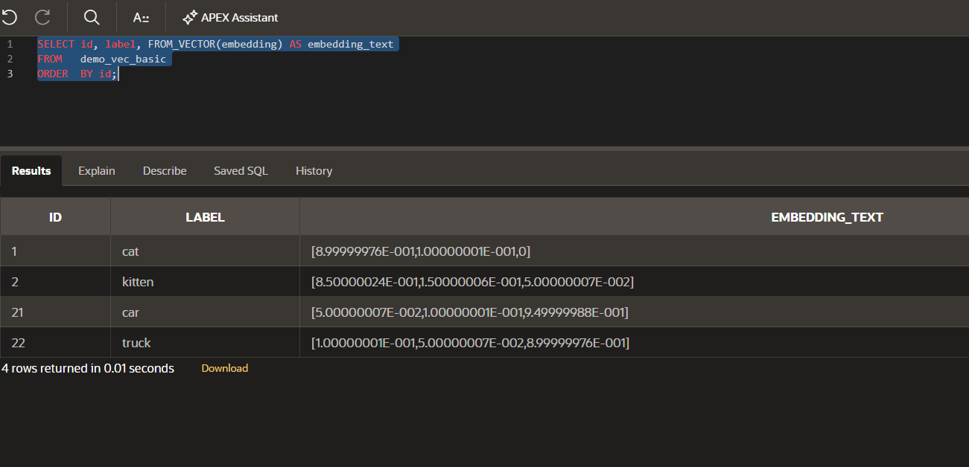
Image 3: Four sample vectors stored in the database.
Explanation of Image 3
- Four rows: cat, kitten, car and truck. “4 rows returned” at the bottom confirms there are no duplicates.
- Each EMBEDDING_TEXT is the list of three numbers we typed in Step 4.
- Why 8.99999976E-001 and not 0.9? The database stores the numbers in a compact 32-bit format, which cannot hold 0.9 exactly, so it keeps the nearest possible value. “E-001” means “move the decimal point one place left”, so 8.99999976E-001 is 0.899999976, which is 0.9 for all practical purposes. The same applies to the other numbers.
- The 0 in the cat row is just 0.0, the third number we typed.
- Why are the IDs 1, 2, 21, 22? The id column is auto-numbered, and the database reserves blocks of ID numbers in advance for speed, so gaps are normal and harmless. IDs are only labels, so the gap does not matter here.
Step 6: Check that every row has 3 numbers
SELECT label, VECTOR_DIMENSION_COUNT(embedding) AS dimensions

FROM   demo_vec_basic

ORDER  BY id;
Expected result: every row shows 3. This proves the column forces the same length on every vector.
Step 7: Which items are closest to “cat”?
Now the real vector search part: how far is each item from “cat”? A smaller number means closer, so more similar.
SELECT b.label,

       VECTOR_DISTANCE(b.embedding, ref.embedding, COSINE)    AS cosine_distance,

       VECTOR_DISTANCE(b.embedding, ref.embedding, EUCLIDEAN) AS euclidean_distance

FROM   demo_vec_basic b

       CROSS JOIN (SELECT embedding FROM demo_vec_basic WHERE label = 'cat') ref

ORDER BY cosine_distance;- The part in brackets, SELECT embedding FROM demo_vec_basic WHERE label = ‘cat’, picks out the “cat” row and calls it ref.
- CROSS JOIN places that one cat vector beside every row, so each row can be measured against it.
- VECTOR_DISTANCE measures distance in two ways. COSINE compares the direction two vectors point in. EUCLIDEAN measures the straight-line distance between them. Article 2 explains both.
- ORDER BY cosine_distance lists the closest items first.
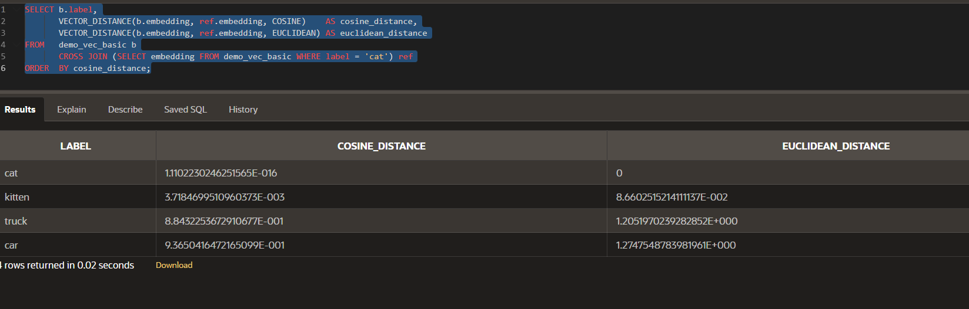
Image 4: Kitten is closest to cat; truck and car are far away.
Explanation of Image 4
- Four rows, no duplicates (“4 rows returned”).
- cat: cosine distance is 1.11E-016, which is 0.000000000000000111. That is practically zero: an item is at distance zero from itself. It is not exactly 0 only because of tiny rounding in computer arithmetic. The Euclidean distance shows an exact 0.
- kitten: cosine 3.72E-003 (about 0.0037) and Euclidean 8.66E-002 (about 0.087). Very small, so kitten is very similar to cat.
- truck: cosine 8.84E-001 (about 0.88) and Euclidean 1.21 (E+000 means the decimal stays put). Big, so truck is very different from cat.
- car: cosine 9.37E-001 (about 0.94) and Euclidean 1.27. The biggest of all, so car is the least similar to cat.
- The order (cat, kitten, truck, car) is exactly the order from most similar to least similar. Using only numbers, the database worked out that a kitten is like a cat and a car is not.
The same results in a clean table (rounded from Image 4):
| LABEL | COSINE_DISTANCE | EUCLIDEAN_DISTANCE | Meaning |
| cat | about 0 | 0 | Itself |
| kitten | 0.0037 | 0.087 | Very similar |
| truck | 0.884 | 1.205 | Different |
| car | 0.937 | 1.275 | Most different |
Did It Work? Quick Checklist
| Step | Good result | If it failed |
| 1 | Name has 26ai or 23ai; version starts with 23 or higher | Your database may be too old for vectors |
| 2 | Shows 3 | Vectors are not supported here |
| 3 | Table created | You may lack permission to create tables |
| 4b | Count is 4 | Duplicates: drop the table and redo from Step 3 |
| 6 | 3 on every row | Check the numbers you inserted |
| 7 | Order: cat, kitten, truck, car | Re-check the data from Step 5 |
Common Errors
| You see | What it usually means | What to do |
| ORA-00902: invalid datatype | The database does not know the VECTOR type | Check Step 1. Older databases cannot store vectors. |
| ORA-00904 or ORA-00907 on a vector function | The function is not known, or a typo | Run Step 2 on its own and check spelling. |
| ORA-00942 on v$version | You are not allowed to view that | Use the Step 1 query shown above instead. |
| A dimension error when inserting | You typed the wrong count of numbers | The column wants exactly 3 numbers. |
| Some items appear twice | An INSERT was run more than once | Drop the table and redo from Step 3. Use Step 4b to check. |
| ORA-01031: insufficient privileges | You cannot create tables | Ask your workspace administrator. |
Final Step: Clean Up
The test table was only for practice, so drop it. This removes only the table we created.
DROP TABLE demo_vec_basic PURGE;PURGE means the table is gone for good and cannot be recovered. That is fine here, because it only held our four sample rows. You should see a “Table dropped” message.
What We Learned
- Vector search finds things by meaning, not by exact words.
- A vector is a list of numbers, and its dimension is how many numbers it has.
- Two quick tests (counting a vector, creating a vector column) tell you if your database is ready.
- In VECTOR_DISTANCE, a smaller number means more similar.
- Results can look odd, like 8.99999976E-001, but that is just how decimal numbers are stored and displayed.
- Our numbers were typed by hand. Real AI-made numbers come in Article 3.

Oracle APEX Developer sharing real-world demos and practical solutions using APEX, REST APIs, and integrations. Recognized as an Oracle ACE Associate.