
🔹 About
Creating database tables, relationships, triggers, and sample data manually can be time-consuming during application development.
That’s where Quick SQL in Oracle APEX becomes a game changer.
Quick SQL allows developers to generate:
✅ Tables
✅ Relationships
✅ Constraints
✅ Triggers
✅ Sample Data
✅ APIs
using a very simple shorthand syntax.
In this blog, we’ll explore how Quick SQL works and how it can dramatically speed up Oracle APEX development.
🛠️ Tools and Technologies
- Oracle APEX
- SQL
- Quick SQL
- Oracle Database
🚀 What is Quick SQL?
Quick SQL is a built-in Oracle APEX feature that converts a simple shorthand design into complete SQL scripts automatically.
Instead of writing hundreds of lines of SQL manually, you can describe your data model in a few lines.
🎯 Why Use Quick SQL?
Traditional table creation requires:
❌ CREATE TABLE statements
❌ Foreign keys
❌ Sequences
❌ Triggers
❌ Audit columns
Quick SQL automates all of this.
✅ Benefits of Quick SQL
✔ Faster development
✔ Easy database modeling
✔ Automatic relationships
✔ Generates clean SQL
✔ Ideal for rapid prototyping
✔ Beginner-friendly
📌 Where to Find Quick SQL
Go to:
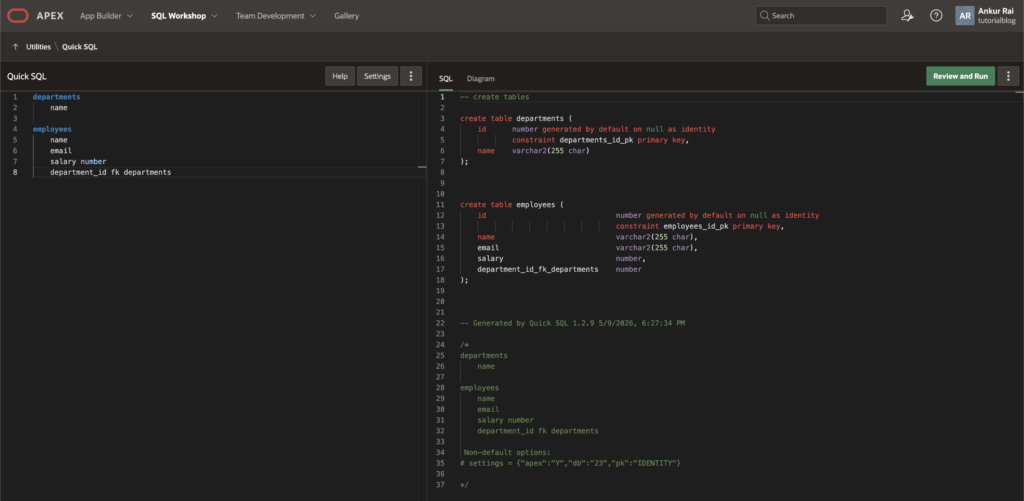
SQL Workshop → Utilities → Quick SQL🚀 Basic Quick SQL Example
📌 Input
departments
    name

employees
    name
    email
    salary number
    department_id fk departments
📌 Generated Output
Quick SQL automatically generates:
✅ CREATE TABLE statements
✅ Primary Keys
✅ Foreign Keys
✅ Identity Columns
Equivalent SQL:
CREATE TABLE departments (
    id NUMBER GENERATED BY DEFAULT AS IDENTITY,
    name VARCHAR2(255),
    CONSTRAINT departments_pk PRIMARY KEY (id)
);

CREATE TABLE employees (
    id NUMBER GENERATED BY DEFAULT AS IDENTITY,
    name VARCHAR2(255),
    email VARCHAR2(255),
    salary NUMBER,
    department_id NUMBER,
    CONSTRAINT employees_pk PRIMARY KEY (id),
    CONSTRAINT employees_fk
        FOREIGN KEY (department_id)
        REFERENCES departments(id)
);
📌 Creating Master-Detail Structure
Quick SQL makes master-detail relationships incredibly easy.
🔹 Example
customers
    customer_name
    email

orders /insert 5
    order_date date
    customer_id fk customers

order_items /insert 10
    product_name
    quantity number
    order_id fk orders
🚀 What Gets Generated?
Quick SQL automatically creates:
✔ Parent-child relationships
✔ Sample data
✔ Identity columns
✔ Constraints
📌 Generate Sample Data Automatically
Use:
/insertExample:
employees /insert 20This creates 20 sample rows automatically.
📌 Add Audit Columns Automatically
Use:
/auditcolsExample:
employees /auditcols
    name
    salary number
Generated columns:
created
created_by
updated
updated_by
📌 Generate REST Enabled Tables
Use:
/restExample:
employees /restThis prepares objects for REST APIs.
📌 Generate Triggers & Sequences
Quick SQL can generate:
✅ Identity columns
✅ Sequences
✅ Triggers
depending on database compatibility settings.
📌 Add Constraints
Example:
employees
    email vc255 /unique
This automatically creates a UNIQUE constraint.
📌 Define Data Types
| Quick SQL Syntax | Oracle Data Type |
|---|---|
| number | NUMBER |
| date | DATE |
| vc255 | VARCHAR2(255) |
| clob | CLOB |
| ts | TIMESTAMP |
🚀 Quick SQL Settings
Quick SQL provides many configuration options.
📌 Important Settings
| Setting | Purpose |
|---|---|
| Generate API | Create APIs |
| Include Drops | Add DROP statements |
| Audit Columns | Add audit fields |
| Row Version Column | Optimistic locking |
| Data Loading | Sample data generation |
📌 Generate ER Diagram Automatically
One powerful feature is:
✅ Automatic ER Diagram generation
This helps visualize table relationships instantly.
🎯 Real-World Use Cases
Quick SQL is perfect for:
✔ Rapid prototyping
✔ Hackathons
✔ Learning Oracle SQL
✔ APEX application design
✔ Database modeling
🚀 Example: Employee Management System
📌 Quick SQL Input
departments /insert 5
    department_name

employees /insert 20
    employee_name
    email
    salary number
    hire_date date
    department_id fk departments
📌 Result
Quick SQL generates:
✅ Tables
✅ Relationships
✅ Sample Data
✅ Constraints
✅ SQL Script
within seconds.
⚠️ Important Considerations
🔹 Good for Development
Quick SQL is ideal for:
✅ Prototyping
✅ Initial design
But enterprise production systems may still require custom optimization.
🔹 Review Generated SQL
Always validate:
- Naming conventions
- Indexes
- Constraints
- Performance
before production deployment.
🚀 Advanced Features
Quick SQL also supports:
✔ Views
✔ APIs
✔ Data generation
✔ Table relationships
✔ Comments
✔ Lookup tables
📊 Example Workflow
Quick SQL Design
        ↓
Generate SQL Script
        ↓
Run SQL
        ↓
Create Database Objects
        ↓
Build Oracle APEX Application
🔥 Why Developers Love Quick SQL
Quick SQL drastically reduces repetitive work and helps developers focus more on business logic instead of boilerplate SQL code.
Especially in Oracle APEX projects, it accelerates development significantly.
🎉 Conclusion
Quick SQL is one of the most powerful productivity tools available in Oracle APEX.
By using simple shorthand syntax, developers can instantly generate:
✅ Tables
✅ Relationships
✅ Constraints
✅ Sample Data
✅ APIs
making database development faster and easier than ever.
Whether you are a beginner learning Oracle SQL or an experienced Oracle APEX developer building enterprise applications, Quick SQL can save hours of development time.
Happy Coding!

Hi, I’m Ankur Rai, an Oracle APEX Developer with 6+ years of professional experience in building enterprise applications. I specialize in creating scalable and efficient solutions using Oracle APEX, PL/SQL, and SQL to solve real-world business challenges.
I am a 3X Oracle APEX Professional Certified Developer and also an Oracle ACE Associate Member, actively contributing to the Oracle community by sharing knowledge, insights, and best practices. Through my blogs, I aim to help developers learn, grow, and build better Oracle APEX applications together.