
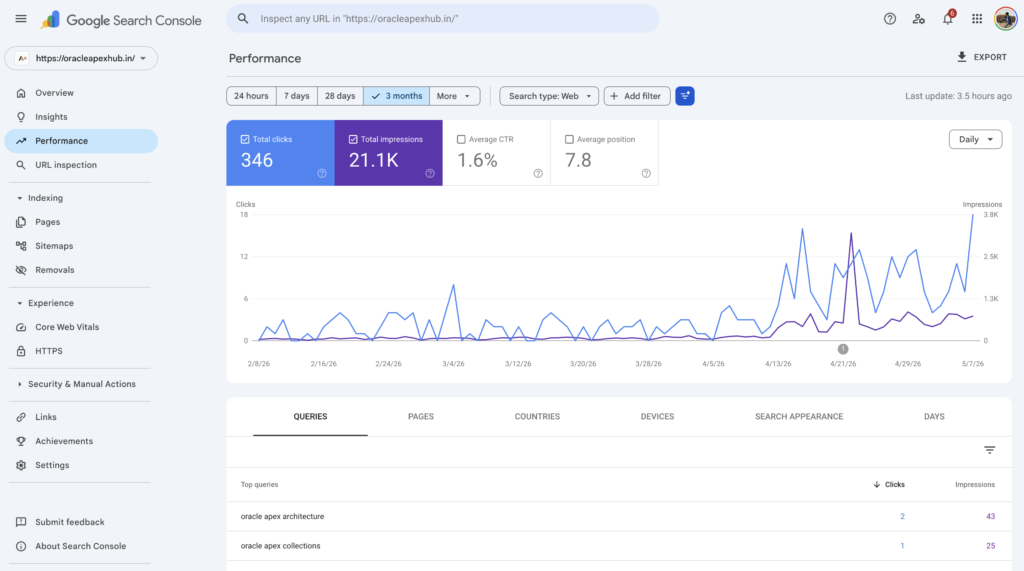

🔹 About
If your Oracle APEX application is publicly accessible, integrating it with Google Search Console is essential for improving search visibility, monitoring indexing, and optimizing SEO performance.
In this blog, we’ll learn how to connect an Oracle APEX application with Google Search Console to:
✅ Monitor search performance
✅ Improve SEO visibility
✅ Submit sitemaps
✅ Detect indexing issues
✅ Analyze search traffic
This integration is especially useful for:
- Public APEX applications
- Customer portals
- Blogs built with APEX
- Documentation portals
- Enterprise public dashboards
🛠️ Tools and Technologies
- Oracle APEX
- Google Search Console
- HTML Meta Tags
- XML Sitemap
- Robots.txt
- SEO Best Practices
🚀 What is Google Search Console?
Google Search Console (GSC) is a free Google tool that helps website owners monitor and optimize their website presence in Google Search.
With GSC, you can:
✅ Track search impressions
✅ Monitor clicks and rankings
✅ Identify crawl issues
✅ Submit sitemaps
✅ Improve indexing
🎯 Why Integrate Google Search Console with Oracle APEX?
By default, many Oracle APEX applications are not optimized for search engines.
Integrating GSC helps:
✔ Improve discoverability
✔ Track organic traffic
✔ Monitor SEO performance
✔ Identify indexing problems
✔ Improve page rankings
📌 Step 1: Make Your Oracle APEX Application Public
Google can only index pages that are publicly accessible.
Go to:
text id=”k3m8fw” Shared Components → Authentication Schemes
Choose either:
- Public Pages
- No Authentication (if applicable)
📌 Step 2: Create Google Search Console Property
Go to:
https://search.google.com/search-consoleClick:
Add PropertyYou can choose:
- Domain Property
- URL Prefix Property
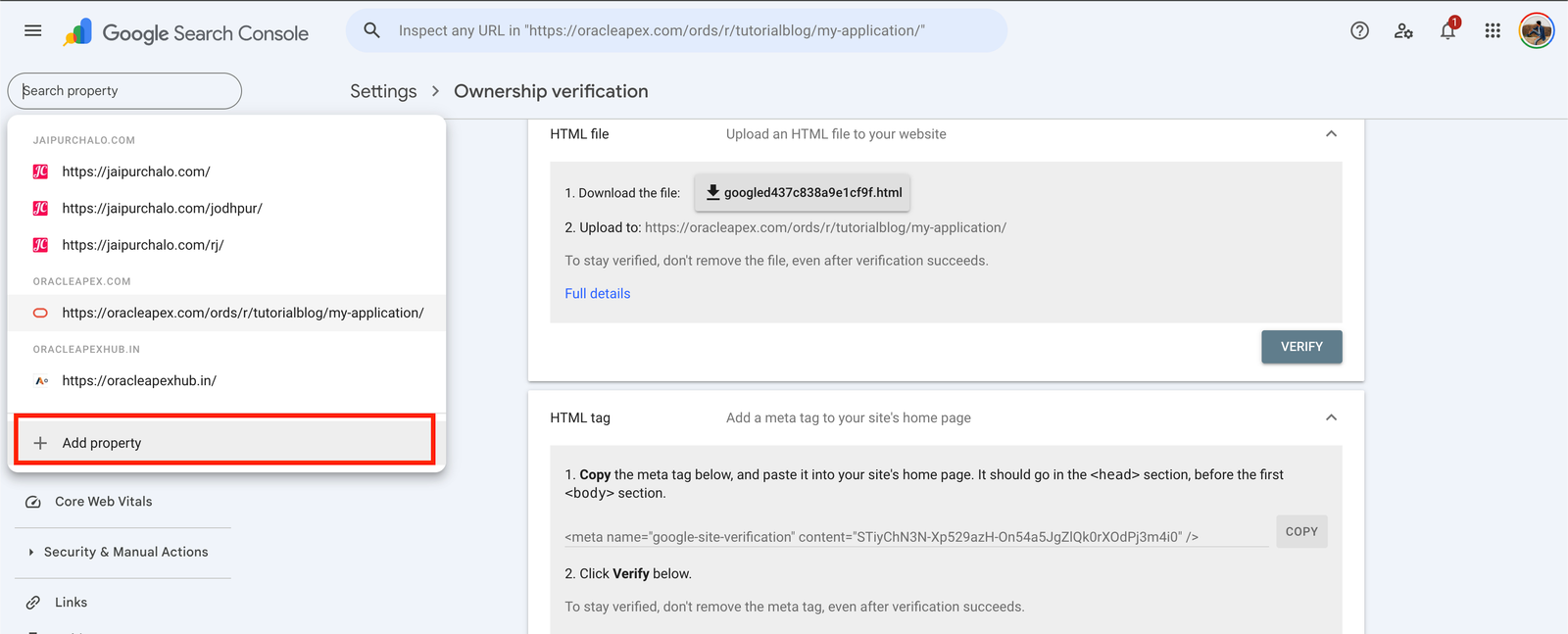
📌 Step 3: Verify Ownership
Google requires verification to confirm ownership of your APEX application.
🔹 Method 1: HTML Meta Tag Verification (Recommended)
Google provides a verification meta tag like:
<meta name="google-site-verification"
content="XXXXXXXXXXXXXXXXXX" />
📌 Add Meta Tag in Oracle APEX
Go to:
Shared Components → User Interface AttributesUnder:
HTML CodePaste the verification tag.
📌 Step 4: Verify Property
Return to Google Search Console and click:
VerifyIf successful:
✅ Property becomes active
✅ Google starts monitoring your application
📌 Step 5: Create Sitemap for Oracle APEX
A sitemap helps Google discover your application pages faster.
🔹 Example Sitemap XML
https://your-apex-app.com/ords/r/app/home https://your-apex-app.com/ords/r/app/dashboard📌 Step 6: Upload Sitemap
Upload sitemap to your web server.
Example:
https://your-apex-app.com/sitemap.xml📌 Step 7: Submit Sitemap in GSC
Go to:
Search Console → SitemapsSubmit:
sitemap.xml📌 Step 8: Configure Robots.txt
The robots.txt file controls crawler access.
🔹 Example robots.txt
User-agent: * Allow: / Sitemap: https://your-apex-app.com/sitemap.xml📌 Step 9: Improve SEO in Oracle APEX
Search ranking depends heavily on SEO optimization.
🔥 Bonus Tip: Automatic Verification Using Google Analytics
If your Oracle APEX application is already integrated with Google Analytics, then in many cases you do not need to manually verify ownership again in Google Search Console.
When using a:
URL Prefix PropertyGoogle can automatically detect the existing Google Analytics tracking code and complete the verification automatically.
✅ Automatic Verification Benefits
✔ No need to add HTML meta tags
✔ No file upload required
✔ Faster setup
✔ Simplified verification process
📌 How It Works
If:
- Google Analytics is already configured correctly
- You are using the same Google account
- The tracking code exists on the application pages
then Google Search Console may show:
Successfully verified via Google Analyticsautomatically during property verification.
You Can Read blog on How to Configure Google Analytics with Oracle APEX
💡 Recommended Approach
For Oracle APEX applications already using Google Analytics:
👉 First try verification using:
URL Prefix Propertybecause Google may auto-verify ownership without requiring additional configuration.
This makes the integration process much easier for public Oracle APEX applications.
🔹 Add Page Titles
Go to:
Page Designer → Page → TitleUse meaningful titles:
✅ Good Example:
Employee Management Dashboard❌ Bad Example:
Page 1🔹 Add Meta Description
Go to:
Page → HTML HeaderExample:
<meta name="description"
content="Oracle APEX Employee Dashboard for HR Management">
🔹 Use Friendly URLs
Enable Friendly URLs in APEX.
Go to:
Instance Settings → Friendly URLs📌 Step 10: Monitor Search Performance
Google Search Console provides detailed analytics:
✅ Search clicks
✅ Search impressions
✅ Average ranking
✅ Indexed pages
✅ Crawl issues
📊 Important GSC Reports
| Report | Purpose |
|---|---|
| Performance | Search traffic analytics |
| Pages | Indexed pages |
| Sitemaps | Sitemap status |
| Core Web Vitals | Performance monitoring |
| Mobile Usability | Mobile optimization |
🚀 Bonus: Add Structured Data (SEO Enhancement)
Structured data improves Google understanding.
Example:
html id=”m2r8fq”
⚠️ Important Considerations
🔹 Avoid Blocking Search Engines
Do not accidentally block pages in:
robots.txt🔹 Authentication Issues
Private applications cannot be indexed.
🔹 Duplicate Content
Avoid duplicate pages and URLs.
🚀 Advanced Enhancements
You can further improve SEO by adding:
✔ Dynamic sitemap generation
✔ Open Graph meta tags
✔ Twitter cards
✔ Canonical URLs
✔ SEO-friendly breadcrumbs
📊 Example Architecture
Oracle APEX Application ↓ Google Search Console Verification ↓ Sitemap Submission ↓ Google Crawling & Indexing ↓ Search Analytics & SEO Insights🎉 Conclusion
Integrating Google Search Console with Oracle APEX helps improve your application’s visibility, indexing, and SEO performance.
By combining:
✅ Oracle APEX
✅ Google Search Console
✅ Sitemap Optimization
✅ SEO Best Practices
you can make your public APEX applications easier to discover and analyze.
This is especially valuable for customer-facing applications, blogs, portals, and public dashboards.
Happy Coding!

Hi, I’m Ankur Rai, an Oracle APEX Developer with 6+ years of professional experience in building enterprise applications. I specialize in creating scalable and efficient solutions using Oracle APEX, PL/SQL, and SQL to solve real-world business challenges.
I am a 3X Oracle APEX Professional Certified Developer and also an Oracle ACE Associate Member, actively contributing to the Oracle community by sharing knowledge, insights, and best practices. Through my blogs, I aim to help developers learn, grow, and build better Oracle APEX applications together.
This is a useful guide for APEX developers because SEO is often overlooked when building public-facing applications. Adding details about optimizing page titles, metadata, and handling dynamic APEX URLs could further help readers improve how search engines understand their applications. The connection between indexing insights from Search Console and ongoing APEX application improvements is a practical approach for better visibility.