Introduction
In Oracle APEX applications, a very common real‑world issue is users clicking the Submit button multiple times. This can lead to duplicate records, multiple workflow triggers, or unexpected errors, especially when the page process takes a few seconds to complete.
To ensure data integrity and provide a better user experience, it’s important to disable double‑click or multiple submissions on buttons. In this blog, we’ll explore simple and effective ways to prevent double submission in Oracle APEX.
Tools and Technologies
To achieve the desired functionality, the following technologies are used:
- Oracle APEX
- Javascript
Why Double Submission Happens
Double submission usually occurs when:
- Page processing takes time (PL/SQL, API calls, file uploads)
- Users think the button click didn’t work
- Network latency causes delayed response
This can result in:
- Duplicate rows in tables
- Multiple email notifications
- Workflow inconsistencies
Solution 1: Disable Button Using JavaScript (Recommended)
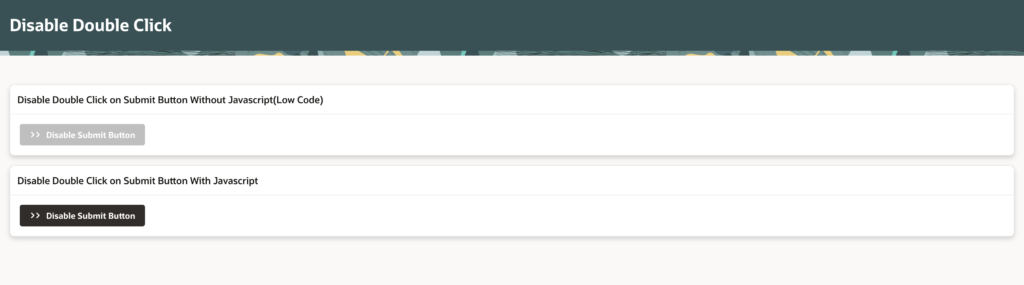
The most reliable and commonly used solution is to disable the submit button immediately after the first click.
Step 1: Identify the Button Static ID
- Go to Page Designer
- Select your Submit Button
- Under Advanced → Static ID, provide an ID
Example:
submitBtnStep 2: Add JavaScript Code
Add the following JavaScript code to:
Page Designer → Page → Execute when Page Loads
$("#submitBtn").on("click", function () {
  $(this).prop("disabled", true)
         .addClass("is-disabled");
});
How It Works
- As soon as the button is clicked, it becomes disabled
- Prevents further clicks
- Page submission continues normally
Solution 2: Using Dynamic Action (No Code Approach)
If you prefer a low‑code approach, Oracle APEX Dynamic Actions work perfectly.
Steps
- Select the Submit Button
- Create a Dynamic Action
- Event: Click
- True Action: Disable
- Selection Type: Button
- Button: Your Submit Button
This ensures the button is disabled immediately on click.
Solution 3: Prevent Multiple Submits Using apex.submit()
If you are using custom JavaScript submit logic, you can control submission like this:
if (!window.pageSubmitted) {
  window.pageSubmitted = true;
  apex.submit();
}
This ensures the page submits only once, even if the button is clicked multiple times.
Optional: Visual Feedback (Better UX)
You can also show users that processing is happening:
apex.util.showSpinner();Or change button text:
btn.innerText = "Processing...";This reassures users that their action is in progress.
Best Practices
✔ Always disable submit buttons on critical transactions
✔ Use server‑side constraints as a backup (unique keys)
✔ Provide visual feedback (spinner or message)
✔ Combine JavaScript + database validation for safety
Output
Conclusion
Preventing double submission in Oracle APEX is a small change with a big impact. By disabling the Submit button on the first click, you protect your application from duplicate data, unnecessary errors, and user frustration.
Whether you prefer JavaScript, Dynamic Actions, or custom submit logic, Oracle APEX provides flexible ways to handle this common issue.
Happy APEXing 🚀
Love coding? Me too! Let’s keep in touch – subscribe to my website for regular chats on Oracle APEX, PL/SQL,SQL JavaScript, and CSS.