1. Introduction
In many Oracle APEX applications, users upload images or PDF documents and expect an instant preview before saving the record. However, by default, APEX processes file uploads only after a page submit, which can impact user experience.
In this blog, we’ll see how to preview image and PDF files instantly without submitting the page, using Dynamic Actions and JavaScript in Oracle APEX.
2. Tools and Technologies
To achieve the desired functionality, the following technologies are used:
- Oracle APEX
- Javascript
3. Business Requirement
Users should be able to:
- Upload an image or PDF file
- Preview the file instantly
- Do this without submitting the page
- Improve usability and reduce unnecessary page submits
This is especially useful in:
- Document management systems
- Profile photo uploads
- Invoice or attachment uploads
4. Implementation Steps
Step 1: Create File Browse Page Item.
Create a File Browse item, for example:
P1_FILEEnsure:
- Storage Type: APEX Managed or Temporary
- Allow multiple files: No (for simplicity)
- File Type: image/*,application/pdf
Step 2: Create Dynamic Action.
- Event: Change
- Selection Type: Item(s)
- Item: P1_FILE
- True Action: Execute JavaScript Code
var file = this.triggeringElement.files[0];

if (file) {
    if (file.type.match('image.*')) {
        $('#prev-pdf').attr('src', '');
        var url = URL.createObjectURL(file);
        $('#prev-img').attr('src', url);
    }
    else if (file.type.match('application/pdf')) {
        $('#prev-img').attr('src', '');
        var url = URL.createObjectURL(file);
        $('#prev-pdf').attr('src', url + '#toolbar=0');
    }
}
else {
    $('#prev-img').attr('src', '');
    $('#prev-pdf').attr('src', '');
}
Step 3: Create Static Content Region.
Add a Static Content region and paste the following HTML:
<img id="prev-img" src="" style="max-width: 100%" />
<iframe id="prev-pdf" width="100%" height="800px"></iframe>
Step 4: Save and Run the page.
5. Final Output
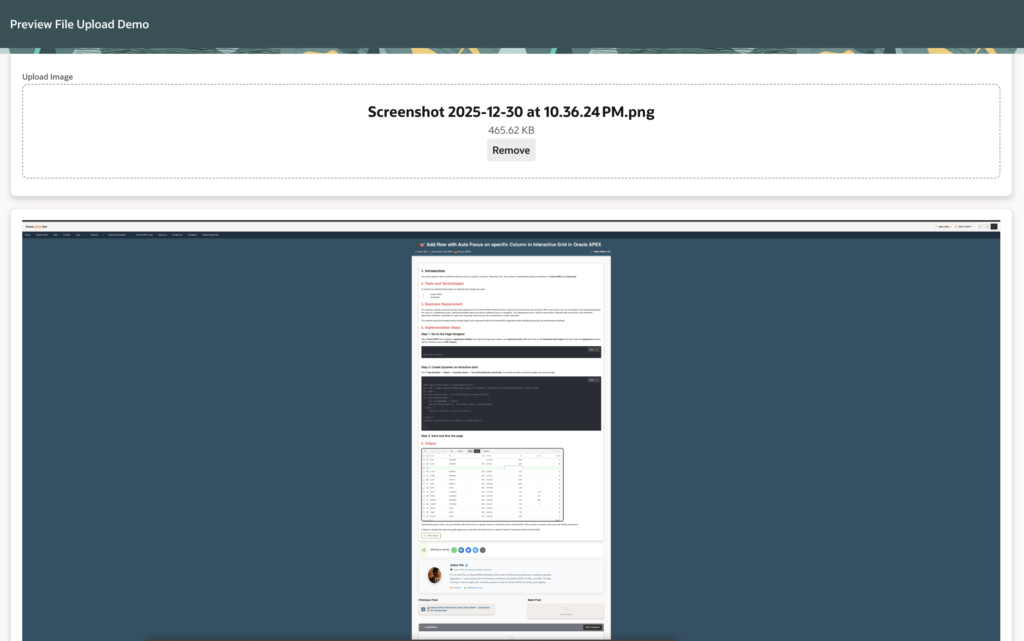
✔ Preview Image & PDF instantly when file uploaded
✔ No page refresh or submit required
✔ Improved user experience and data visibility
🏁 Conclusion
Previewing files before submit is a small enhancement that makes a big difference in Oracle APEX applications. With just a few lines of JavaScript and a Dynamic Action, you can significantly improve usability and user confidence.
This approach is lightweight, efficient, and easy to implement in any APEX app.
Following the above steps, you can Preview Image & PDF Without Submit in Oracle APEX. This ensures a smoother and more user-friendly experience.
🔗 Final Thoughts
If you found this blog useful:
- 👍 Like
- 🔄 Share with your APEX friends
- 💬 Comment your feedback
- 📌 Bookmark for future reference
Happy APEXing! 🚀
Love coding? Me too! Let’s keep in touch – subscribe to my website for regular chats on Oracle APEX, PL/SQL,SQL JavaScript, and CSS.