
Introduction
Every Oracle APEX developer has seen URLs like this:
f?p=100:1:1234567890:::::But very few truly understand:
- What each part of the URL means
- How sessions are created and managed
- Why session state matters
- How security is enforced behind the scenes
In this blog, we’ll break down APEX URL structure and session management in simple words, using real-world examples and easy-to-understand diagrams.
What is an APEX URL?
An APEX URL is the entry point to an Oracle APEX application.
It tells APEX:
- Which application to open
- Which page to show
- Which session to use
- What values to pass
Basic format:
f?p=App:Page:Session:Request:Debug:ClearCache:ItemNames:ItemValues:PrinterFriendlyBreakdown of APEX URL Parameters
1️⃣ Application ID (App)
Example:
f?p=100:1:0- 100 → Application ID
- Identifies which APEX application to open
📌 Every APEX app has a unique Application ID.
2️⃣ Page ID (Page)
f?p=100:10:0- 10 → Page ID
- Determines which page loads
📌 Example: Page 10 = Employee Form
3️⃣ Session ID (Session)
f?p=100:10:1234567890- Identifies the user session
- APEX creates this automatically after login
📌 Session ID links the user to:
- Page values
- Authentication state
- Authorization checks
4️⃣ Request
f?p=100:10:1234567890:SAVE- Used to control processing logic
- Common values:
- SAVE
- DELETE
- SUBMIT
📌 Used in conditions like:
When Request = SAVE
5️⃣ Debug
f?p=100:10:1234567890::YES- Enables APEX debug mode
- Shows detailed execution logs
📌 Very useful for troubleshooting
6️⃣ Clear Cache
f?p=100:10:1234567890:::10- Clears session state
- Prevents stale data
📌 Example:
- Clear page 10 cache before loading
7️⃣ Item Names & Values
f?p=100:10:1234567890::::P10_EMPNO:7369- Passes values to page items
- Sets session state automatically
📌 Used for deep linking
Real-World Example: Employee Details Page
Scenario
You want to open Employee Details page directly from a report.
Generated URL:
f?p=100:10:&SESSION.::::P10_EMPNO:7369What happens:
- Application 100 opens
- Page 10 loads
- Current session is reused
- EMPNO item gets value 7369
- Page fetches employee details
What is Session State in APEX?
Session State is where APEX stores page item values.
For example:
P10_EMPNO = 7369This value lives in the APEX session, not the database.
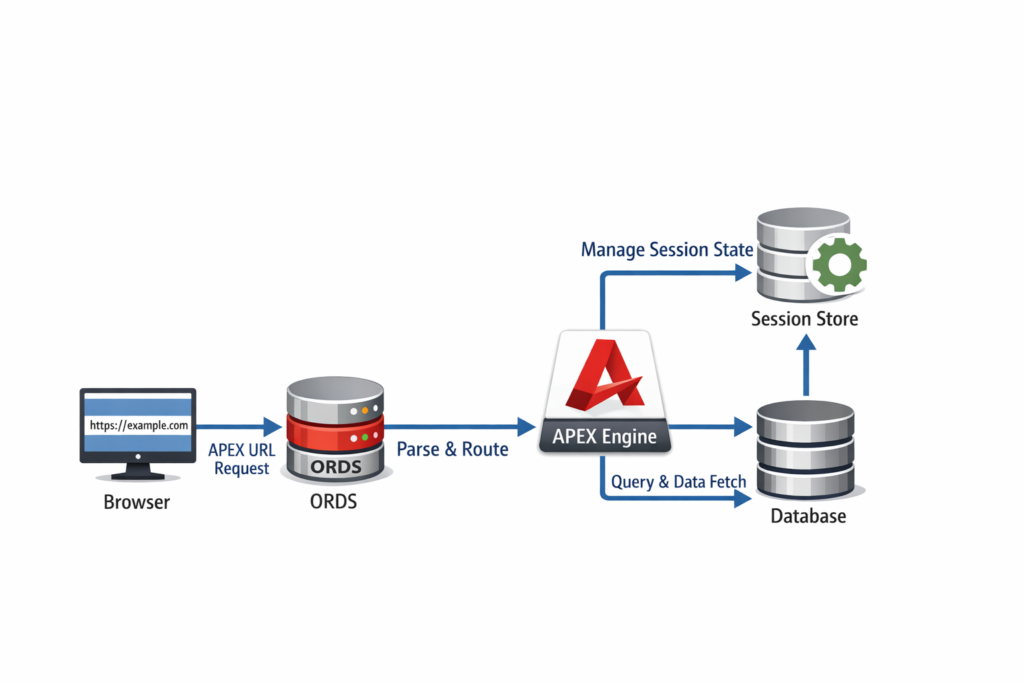
How APEX Session is Created
Step-by-Step Flow
- User opens APEX URL
- APEX checks authentication
- Session ID is generated
- Session data is stored in memory
- User interacts with pages
Session Management Behind the Scenes
APEX manages sessions automatically:
- Creates session on login
- Maintains session state
- Expires session on timeout
You control:
- Session timeout
- Logout behavior
- Cache clearing
Session Timeout and Expiry
Session expires when:
- User is inactive
- Browser closed (optional)
- Explicit logout
📌 Configured at:
Shared Components → Security Attributes
Security: Why Session Matters
APEX sessions protect:
- Unauthorized page access
- URL manipulation
- Session hijacking
Best practices:
✔ Use &SESSION. instead of hardcoding
✔ Clear cache when passing sensitive values
✔ Use authorization schemes
Common URL & Session Issues
❌ Bookmarking URLs with Session ID
- Session expires
- URL breaks
❌ Missing Clear Cache
- Old values appear
❌ Direct Page Access
- Bypasses logic
Best Practices for APEX URLs
✔ Use apex_util.prepare_url
✔ Avoid exposing sensitive values
✔ Use page items for parameters
✔ Clear cache when required
✔ Use friendly URLs (APEX 22+)
Interview One-Liner
“APEX URLs define application, page, session, and parameters, while session management ensures secure storage and lifecycle of user state across page requests.”
Conclusion
Understanding APEX URL structure and session management helps you:
- Build secure applications
- Debug issues faster
- Avoid session-related bugs
- Write better APEX code
Once you master this, APEX behavior becomes predictable and powerful 🚀
Happy Coding with Oracle APEX 💙
Love coding? Me too! Let’s keep in touch – subscribe to my website for regular chats on Oracle APEX, PL/SQL,SQL JavaScript, and CSS.