1. Introduction
This article explains How to Capture Column data from Interactive Grids into Page Items in Oracle APEX. The solution is implemented using a combination of Oracle APEX, PLSQL and Javascript.
2. Tools and Technologies
To achieve the desired functionality, the following technologies are used:
- Oracle APEX
- PLSQL
- Javascript
3. Business Requirement
The application must allow users to select one or more rows from an Oracle APEX Interactive Grid and automatically capture the corresponding EMP NO(s) into page items. These captured EMP NO will be used to perform downstream business operations such as record validation, updates, approvals, deletions, or integrations with backend PL/SQL processes. This functionality ensures accurate identification of user-selected records, improves data integrity, and enables efficient processing without requiring page navigation or manual data entry.
The solution should be reusable across multiple pages and components within the Oracle APEX application while maintaining security and performance standards.
4. Implementation Steps
Step 1: Go to the Page Designer
Navigate to the Page Designer of the report where you want to Capture Column data from Interactive Grids into Page Items.
Give static ID to your Report Region “EMP_REPORT”. After that Create Dynamic Action on your interactive grid report and in true action Execute Javascript code and paste below code.
 var grid = apex.region("EMP_REPORT").widget().interactiveGrid("getViews","grid").model;
var selectedRecords = apex.region("EMP_REPORT").widget().interactiveGrid("getSelectedRecords");
var i_selectID = [];

for (var i = 0; i < selectedRecords.length; i++) {
    i_selectID.push(grid.getValue(selectedRecords[i], "EMPNO"));
}

apex.item("P2_EMP_NO").setValue(i_selectID.join(','));
Explanation
- apex.region(“EMP_REPORT”): References the Interactive Grid using its Static ID (EMP_REPORT).
- getSelectedRecords(): Fetches all rows currently selected by the user.
- gridModel.getValue(…): Extracts the EMPNO value from each selected row.
- selectedIds array: Collects all selected employee IDs.
- apex.item(“P2_EMP_NO”).setValue(…): Saves the comma-separated list of IDs into page item P2_EMP_NO.
Step 2: PL/SQL Processing of Captured IDs
After storing the selected IDs in P2_EMP_NO, you can process them using PL/SQL. The following example splits the IDs and stores them in an APEX collection for further business logic.
DECLARE
    l_ids_string VARCHAR2(4000) := :P2_EMP_NO;
    l_emp_nos    APEX_T_VARCHAR2;
    l_emp_no     NUMBER;
BEGIN
    APEX_COLLECTION.CREATE_OR_TRUNCATE_COLLECTION('EMP_NO_COLLECTION');

    IF l_ids_string IS NULL OR TRIM(l_ids_string) IS NULL THEN
        RAISE_APPLICATION_ERROR(-20001, 'No IDs were selected.');
    END IF;

    l_emp_ids := APEX_STRING.SPLIT(l_ids_string, ',');

    FOR i IN 1 .. l_emp_nos.COUNT LOOP
        l_emp_no := l_emp_nos(i);

        APEX_COLLECTION.ADD_MEMBER(
            p_collection_name => 'EMP_NO_COLLECTION',
            p_c001            => l_emp_no
        );
    END LOOP;

    COMMIT;
EXCEPTION
    WHEN OTHERS THEN
        RAISE_APPLICATION_ERROR(-20002, 'Unexpected error: ' || SQLERRM);
END;
Key Notes
• APEX_STRING.SPLIT converts the comma-separated string into a PL/SQL array.
• APEX_COLLECTION temporarily stores the selected EMP NOs for validations, updates, approvals, or other backend operations.
• This approach ensures reliable processing of user-selected records from an Interactive Grid.
Step 3: Save and Run the page
5. Output
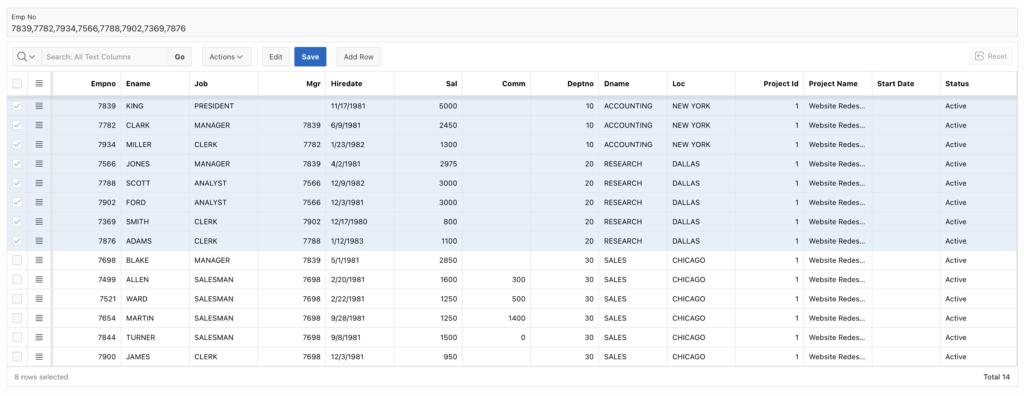
Following the above steps, you can Capture Row IDs from Interactive Grids into Page Items in Oracle APEX. This ensures a smoother and more user-friendly experience.
Thanks for reading! We hope this guide helped you How to Capture Row IDs from Interactive Grids into Page Items in Oracle APEX.

Hi, I’m Ankur Rai, an Oracle APEX Developer with 6+ years of professional experience in building enterprise applications. I specialize in creating scalable and efficient solutions using Oracle APEX, PL/SQL, and SQL to solve real-world business challenges.
I am a 3X Oracle APEX Professional Certified Developer and also an Oracle ACE Associate Member, actively contributing to the Oracle community by sharing knowledge, insights, and best practices. Through my blogs, I aim to help developers learn, grow, and build better Oracle APEX applications together.