1. Introduction
This article explains how to automatically set the focus on the first editable page item when a page loads in Oracle APEX. The solution is implemented using a combination of SQL/PL/SQL and JavaScript.
2. Tools and Technologies
To achieve the desired functionality, the following technologies are used:
- SQL / PL/SQL
- Oracle APEX
- JavaScript
3. Business Requirement
In many applications, users expect the cursor to automatically focus on the first editable item when a page opens. This small enhancement improves user experience by reducing clicks and making the form more intuitive.
This document outlines the steps required to implement this across all pages in an APEX application.
4. Implementation Steps
Step 1: Identify the First Editable Item
Create a region-level procedure that determines the first region on the page and retrieves its first editable page item.
create or replace PROCEDURE sp_fnd_page_itm (

P_app_id NUMBER,

P_page_id NUMBER,

o_page OUT VARCHAR2

)

IS

CURSOR c_region IS

SELECT REGION_ID, r.REGION_NAME

FROM APEX_APPLICATION_PAGE_REGIONS r

WHERE r.page_id = P_page_id

AND r.APPLICATION_ID = P_app_id

AND NVL(r.CONDITION_TYPE, ‘Y’) <> ‘Never’

AND REGION_NAME NOT IN (‘Breadcrumb’) AND TEMPLATE NOT IN (‘Inline Dialog’)

ORDER BY r.display_sequence fetch first 1 row only;

CURSOR c_item (P_REGION_ID NUMBER) IS

SELECT i.ITEM_NAME

FROM apex_application_page_items i

WHERE i.REGION_ID = P_REGION_ID

AND i.page_id = P_page_id

AND i.APPLICATION_ID = P_app_id

AND i.DISPLAY_AS NOT IN (‘Hidden’, ‘Display Only’, ‘Radio Group’)

AND NVL(LOWER(HTML_FORM_ELEMENT_ATTRIBUTES), ‘y’) NOT LIKE (‘%readonly=”true”%’)

AND NVL(READ_ONLY_CONDITION_TYPE, ‘Y’) <> ‘Always’

AND NVL(i.CONDITION_TYPE, ‘Y’) <> ‘Never’

ORDER BY i.display_sequence fetch first 1 row only;

— Declare a variable to store concatenated item names

lv_result VARCHAR2(4000);

BEGIN

lv_result := ”; — Initialize the result string

FOR i IN c_region

LOOP

FOR j IN c_item(i.REGION_ID)

LOOP

— Concatenate item names

lv_result := lv_result || j.ITEM_NAME || ‘, ‘;

END LOOP;

END LOOP;

— Remove the trailing comma and space from the result string

IF LENGTH(lv_result) > 0 THEN

lv_result := RTRIM(lv_result, ‘, ‘);

END IF;

— Assign the result to the output parameter

o_page := lv_result;

EXCEPTION

WHEN OTHERS THEN

o_page := ‘error’;

END sp_fnd_page_itm;
Step 2: Create a Global Page Item
On the Global Page (Page 0), create a hidden page item named P0_FOCUS.
This will hold the name of the first editable page item for each page.
Step 3: Dynamic Action – Server-Side Code
On the Global Page, create a Page Load Dynamic Action named “Get Page Item”.
- Action Type: Execute Server-Side Code
- Add the PL/SQL block to set the value of P0_FOCUS with the first page item.
BEGIN

DECLARE

l_page_name VARCHAR2(4000);

BEGIN

:P0_FOCUS := null;

sp_fnd_page_itm(

P_app_id => :APP_ID,

P_page_id => :APP_PAGE_ID,

o_page => l_page_name

);

:P0_FOCUS := l_page_name;

EXCEPTION

WHEN OTHERS THEN

:P0_FOCUS := ‘error’;

END;

END;
Step 4: Dynamic Action – JavaScript
In the same Dynamic Action, add another True Action of type Execute JavaScript Code.
- Use JavaScript to set the focus dynamically based on the value of P0_FOCUS.
$(document).ready(function(){

var itemValue = apex.item(“P0_FOCUS”).getValue();

$(“[name=” + itemValue + “]”).focus();

console.log(‘item value ‘ + itemValue);

})
Step 5: Example Region
As an example, you can create a region with an Email field and a Submit button.
When the page loads, the focus will automatically be placed on the email field.
5. Output
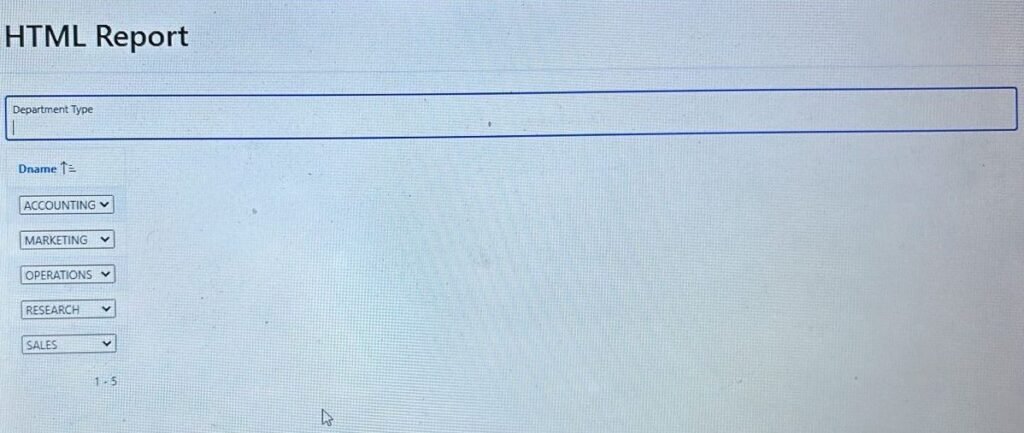
Following the above steps, the first editable page item will always receive focus automatically when the page loads. This ensures a smoother and more user-friendly experience.
Thanks for reading! We hope this guide helped you implement Focus on the First Editable Page Item in Oracle APEX.

Hi, I’m Ankur Rai, an Oracle APEX Developer with 6+ years of professional experience in building enterprise applications. I specialize in creating scalable and efficient solutions using Oracle APEX, PL/SQL, and SQL to solve real-world business challenges.
I am a 3X Oracle APEX Professional Certified Developer and also an Oracle ACE Associate Member, actively contributing to the Oracle community by sharing knowledge, insights, and best practices. Through my blogs, I aim to help developers learn, grow, and build better Oracle APEX applications together.