1. Introduction
This article explains how to automatically set the focus on the Prevent Duplicate Tabs to open in Oracle APEX Using JavaScript when a page loads in Oracle APEX. The solution is implemented using a combination of HTML and JavaScript.
2. Tools and Technologies
To achieve the desired functionality, the following technologies are used:
- HTML
- Oracle APEX
- JavaScript
3. Business Requirement
Allowing multiple instances of the same page to run at once can create several challenges, such as:
- Session Conflicts – Multiple tabs sharing the same session variables can produce unpredictable outcomes.
- Data Overwriting – Submitting a form in one tab while another remains open can result in duplicate or overwritten data.
- Performance Degradation – Each open tab generates server requests, increasing resource consumption unnecessarily.
- User Confusion – Actions taken in one tab may not be reflected in another, leading to inconsistencies in the user interface.
4. Implementation Steps
Step 1: Create Static Content Region on Global Page
Create a Static Content region that holds message to close duplicate tab.
- Template: Blank with Attribute(No grid)
<div id="singleTabModal">
 <div id="singleTabModalContent">
 <h2> <i class="fa fa-exclamation-triangle" aria-hidden="true"></i> This Website is already opened in another tab.</h2>
 <p>Please use the existing tab.</p>
 <button onclick="window.close()">Close Tab</button>
 </div>
</div>
Step 2: Dynamic Action – Execute Javascript Code
On the Global Page, create a Page Load Dynamic Action named “Close Duplicate window”.
- Action Type: Execute Javascript Code
- Add the Javascript code to close duplicate tabs.
const storageKey = "single-tab-lock-heartbeat";
const heartbeatInterval = 3000; // 3 seconds: how often this tab updates its heartbeat
const heartbeatTimeout = 7000; // 7 seconds: how long until a tab is considered dead
const tabId = `${Date.now()}-${Math.random()}`; // Unique ID for this tab instance

function showModal() {
    const modal = document.getElementById("singleTabModal");
    if (modal) modal.style.display = "flex";
}

function getHeartbeats() {
    try {
        return JSON.parse(localStorage.getItem(storageKey)) || {};
    } catch {
        // Clear corrupt data
        localStorage.removeItem(storageKey);
        return {};
    }
}

function setHeartbeats(hb) {
    localStorage.setItem(storageKey, JSON.stringify(hb));
}

function cleanExpiredHeartbeats(hb) {
    const now = Date.now();
    let changed = false;
    for (const id in hb) {
        // If a tab hasn't updated its heartbeat in 'heartbeatTimeout' ms, it's considered closed/dead.
        if ((now - hb[id]) > heartbeatTimeout) {
            delete hb[id];
            changed = true;
        }
    }
    // Only write to localStorage if a cleanup actually occurred.
    if (changed) {
        setHeartbeats(hb);
    }
    return hb;
}

function isAnotherTabActive(hb) {
    const now = Date.now();
    // Check if any other ID exists whose heartbeat is still fresh (within the timeout)
    return Object.keys(hb).some(id => id !== tabId && (now - hb[id]) <= heartbeatTimeout);
}

function heartbeat() {
    const hb = getHeartbeats();
    // Update this tab's timestamp
    hb[tabId] = Date.now();
    cleanExpiredHeartbeats(hb);
    setHeartbeats(hb);
}


// --- Main Initialization Logic (runs immediately on page load) ---
(function() {
    let hb = getHeartbeats();
    hb = cleanExpiredHeartbeats(hb); // Clean up any dead tabs first

    // 1. Initial Check: If another valid tab exists, show modal and stop.
    if (isAnotherTabActive(hb)) {
        showModal();
        return; // Stop execution in this tab
    }

    // 2. Lock Acquired: Start the heartbeat process.
    heartbeat(); // immediate heartbeat on load
    const intervalId = setInterval(heartbeat, heartbeatInterval);

    // 3. Cleanup on Close: Remove this tab's ID when the tab is closed/unloaded.
    window.addEventListener("beforeunload", () => {
        const hb = getHeartbeats();
        if (hb[tabId]) {
            delete hb[tabId];
            setHeartbeats(hb);
        }
        clearInterval(intervalId);
    });

    // 4. Storage Listener: Check if another tab's state change affects us (e.g., if the locking tab closes).
    window.addEventListener("storage", (event) => {
        if (event.key === storageKey) {
            const hb = cleanExpiredHeartbeats(getHeartbeats());
            // If we've been running and a check now shows a NEW tab has opened, show the modal.
            if (isAnotherTabActive(hb)) {
                showModal();
            }
        }
    });

})(); // The IIFE ensures this runs as soon as the APEX page is ready.
5. Output
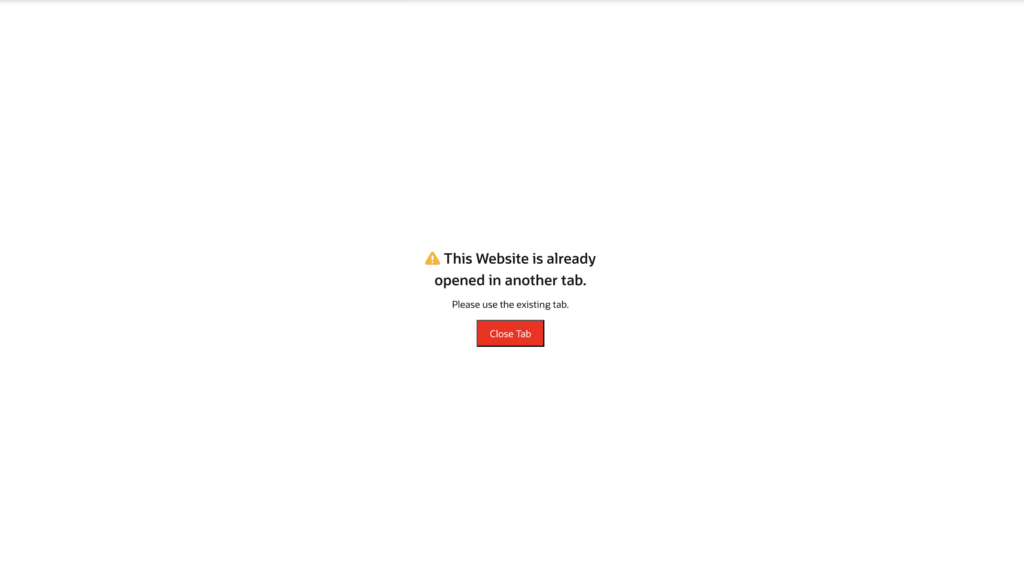
Following the above steps, Prevent the Duplicate Tabs to open in Oracle APEX Using JavaScript automatically when the page loads. This ensures a smoother and more user-friendly experience.
Thanks for reading! We hope this guide helped you implement Prevent Duplicate Tabs to open in Oracle APEX Using JavaScript.

Hi, I’m Ankur Rai, an Oracle APEX Developer with 6+ years of professional experience in building enterprise applications. I specialize in creating scalable and efficient solutions using Oracle APEX, PL/SQL, and SQL to solve real-world business challenges.
I am a 3X Oracle APEX Professional Certified Developer and also an Oracle ACE Associate Member, actively contributing to the Oracle community by sharing knowledge, insights, and best practices. Through my blogs, I aim to help developers learn, grow, and build better Oracle APEX applications together.