1. Introduction
This guide explains how to verify whether a user exists in an LDAP directory using Oracle APEX and PL/SQL.
In some scenarios, you may need to check if a user account is present in the LDAP directory before allowing access or performing specific actions. This document outlines the steps to implement such verification.
2. Technologies Used
- Oracle APEX
- PL/SQL
3. Why This Is Needed
In many enterprise applications, user authentication and validation are managed through LDAP. Before proceeding with login or other operations, it’s often necessary to confirm that the user exists in the LDAP directory.
4. Implementation Steps
Step 1: Create a Function
Write a PL/SQL function to check if a given user exists in the LDAP directory.
create or replace function user validation(p_username IN varchar2, P_userpass IN varchar2)

return number as

L_LDAP_SESSION DBMS_LDAP.SESSION;

L_HOST VARCHAR2(100) :=xxx.com’ ;

L_PORT NUMBER := 389;

L_DN VARCHAR2 (300);

L_RESULT NUMBER;

Begin

L_DN := ‘xxxdomain)’ || p_username;

L_LDAP_SESSION := DBMS_LDAP. INIT (L_HOST, L_PORT) ;

L_RESULT := DBMS_LDAP.SIMPLE_BIND_S(L_LDAP_SESSION, L_DN, P_userpass) ;

RETURN L_RESULT;

END;
Step 2: Call the Function on the Login Page
On your Login Page, create a Process (or call within an existing Function) to validate the user by invoking the LDAP verification function before authenticating.
declare

begin

IF : P9999_USERNAME IS NULL THEN

RAISE_APPLICATION ERROR(-20001, ‘Please enter Username’):

apex_error .add_error (

P_message => ‘Please enter Username’

p_display_location => apex_error.C_inline_in_notification

ELSIF : P9999_PASSWORD IS NULL THEN

RAISE_APPLICATION ERROR(-20001, ‘Please enter Password’);

apex_error. add_error (

P_message => ‘Please enter Password’,

P_display_location => apex_error.c_inline_in_notification

);

ELSIF

user_validation (: P9999_USERNAME, :P9999_PASSWORD) != 1 then

apex_error. add_error (

p_message → ‘INVALID USER OR PASSWORD’,

P_display_location → apex_error.c_inline_in_notification

BEGIN

L_RESULT : =DBMS_LDAP.SIMPLE_BIND_S(L_LDAP_SESSION, L_DN, : P9999_PASSWORD);

COMMIT;

EXCEPTION

WHEN OTHERS THEN

Raise_application_error(-20001,  ‘LDAP Authentication failerd:’ || SQLERRM );

–error_messag := ‘LDAP Authentication failerd:’ || SQLERRM;

END;

DBMS_LDAP. UNBIND(L_LDAP_SESSION) ;

END IF;

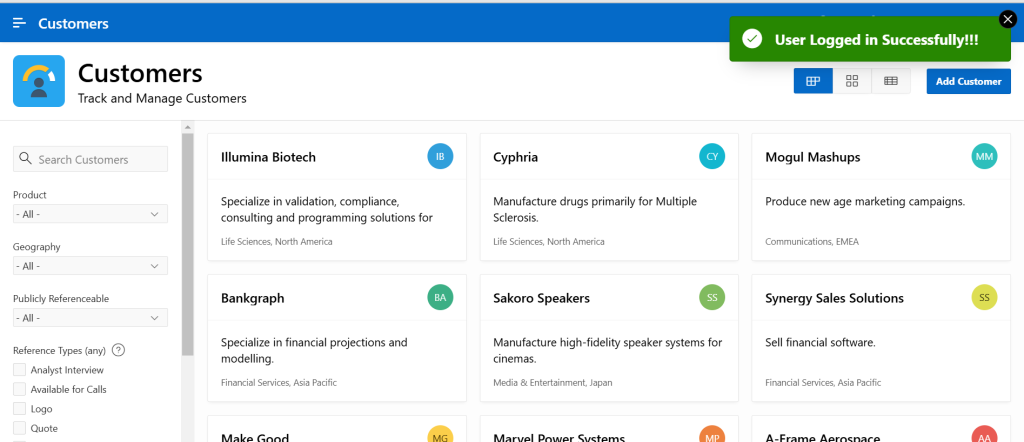
APEX_APPLICATION.G_PRINT_SUCCESS_MESSAGE := ‘User exist in LDAP Directory!’;

end;
Step 3: Create a Dynamic Action on the Global Page
- Navigate to the Global Page (Page 0).
- Create a Dynamic Action with the event set to Page Load.
- Add a True Action → Execute JavaScript Code, and include logic to handle user validation feedback (e.g., showing a message or focusing on a field).
var validPageIds = [“1”, “3”];

var currentPageId = apex.item(‘P0_PAGE_ID’).getValue();

if (validPageIds.includes(currentPageId)) {

    apex.message.setDismissPreferences({

        dismissPageSuccess: true,

        dismissPageSuccessDuration: 10000 // Success message stays for 10 seconds

    });

} else {

    apex.message.setDismissPreferences({

        dismissPageSuccess: true,

        dismissPageSuccessDuration: 2000 // Success message stays for 2 seconds

    });

}
5. Output
After completing the above steps, your application will be able to verify if a user exists in the LDAP directory during login or on page load.
6. Conclusion
Implementing LDAP user verification in Oracle APEX is straightforward and ensures that only valid directory users can proceed. This enhances both security and data integrity in your applications.
Thanks for reading! We hope this guide helped you implement Verify Users from LDAP Directory in Oracle APEX.

Hi, I’m Ankur Rai, an Oracle APEX Developer with 6+ years of professional experience in building enterprise applications. I specialize in creating scalable and efficient solutions using Oracle APEX, PL/SQL, and SQL to solve real-world business challenges.
I am a 3X Oracle APEX Professional Certified Developer and also an Oracle ACE Associate Member, actively contributing to the Oracle community by sharing knowledge, insights, and best practices. Through my blogs, I aim to help developers learn, grow, and build better Oracle APEX applications together.