1. Introduction
Oracle APEX Interactive Grid is a powerful component that allows users to view and edit data directly within the page. However, in many real-world applications, users expect instant feedback when they modify numeric values—such as automatically updating totals or summaries on the same page. By default, Interactive Grids do not provide a built-in way to dynamically calculate and display column totals outside the grid.
In this blog, we will explore how to calculate a dynamic column total from an editable Interactive Grid and display it in a page item using JavaScript and Dynamic Actions, without requiring a page submit or refresh.
In Oracle APEX, there is no direct region type called “Footer”, so we need to design it using static regions + HTML + CSS, and make sure it stays at the bottom of every page.
2. Tools and Technologies
To achieve the desired functionality, the following technologies are used:
- Oracle APEX
- Javascript
3. Business Requirement
In business applications such as HR systems, payroll management, expense tracking, sales orders, or budgeting applications, users frequently update numeric values directly within a grid. The business expects the total value to be visible and updated immediately as changes are made, without saving or reloading the page.
The requirement is to:
✔ Calculate the total of a numeric column (e.g., Salary, Amount, Quantity) from an editable Interactive Grid
✔ Display the total in a page-level item
✔ Update the total in real time when users modify grid values
✔ Automatically calculate the total on page load
Implementing this feature improves user experience, accuracy, and efficiency, allowing users to make informed decisions instantly.
4. Implementation Steps
Step 1: Create an Editable Interactive Grid.
• Create an Interactive Grid based on the EMP table
• Ensure the grid is editable
• Set Static ID of the IG region as:
emp_igStep 2: Hide the Interactive Grid Footer (Optional).
To keep the UI clean (since totals will be shown outside the grid):
- Go to IG Region → Attributes → Initialization JavaScript Function
- Add the following code:
function (config) {
   config.defaultGridViewOptions = { footer: false }; // Hide footer
   return config;
}
Step 3: Create a Region to Display the Total.
- Create a Static Content Region
- Region Name: Display Total
Template Options:
- General → Remove Body Padding ✔
- Header → Hidden but Accessible
- Item Spacing → Slim
- Top Margin → None
- Bottom Margin → None
Step 4: Create a Display Only Page Item.
Create a Display Only item under the Display Total region.
Item Name: PXX_TOTAL_SAL
Set the following properties:
- Settings → Send on Page Submit: Off
- Layout → Column: 9
- Advanced → Warn on Unsaved Changes: Ignore
Step 5: Create Dynamic Action on SAL Column (Change Event).
Dynamic Action Details:
- Event: Change
- Selection Type: Column
- Column: SAL
✅ True Action 1: Set Value
- Action: Set Value
- Set Type: PL/SQL Expression
- PL/SQL Expression:
:SAL- Items to Submit: SAL
- Affected Item(s): PXX_TOTAL_SAL
- Fire on Initialization: Off
✅ True Action 2: Execute JavaScript Code
var model = apex.region("emp_ig")
               .widget()
               .interactiveGrid("getViews", "grid")
               .model;

var n_sal, n_total = 0;
var col_sal = model.getFieldKey("SAL");

// Loop through all rows and calculate total salary
model.forEach(function(igrow) {
   n_sal = parseInt(igrow[col_sal], 10);
   if (!isNaN(n_sal)) {
      n_total += n_sal;
   }
});

console.log(n_total);

// Set the total in page item
$s('PXX_TOTAL_SAL', n_total);- Affected Item(s): PXX_TOTAL_SAL
- Fire on Initialization: Off
🎯 Client-side Condition:
- Type: Item / Column is not null
- Component: Column
- Column: SAL
Step 6: Calculate Total on Page Load
To display the total when the page loads:
- Create another Dynamic Action
- Event: Page Load
- True Action: Execute JavaScript Code
- Code: (Reuse the same JavaScript from Step 5)
- Fire on Initialization: On
- Affected Item(s): PXX_TOTAL_SAL
5. Final Output
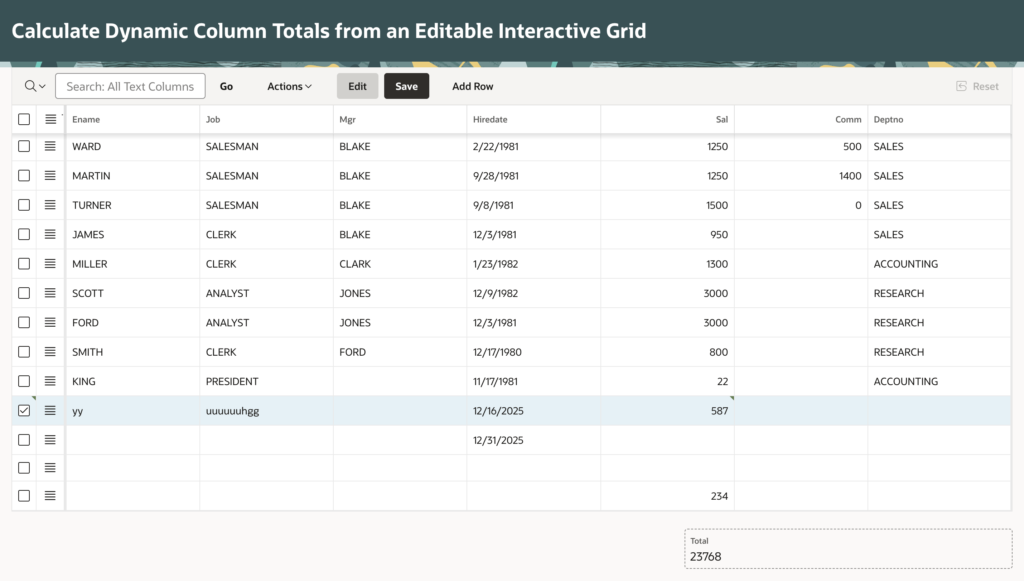
✔ Page-level total updates instantly when salary values change
✔ No page refresh or submit required
✔ Clean UI with footer hidden
✔ Improved user experience and data visibility
🏁 Conclusion
By combining Interactive Grid APIs, Dynamic Actions, and JavaScript, you can easily extend Oracle APEX capabilities to deliver a real-time, responsive UI. This approach is lightweight, efficient, and highly reusable across applications.
Following the above steps, you can Calculate Dynamic Column Totals from an Editable Interactive Grid in Oracle APEX. This ensures a smoother and more user-friendly experience.
Thanks for reading! We hope this guide helped you How to Calculate Dynamic Column Totals from an Editable Interactive Grid in Oracle APEX – Step by Step Guide.
Love coding? Me too! Let’s keep in touch – subscribe to my website for regular chats on Oracle APEX, PL/SQL,SQL JavaScript, and CSS.