1. Introduction
This article explains How to Enable Image Upload Inside the Display Report Execution Time Using #TIMING# in Oracle APEX. The solution is implemented using a combination of Oracle APEX.
2. Tools and Technologies
To achieve the desired functionality, the following technologies are used:
- Oracle APEX
3. Business Requirement
Users frequently access data-heavy reports within the Oracle APEX application. As data volume grows, report loading time becomes a key factor affecting user experience, system transparency, and performance perception.
Currently, users have no visibility into how long a report takes to execute, which can lead to confusion, repeated refresh actions, and unnecessary performance-related support requests.
This document outlines the steps required to implement Display Report Execution Time Using #TIMING# in Oracle APEX.
4. Implementation Steps
Step 1: Go to the Page Designer
Go to the Page designer where you want to Display Report Execution Time in report. Create new Classic report.
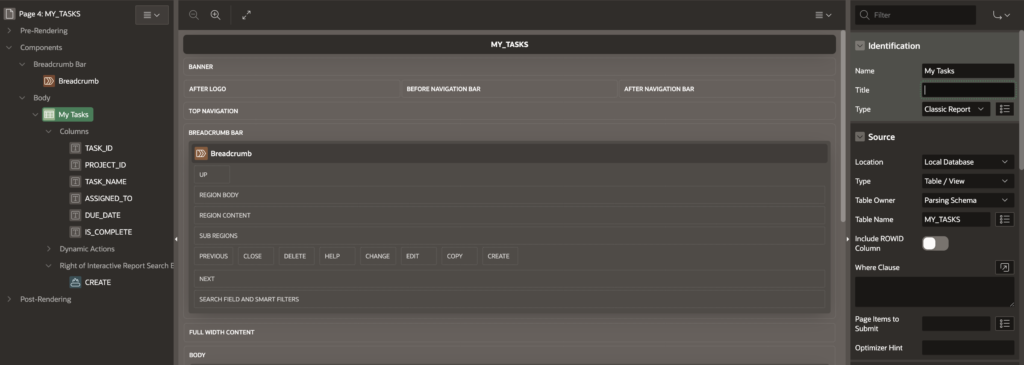
Step 2: Now go to report “Footer Text”
On same report, go to footer text and paste below code.
Fetched #ROWS_FETCHED# rows of #TOTAL_ROWS# in #TIMING# secondsStep 3: Save and Run the page
5. Output
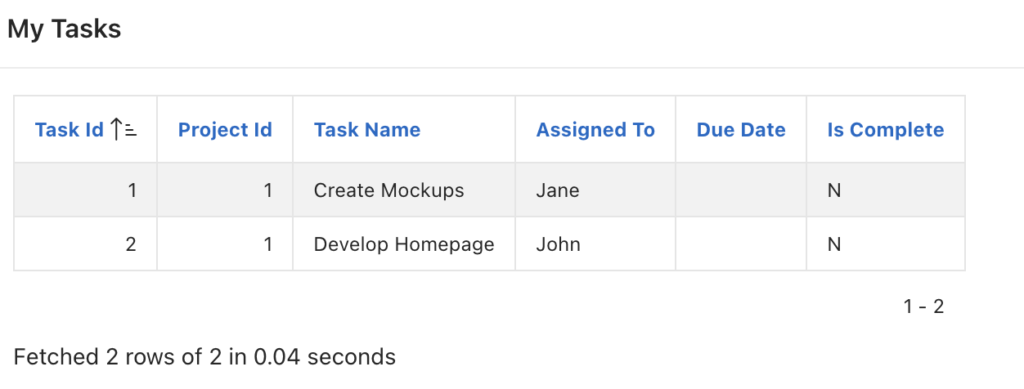
Following the above steps, you can Display Report Execution Time Using #TIMING# in Oracle APEX. This ensures a smoother and more user-friendly experience.
Thanks for reading! We hope this guide helped you to Display Report Execution Time Using #TIMING# in Oracle APEX.
Love coding? Me too! Let’s keep in touch – subscribe to my website for regular chats on Oracle APEX, PL/SQL,SQL JavaScript, and CSS.